
Before I talk about my left-hand setup, it's important to cover a few
other
general setup topics.
Here's how I arrived at my setup for the left hand. The fingers of my
left hand,
left-shifted by one key from a standard "home-row" typing position,
rest naturally
on the left-shift, A, S, D, and spacebar keys:
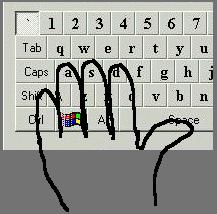
Try it & see; yours should fall on the same keys if you're an Average
Human. FYI, some folks
use layouts that clearly identify them as Extraterrestrials.
What's the goal of a good layout? To be able to move around in all possible
directions while
trichording and pulsing AfterBurner (AB), with a minimum of finger
motion when transitioning
between the various combinations. To understand all the trichording
combinations, just choose
one action from each of the three axis-columns below:
X
Y Z
------ ------ ------
FWD LEFT
UP
FWD+AB RIGHT
DOWN
REV
That yields 12 trichording combinations. Again, it's vital to limit
finger motion - having to
jump off this new "home-row" orientation will only slow you down and
make you an
easier target. So from the natural hand position (red dots), I only
want to move a couple
of fingers up or down...
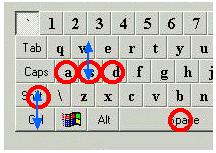
...which maps to these actions:

Now it's time to consider the less-commonly used, but still vital, operations:
banking, flare, cycling primaries & secondaries, and deploying
countermeasures
like proximity mines. Perhaps banking should not be considered
a less-common
function, because it's essential to apply bank when doing quick 180degree
turns,
or when trying to circle-strafe an opponent from above or below.
After I add in these functions, my keymap looks like this:
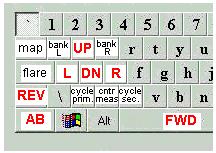
This is what I do. Your mileage may vary. May lead to carpal tunnel
syndrome.
Offer not valid in Wisconsin. :)
Back to Zapped Home
