Keyboard ramping defaults to 0.35. This means that it takes 0.35sec
(350ms)
for D3 to ramp up to "full value" for whatever operation you've requested
by
your key press. Its intent was to give keyboarders more precise control
over
aiming, but it has the unfortunate side-effect of delaying ALL operations,
like
hitting fwd+AfterBurner when trying to evade incoming fire. Set that
puppy to
0.0 & live longer.
Regarding mouse sensitivity, I find X/Y=0.8/0.6 to be a sweet spot for
most
ships, but depending on my mood & fine motor skills du jour I might
lower it
a bit (-0.2) or raise it (+0.2). At lower settings I get easier aiming
but crummy
turning (pivots), and at higher settings my aiming is hopeless although
I can
do a 180-degree turn like nobody's bidness. So my typical range is
0.6/0.4
to 1.0/0.8.
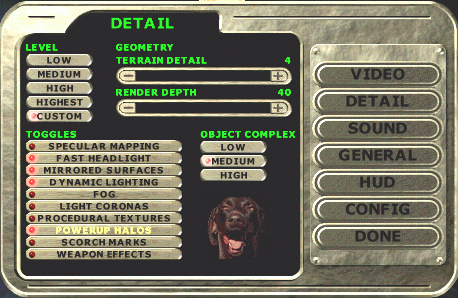
Finally, it's ok to turn off detail to keep your framerate as high as
possible,
but you want to have two things on. Powerup halos help you pick out
the
powerups in a cluttered or dark room, and dynamic lighting lights up
the room
or hallway where weapons are being fired. With dynamic lighting off,
you can't
see that someone's firing in a room just around the corner!
Back to Zapped's D3 Key Configuration
Back to Zapped
Home