
|
|






Hardware: Wireless Systems |
Brief History: When one thinks of wireless Internet access, one usually immediately thinks of laptops and "hot spots" The truth is that since the popularity of cellphones and PDA's that there has been wireless Internet access to a small degree. A lot of cellphones and PDA's allow their users to access email, view websites that have been written in code just for cellphone or PDA use, as well as having instant messaging programs that can be used by the owner. Today, wireless Internet access is growing in popularity in response to the growing number of laptops being sold and the growing change in society that wants to be able to have the amenities of home no matter where they may be at the time. This has lead to the growth and development of what is termed as "hot spots" or terminals that are equiped with modems for Internet access that are also equiped with wireless nic cards that allow anyone with a wireless Internet capable computer to virtually plug into the terminals modem without the need for any wires and then connect to the Internet. How Wireless Access Works: A laptop or any computer equiped with a wireless nic card will send its digital shock/no shock message by sending the message in the form of a radio wave instead of the conventional pulses that a wired computer would have to send. As it stands today these radio messages are governed by one of two response/accept systems. The first style of the system is called CSMA/CA which is a collision avoidance system. The nic card will send out a short message to see if there is any other traffic and if there is then the nic card will not send the whole message and will thus wait for when it gets a response from the modem that it is trying to communicate with that there is no current traffic and that it is ok to send a message at that time. The second style of the system is called RTS/CTS which stands for request to send/clear to send. With this system the main computer sends a message to the modem it wishes to talk to that it requests to send a message, the main computer then waits until it gets a clear to send signal back and then the communication can begin without interruption. Downfalls of Wireless Access: Right now there is the overall standard call number of 802.11 that is a group(s) of people that are coming up with the standards that will govern wireless applications. A big part of this 802.11 standard group is the sub-group called 802.11g which is concerned with the security of this emerging wireless Internet access technology. Since the messages are sent via radio waves between the computer and the receiver in whatever form it may be, weither a router, a modem, or dumb terminal, these radio waves are subject to being hijacked while they are traveling through the air. The other downfalls as of right now is for one the throughput is only rated at 54Mbps and that is actually considered a higher number then what is actually achieveable at this point in time. Another downfall is that radio waves besides being subject to being hijacked are also subject to interference by many sources such as microwaves in the air, satelitte television waves and so on. The last downfall which is becoming less of one as we speak is the lack of outside the house locations to be able to connect with a wireless capable laptop. With more airports, businesses and cities across America unleashing more "hot spots" this downfall will soon be a thing of the past. |
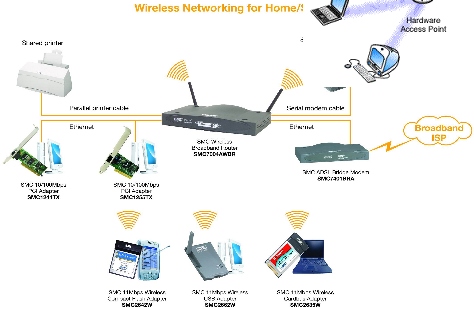
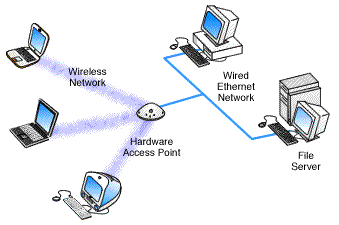
*two examples of how wireless technology can be used |

Click me to take the quiz. |
