

|
||
|
I’m sure you all have heard about the “horrible” W32.Blaster.Worm that has been invading thousands of computers over the past week or so. First off the worm only affects systems running Windows NT, 2000, or XP (both versions). So all of you running Windows 95, 98, and Me are safe. Second thing is that the vulnerability was patched about a month ago by Microsoft. The vulnerability is discussed in this Microsoft security bulletin and there is a patch that needs to be installed. Once the patch is installed the worm will not be able to infect your system. This is why Windows Critical Updates are so important, if users had patched their computers when Microsoft released the patch, the worm would not have spread like this. So please, PLEASE install Windows Updates people!!!
|
||
|
||
|
Getting tired of all of the default sounds Windows makes? Well you can change just about all of them and replace them with any .wav file you want. Just go into control panel, choose sounds (XP: sounds and audio devices, click on the sound tab), click on the event you want and browse to the file you want to change the sound to. |
||
|
||
|
The Google Toolbar is a very useful IE plugin if you do a lot of searching and want a nice popup blocker. The popup blocker is pretty basic, but for the average user it is fine. Another feature is Auto fill which automatically allows you to fill in information with a single click. |
||
|
||
|
Belarc Advisor is a great utility if you want to know more about your system. The program scans your computer and builds an extensive profile of your system’s hardware and software. It lists information about your processor, hard drive(s), motherboard, and even what Windows Hotfixes you have installed. |
||
|
||
|
If your like me and run several IM programs you will realize that
they suck up a lot of system resources.
Trillian allows you to connect to the MSN, AIM, Yahoo, ICQ, and
IRC networks with just one program. Even the average user knows
that one program running in the background is better than five.
There are also many
skins available, which makes the program extremely
customizable. The only drawback to using trillion is that it is
unable to take advantage of streaming and viewing webcams, and voice
chat. But if you just use the programs to chat, it’s a great
replacement. The
Pro version has a few more added features such as 128bit message
encryption and tons of
plug-ins. |
||
|
||
|
If you have ever installed a program or driver that trashed your system you know what it is like to try and get your system back in working order. Windows XP has a great utility for times like these. System Restore lets you roll back the clock and restore your system to a working environment. The tool was first introduced with the release of Windows Me, but was extremely buggy and did not work most of the time, and even trashed your system even more a lot of the time. To access system restore go to start, all programs, accessories, system tools and click on the system restore icon. Once the application is launched simply choose the restore my computer to an earlier time option. The following window shows a calendar, simply choose a date and a restore point at the right and your on your way. |
||
|
||
|
Over the past week I have received several questions about how to remove the W32.Blaster.Worm once infected. First off download this fix tool from Symantec, save it to your desktop so you are able to access it easily. Then reboot your computer into safe mode, press F8 before the windows splash screen, pressing it repeatedly during boot up will make sure you don’t do it too late. Once in safe mode choose you Windows account and run the tool. The tool will detect the worm and its variants and remove the files and registry entries. You want to run the tool in safe mode so that the file is not in use by Windows, making it hard to delete. After the tool is finished reboot the system into Windows and then run the tool again to make sure the files are totally gone, if they aren’t repeat the above steps. Once you are sure the virus is removed make sure you install the patch if you haven’t already. |
||
|
|
||
|
||
|
|
||
|
||
|
Today, I was caught unawares. Whilst casually surfing funny internet pages, I was suddenly alerted by a white screen. Previously on my computer, I have encountered the “blue screen of death”, but never a white one. I was a little perturbed by the sudden appearance of all this whiteness, and sudden disappearance of everything I had previously been viewing on my screen.
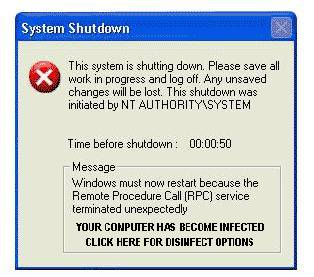
Just as I was starting to get more than a little paranoid, a small box popped up on my screen, which looked like this:
Owing to the fact that I had previously changed my RPC settings according to the advice given regarding the new Worm Virus, it was fair to say that I was becoming more alarmed by the minute. I skimmed over the warning, saw the words “RPC”, “Terminated” and “Infected”, and pretty much freaked out. After making some odd squeaking noises, and pulling some bizarre, albeit amusing, faces, I found my hand reaching for the “off” switch. I pressed it in, held it and waited. Then, I sat and wondered if that was really going to solve my “problem”. So, I switched my computer back on, and chose the “sensible” route – a virus scan.
The virus scan found nothing on my system. I then activated my firewall, and cautiously connected to the internet, whereupon I downloaded a fix tool for the msblaster worm. I ran the fix tool, and again, there was nothing found on my system. Time to consult technical support – that would be Rob!!!
When I approached Rob all panic stricken and such, he tried to stifle his laughter. As he was almost 100% sure that I had been attacked, not by an msblaster worm, but by a much worse internet phenomenon … THE POP-UP AD!!!
Imagine my horror, when I realized that I most definitely had been fooled by a pop-up which was made so realistic by the imitation windows box, and the white screen, with no border, toolbar, or anything! Needless to say, the screen was aglow with colorful language on my part upon realizing my error! And I think it goes without saying, that I won’t be purchasing anything from the originator of said ad!
So, friends, the moral of the story is … be very careful, and don’t believe everything you see on your computer screen!
|
||
|
||
|
If you are looking for something that you can not find in the TidBits here are some great resources: Locker Gnome The Screen Savers Call For Help BootDisk.com Black Viper
|
||
|
||
|
|
||
|
|
||
|
|
||
|
||
|