(Don't forget to save your work often!!) For simpilicitys sake, I am going to work on the doll that I lowered the opacity on. Next add a new layer, and choose an even paler shade of blonde. I chose #FFFFC0. Draw some more lines of hair in the same direction beside those you just drew. If you blurred this, you don't have to worry about this part. Just draw them on.
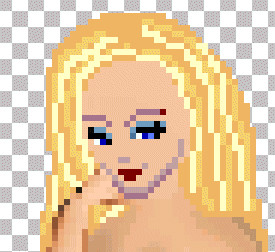 Now lower the opacity of this layer until you're satisfied with it. Don't blur it. It's too light for that. I lowered mine to 33.
  Now turn off your doll layer, and merge all the hair layers together.
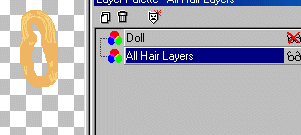 Keep your hair layer active, but you can turn the doll layer back on, if you want. Now take the "Burn Tool" and lightly darken the edges of the hair. I used these settings: Size: 2 Hardness: 9, Opacity: 4, Step:25, Density:100.
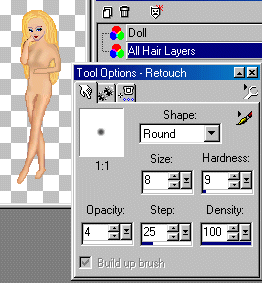 Now merge all layers. And it's time to work on the front of the hair. Take your push brush, and push the hairline down. Use a 1 pixel brush on this and if you mix the colors, that's okay. Just push them around until they look like you want them to. I made a side part, on this one.
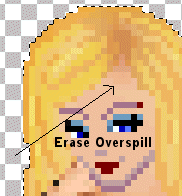
 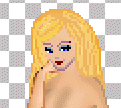 As a general rule, most blondes have a darker area where the hair parts near the roots. Take my word for it, we all have it, but on some it's not as noticeable. I was a hairdresser for years and unless the hair was dyed, the root area was darker. So now that your image is merged, select it by clicking outside the image somewhere, and invert your selection. (Selections, Invert) Add a new layer, and choose a darker, slightly brownish-gold shade of paint. Using your airbrush tool, set the brush size to 3, and paint a line where the part should be. Now blur it, using Gaussian Blur set at 1.99. You can work with this a little. Not all dolls are going to be exactly alike nor the same sizes. Be sure and look closely at the dolls face and erase any overspill of brown paint.
 Almost finished. Merge all layers. And if you want shinier hair, then select your Dodge Tool and draw on some more lights.
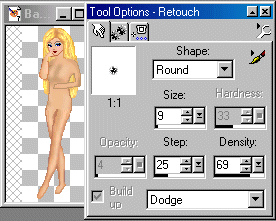
I used these settings: Size: 9, Hardness: 33, Opacity:4, Step:25, Density:69. You can play around with these also. I use a larger brush, so that the highlights don't look like one skinny line somewhere on the hair, but I just barely skim over the places that I want them to go with the brush. Then last, but not least, clean up any extra areas that need it, and there you go...
Almost finished. Merge all layers. And if you want shinier hair, then select your Dodge Tool and draw on some more lights.
I used these settings: Size: 9, Hardness: 33, Opacity:4, Step:25, Density:69. You can play around with these also. I use a larger brush, so that the highlights don't look like one skinny line somewhere on the hair, but I just barely skim over the places that I want them to go with the brush. Then last, but not least, clean up any extra areas that need it, and there you go...
 You now have ....shiny blonde hair.

|