|
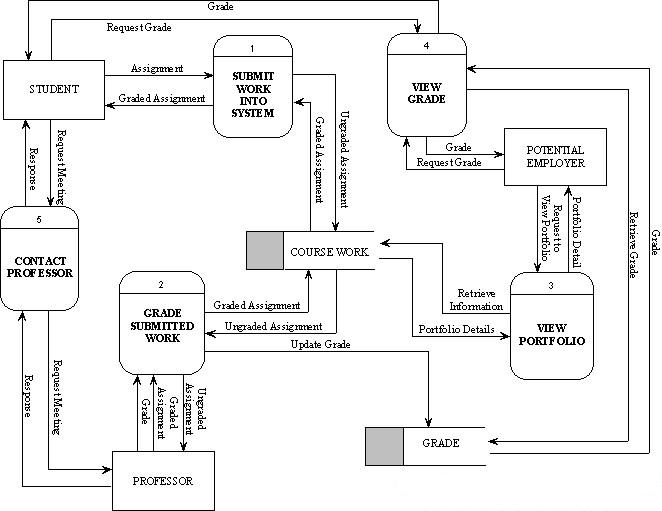
Level 1 shows how the e-Course Portfolio System works in greater
detail.
The first process, “Submit Work into System” is the process that a
student can use to submit his or her assignment, which is placed into a online course work data
store, where all assignments are collected until the due date of the
assignment. Once all the assignments are collected, an electronic
copy is made to keep for storage.
The assignments are then passed to the second process, “Grade Submitted
Work”, which passes the ungraded assignments to the professor. Grade Submitted
Work, can also be used by the professor to send the corrected
assignments, as well as the grade, back to it. The process
will then deposit the marked assignments into the online course work
data store and update the grade data store excel
sheet with the mark.
“View Portfolio” process, is the third process in the system. It can be
used by any potential employer to view the various work completed by a student throughout their
University years. The employer has to make a request and wait for the
system to retrieve the information from the course work
data store, to view the work of a student.
Students, as well as potential employers can use the “View Grade”, to
make a request to obtain grads. The grades are retrieved from the grade data store and sent
to the View Grade process. Both the student and the potential employer
make a request to view the grades. They are then
grated access to view the grade or denied access.
The
fifth process, “Contact Professor”, enables students to communicate
with their professors. A request from a student is sent to the
process, from where it is to be sent to the appropriate professor. The
professor then answers the request and can respond by sending a message back to process
to be delivered back to the
student. |