James Powell, Virginia Polytechnic Institute & State University
Copyright © 1997

Many new Internet trends started out on computers running the UNIX operating system. This complex environment has many problems and associated resources for resolving these problems, which are not available or even needed under less complex operating systems. UNIX machines generally function as servers, that is, they support multiple users accessing resources simultaneously. The job of maintaining or administering a UNIX system is far more difficult than managing the files and resources on a single-user system such as a Macintosh or Windows-based PC. A good deal of that management task involves text processing: moving groups of files, changing passwords, and managing server applications often involving text-based configuration or data files. And since UNIX first evolved as a system to nurture and cater to the needs of software developers, many tools have been developed on this platform to serve both developers and administrators. One such tool is Perl, or the Practical Extraction and Reporting Language.
Perl is an interpreted language. This means that each line of the program is read and processed at the time the program is executed. Other languages such as C or Pascal are first compiled into machine language, the native language of the computer. Compilers can often catch errors while building the executable, while programs written in interpreted languages such as Perl must be run in order to determine whether or not they have errors. Interpreted languages also tend to be somewhat slower than compiled languages since there are actually two programs running: the Perl script and the Perl interpreter.
Most Perl programs start with a line declaring the
location of the Perl interpreter. On UNIX systems, this line
often looks like this:
#!/usr/local/bin/perlPound signs occurring anywhere else in a Perl script tell the interpreter that the data following the symbol is a comment and should be ignored. Comments help other programmers understand what your program is doing, as well as identifying the overall purpose, the author, and other information about your script. You should use comments liberally to explain statements, variables, and functions. They have no impact on the speed of your program and consume only minimal additional disk space.
Every line in a Perl program that instructs the computer
to actually perform a task is called a statement. Statements
should always end with semicolons (;).
Perl statements consist of data structures, functions, variable
assignments, and other operations used to process data. When
all operations are completed, a Perl script should end with an
exit statement declaring whether or not the program completed
successfully:
exit (1); # true, successful completionor
exit (0); # false, something went wrongHere is the basic structure of a Perl script:
  #!/usr/local/bin/perl
  # Name: a_program
  # Author: Jane Doe
  # Usage: type the program name followed by one or more numbers,
  #        e.g. a_program 2 3
  …
  # Perl statements
  …
  exit (0);
Statements can perform any number of tasks in a script. Assignment statements place data such as numbers or strings into variables. Collections of related values can be stored in arrays or associative arrays. While statements are normally processed in the order in which they are listed in the program, control structures can be used to skip or repeat statements as needed. Frequently used statements can be grouped into miniprograms called functions, and assigned a name so they can be referred to without repeating a block of statements over and over again. And most importantly, the statements can request data from the user and display the result of all this work using input/output statements.
So let's find out how to construct Perl statements.
Perl has several data structures. Data structures are variables
that store certain types of data. Unlike many programming
languages, you don't need to declare the type of a data structure
before you use it in Perl. Perl figures out the type when you
first assign a value to a variable. Some data structures do have
a specific syntax, however, which is synonymous with declaring
the type. But first let's look at the most basic data structure:
scalar data. A scalar is one value assigned to one variable.
That value can be a number, a character, or a string of characters.
Scalar variables begin with a dollar sign ($)
and are named with alphanumeric characters. Scalar variable names
can also include underscore characters (_).
Scalar values include any type of numeric data or strings of
alphanumeric data. Strings must be surrounded by single or double
quotes when assigned to a scalar variable. These quotes do not
become part of the value stored in the scalar. Here are some
examples of scalar variables being assigned values:
  $zip_code = 24060;
  $name = "John Doe";
Perl includes a number of operators that can be used to modify or
evaluate the value of a scalar variable. Mathematical operators
such as +, -, and = can be used on numeric
scalar values:
$total = $amount_of_purchase * 4.5;Perl also has C-like increment/decrement operators for numeric scalars that add or subtract one from a value:
$count++;is equivalent to
$count=$count+1;and
$count+=1;String operators such as period (.) can be used to merge, or concatenate two strings together:
$name=$first_name.$last_name;The chop() operator removes the last character in a line. The statements
  $name="John Doe";
  chop($name);
cause the last character in $name to be removed so that $name now contains "John Do".
Comparison operators are used to compare the values
of two scalar variables. For example, you might want to create
a list of people with the last name "Doe", so you would
use a comparison operator to compare each scalar variable to a
string value to decide if the current name is identical to the
name you are looking for:
$last_name eq "Doe"Perl uses different comparison operators for strings and numeric values. If a numeric value is compared to a string using a string comparison operator, then the numeric value is treated as though it were a string during that operation, which might yield unexpected results. Table 27-1 lists the various Perl comparison operators and the string and numeric equivalents.
| Comparison Operator | String | Numeric |
| Equal to | eq | == |
| Not equal to | ne | != |
| Less than | lt | < |
| Greater than | gt | > |
| Less than or equal to | le | <= |
| Greater than or equal to | ge | >= |
Statements utilizing scalar operators are also referred to as expressions. The value of an expression (such as "2+2") is used by other types of Perl language structures to decide whether or not to perform a particular statement. There are other types of scalar operators in Perl such as binary assignment operators. But the operators we have covered so far (math, string, and comparison) are the most commonly used operators in this or any other programming language.
Perl also supports several types of arrays. Arrays
contain sets of data. A simple array might contain a list of
post office boxes or street names. Array names begin with the
at sign (@) to tell Perl this is a set of data and not
just one scalar value. The values to be placed in the array are
comma-separated and enclosed in parentheses:
@streets = ("Jones", "Taylor", "Mason", "Powell");
Individual items stored in an array can be addressed by replacing
the @ sign with a $ sign and then specifying the
item number desired (Perl numbers array items starting with 0) in
square brackets:$streets[2]="Mason";To get two or more values from the array, use the array name with a comma separated list of item numbers in square brackets ([]):
@streets[2,3]; # Mason and Powell
While this might seem confusing, remember that the contents of an array are simply multiple scalar values. So when you only want one, use a scalar version of the name, specified with the $ sign just like other scalar variables, followed of course by the index value in brackets.
An associative array contains pairs of data. Names and phone numbers
might be stored in an associative array, so that if you know a name,
you can get at the person's phone number, and vice versa, provided the
values are stored in alternating order within the array. Associative
arrays are ideal for storing the name/value pairs from Web forms.
Associative array names start with a percent (%) sign:
%phone_list = ("Jane Doe", "555-1244", "John Doe", "555-9987");
What makes associative arrays especially powerful
are the various ways in which the data can be accessed. For example,
to access John Doe's phone number, simply use his name as an item
specifier, or key, to access the other half of the value pair:
$phone_list("John Doe"); # is equivalent to 555-9987
Keys are the odd numbered items within the array.
You can access each pair of items in the associate array with
the foreach control structure (discussed below) and the
keys operator:
  foreach $names (keys %phone_list) {
  # put a name in $names and process statements between curly brackets
  # repeat until you reach the end of the list
      $name=$names; # Jane Doe first time through, John Doe next
      $phone_number=$phone_list($names); # 555-1244, then 555-9987
  }
Other useful operators include values() which accesses the even numbered items in an associative array, and each() which returns a pair consisting of one key (odd-numbered item) and its associated value (even-numbered item).
Statements can be grouped into blocks of statements with curly braces ({}). Statements are grouped when they work together to accomplish a task. Control structures cause statements and blocks of statements to be repeated a certain number of times or to be selectively executed or skipped. Without control structures, a Perl script would be limited to performing each statement only once, in sequence.
All control statements use expressions to selectively
process a statement or block of statements. The if/else
statement pair selectively processes a statement or statement block
one time:
  if ($name="John Doe")
  {
      $wife="Jane Doe";
  } else
  {
      # do something else
  }
if/else statements can be strung together to check
for a number of possible values using elsif:
  if ($street="Mason")
  {
      $turn="left";
  } elsif ($street="Powell")
  {
      $turn="right";
  } else
  {
      $turn="Lost!";
  }
The while and until structures repeat a set
of statements until a certain condition is met. while
performs an action while the expression is true, until
performs a statement block until an expression becomes true:
  while ($name ne "Jane Doe") {
      # perform some statements
  }

  until ($name eq "Jane Doe") {
      # perform some statements
  }
The for structure performs an action a specified number
of times. It includes an assignment statement, a conditional
expression, and an increment statement:
  for ($count=0; $count<10; $count++) {
      # do something ten times
  }
Finally, as demonstrated previously, foreach works its way through a set of values stored in an associative array.
There would be little point to all this work if we could not interact with the program and get results from it. Perl treats all input and output as though it were interacting with files. If the output file is not declared, then output is sent wherever the program's standard output is directed. If you are running the program from a command line, this means it is displayed in the window from which the program was started. If the Perl program is a CGI script, then the standard output is grabbed by the Web server and returned to the Web browser. Data delivered to the program from this location will be found in a "file" called <STDIN>, or standard input.
One of the most confusing aspects of Perl is the special variables
it uses. File input and output usually involves one of these
special variables, $_, which contains the current line
retrieved from an input source. Consider this statement block that
reads several lines from stdin and sends each back to stdout:
  while (<STDIN>) { # when the end of the data
                    # is reached, this returns false
      print $_; # send the current line from standard in,
                # stored in $_ to standard out
  }
This statement block has the effect of echoing data typed in back to
the screen, if stdin and stdout are both in the same window. Files
can be accessed for input by specifying them on the command line
with the script name. The data in the file is accessed using
while(<>) instead of <STDIN>.
<> is a shortcut to explicitly opening a file and
assigning a variable name called a file handle to it, in order to
retrieve data:
  open (phone_list, "phone_list.txt");
  while (<phone_list>) {
      # each line is placed, one per loop in $_
  }
Perl output is performed with the print and printf
statements. The print statement sends a quoted string or
set of strings to a file or to stdout. If a file is specified, it
must be opened using single or double greater than signs which mean
open and replace contents, or open and append to contents,
respectively:
  open (phone_list, ">phone_list.txt"); # notice >, this means open and
                                        # replace the contents
  print "hello, world"; # print one string to standard out
  print ("hello, ", "world"); print a pair of strings to standard out
  print phone_list "hello, world"; # print a string to the file opened
                                   # with the filehandle phone_list
The printf statement allows you to perform formatted output, just like the C programming language statement of the same name.
Functions, also referred to as subroutines, are blocks
of statements that can be referred to by name as needed in the
main program. The statement block is declared with sub
followed by the name and the statements to be executed:
  sub counter {
      for ($count=0; $count<10; $count++) {
          # count to ten
      }
  }
Functions can be declared anywhere in the program
but it is best to group them at the beginning or end of the program,
to avoid confusion and make them easier to keep track of. When
a function is needed, simply refer to it by name using a statement
like this, beginning with an ampersand (&):
&counter; # counts to ten
Functions can access variables declared in the main
program, but sometimes you may wish to pass values to the function
as arguments. Arguments are listed after the function name in
parentheses when it is called:
&counter($start, $end);Arguments are also accessed from another strangely named array called @_. The function counter can find these two arguments in $_[0] and $_[1]:
  sub counter {
      for ($counter=$_[0]; $count<$_[1]; $count++)
        # count from the value assigned to start, $_[0], to the value
        # assigned to $end, $_[1]
      }
  }
Functions can have their own "private" variables. They must be declared at the beginning of the function using the local() operator:
  sub counter {
      local($counter); # $counter is only visible inside the function's statement block
Functions can return values. The value of the last
expression in the function is returned to the main program. So
a scalar can be assigned to a function name to access it:
  $counted_to = &counter($start, $end); # would be assigned the
                                        # value of $_[1] ($end)
Finally, functions can be stored in separate files.
You might want to do this if you have a set of functions that
perform a specific task (such as tagging text with HTML tags)
that you will want to use in more than one Perl program. You
can call these functions just like functions you declare in your
script, but first you must tell your script to use the function
library:
require "/usr/local/sources/cgi-lib.pl"; # might contain a few or dozens of functions
Data transformation involves the process of extracting
and converting single characters and character strings into other
characters or strings. Character replacement is performed with
the transliteration (tr), and substitute (s)
operators. Substitution replaces one character (following the
first forward slash) with another (following the second forward
slash):
  $phone="540-555-5010";
  $phone=~ s/-/./;
The first line assigns a phone number to the scalar variable $phone. The second line tells the substitute operator to process the $phone variable, indicated by the tilde (~), substituting periods (.) for each dash (-) it finds.
The transliteration operator performs the same function
on a range of letters. Here all capital letters are replaced
with lower case letters in a string:
  $name="JANE DOE";
  $name=~ tr/A-Z/a-z/;
Ever more complex search-and-replace strings can be constructed with regular expressions. An entire book could be devoted to the topic of regular expressions. Basically, they are a set of pattern matching commands that can be combined with strings of characters to locate specific strings or match character patterns. They can be used with assignment statements, conditional structures, and character transformation operators to examine and modify the contents of a string. The transliteration and substitution examples above both use regular expressions to identify a character /-/./ or a range of characters /A-Z/a-z/. Regular expressions are most commonly used in CGI scripts to "unescape" form content as in the following form parsing function:
Perl source for the CGI form parsing library: cgi-lib.pl
In Chapter 8, the forms project was a simple quiz on the Malay language. We can use a CGI script written in Perl to "grade" the responses to the test questions. Here's the Perl source for the grading program (score-test); note the use of cgi-lib.pl to extract name/value pairs from the form data:
Perl source for the Malay quiz grading program: score-test.pl
Regular expressions are a powerful feature of Perl. If you find that you need to perform a lot of string or character pattern matching, you may want to consult a text devoted exclusively to Perl.
Perl has data transformation operators for locating
and extracting substrings from alphanumeric strings of characters.
The index() and rindex() operators locate the
left-most and right-most occurrence of a string, respectively, and
return a numeric value that corresponds to the position of the
first letter of that string, its index value:
  $names="Jane Doe John Doe";
  $leftmost=index($names, "Doe"); # returns 5
  $rightmost=rindex($names, "Doe"); # returns 14
If the string is not found, index returns -1. It does not return 0
(which is normally the value used for "false"), since
it is possible for the substring to start in the first position
in the string, which is 0. Substrings can be extracted from a
string using the substr() operator, by providing the string
variable name, and the start point and length of the string you wish
to extract:
  $names="Jane Doe John Doe";
  $leftmost=index($names, "Doe");
  $last=substr($names, $leftmost, 3);
There are more operators and language structures, but we've covered most of the Perl language features you will use when writing CGI scripts.
While Perl is fairly easy to learn, particularly for individuals with some programming experience, it is also quite powerful. To demonstrate the potential of Perl combined with Web forms, here is a simple VRML (Virtual Reality Modeling Language) editor. VRML is a text-based language for describing three-dimensional objects and worlds. These documents are delivered by Web servers to VRML-capable browsers. VRML is discussed in some detail in Chapters 33 and 34. This editor allows users to create basic shapes: spheres, cones, or cubes in various sizes by selecting options and providing dimensions using this HTML form:
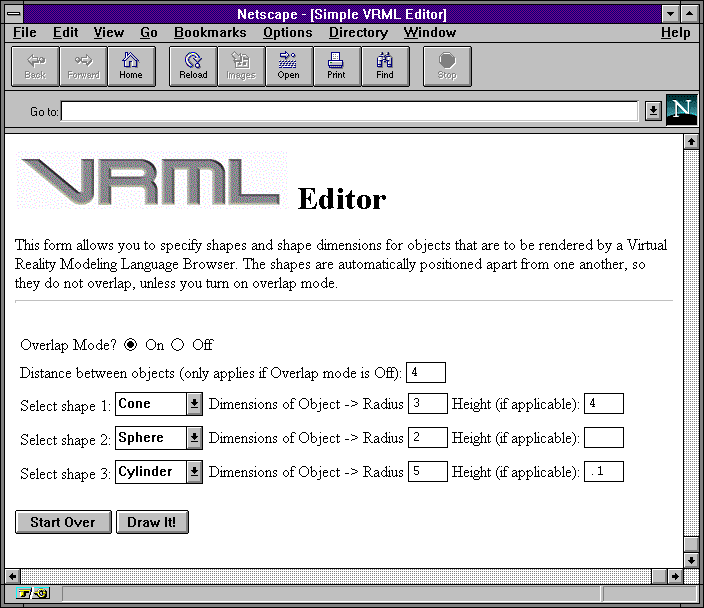
HTML source for the simple VRML editor form: vrmlform.html
The script has to deal with several input fields from an HTML form, so it calls cgi-lib.pl (from earlier in this chapter) to unescape the data and convert it into name/value pairs. It creates VRML code for up to three 3-D shapes (See Chapters 33-34 for more information about VRML).
Perl source for the simple VRML editor: vrml-edit.pl
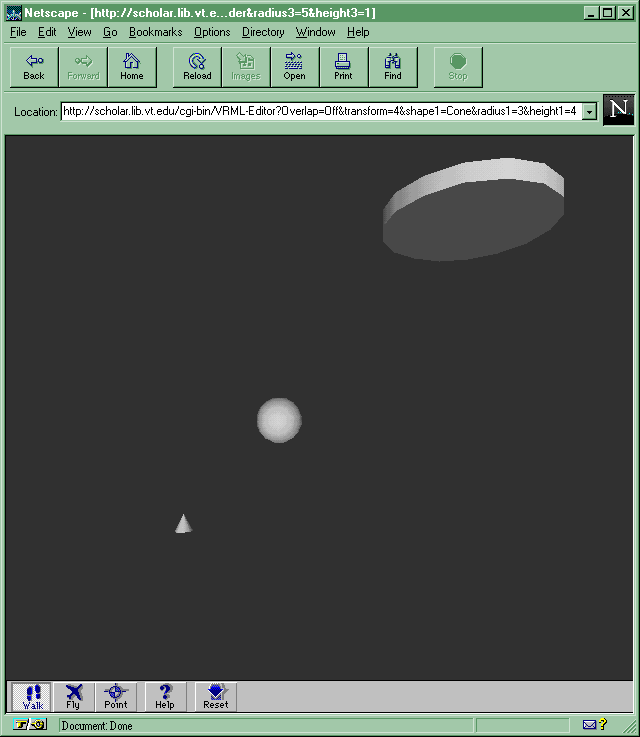
A VRML document (MIME type x-world/x-vrml) is generated and returned by the CGI script. When the Web browser sees the VRML Content-type, it passes the data on to a VRML browser: