
HOTAS
Using Realistic F-16 Falcon Switchology SetBy The 808th Composite Fighter Wing Pilot Staff Development Aerial War College (PSD-AWC) ©
Programmers
|
F-16 FLCS/TQS(w/TRACK BALL)/ RCS Michael "Spooky" Scott F-22 Pro/TQS/RCS Christopher "Bones" Bonner |
UPDATED: 12.12.99 [Update 12.12.99]Just added a Y2k Cockpit just joking... I have updated the 1024x768 cocpits. Made Props to Sno To Snoop Dog and his art work. He maid it good I just made it better also I have added the font fix and the proper amber buttons. -BonesDownload F-16 Block50 AMBER Cocpit 1024x768 Version 10.24a
[Update 9.13.99] Wow its been months since this site was updatd but here come a big one.
Words About This These Stick Setups:
Our stick set-ups represent a "simulated accuracy " approach to programming both the F22 Pro, F-16 FLCS, and TQS. Our goal is to provide the same switchology and functionally found in the jet. This means that our stick set-ups Simulate the pilot systems management and Approximate the functionally of the switchology found in the Jet.
We like to point out this FACT that not all of the pilots workload is confined to the HOTAS. There are plenty of times when you have to use the ICP and the OSBs to input data into the system. These Stick Setups follow that workload methodology.
We keep it Real, we keep it Simple
Our concept to stick programming is to make it as real as possible. We try to keep true to the Jet. This means that we don't have every possible key that exist, in the stick setup. This reduces the chances of Helmet Fire Blaze Ups and Complete Cerebellum shutdown.
Download F-16 Spec Falcon4 Setup For The F22/TQS Version 1.03 Download F-16 Spec Falcon4 Setup For The F16/TQS Version 1.03How Do We Know Our Stick Set Up Is Close To Real?
Unlike many stick setup out there, these stick files have been based on UNCLASSIFIED infomation gained from flying the F-16 UTD. This Version of the stick set up HAS BEEN CERTIFIED By A Real F-16 Instructor Pilot for UNCLASSIFIED accuracy
We Must point out that some of the functionally of certain systems are
CLASSIFIED and can not be verified as accurate. Also Falcon 4.0 v1.0-v1.3 is not simulating ever function that exist in the jet. So switches on DMS TMS and CMS are set up as a "Best Guess" of what might be there. Have Fun, IF you have any questions or problemsEmail: The War College Staff
USPT@xoommail.comEach of these switches is described in the appropriate throttle/stick paragraphs below some of these switches are multipurpose and their function at any one time depends upon such variables as master mode, AG weapons delivery mode/ (SOI), And Pinky In Or Out.
F22/F-16 FLCS [F-16 Switchology Set]
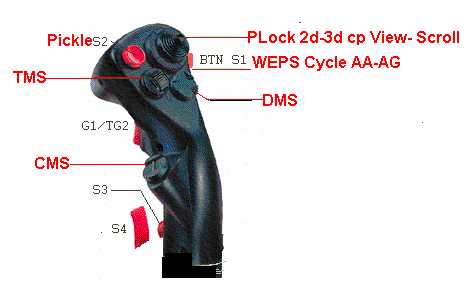
For Use With Falcon v1.00-1.03`
The FLCS Break Down Of TRIM HAT TMS DMC CMS
How to use this table and Color Codes
|
: Red = |
The Switch On The Stick |
|
Green = |
The Position Of The Dogfight Switch |
|
Gray = |
The Movement Of The Switch |
|
Light Blue = |
Button S3 Not Pushed In |
|
Yellow = |
Button S3 Pushed In |
|
White = |
Modes When Dogfight Switch is Up or Down Only |
|
Purple = |
Modes When Dogfight Switch Is In the Middle Position |
|
TRIM HAT Button |
All Modes |
Fwd -OUT/IN |
Looks UP 2D-3D /Padlocks |
|
All Modes |
Aft -OUT/IN |
Looks DWN 2D-3D /Glance FWD |
|
|
All Modes |
Left –OUT/IN |
Looks LFT 2D-3D /Return to 2D Cockpit |
|
|
All Modes |
Right -OUT/IN |
Looks RGT 2D-3D /Return to 3D Cockpit |
|
|
Pickle S2 |
All Modes |
IN /OUT |
Consent to weapon release /ACMI ON |
|
Target Management |
All Modes |
Fwd- OUT/IN |
TGT Designate/ LOCK TGT ON NOSEReturn To Search /ACM BORESITELOCK PREV TGT/ ACM VERT Sub mode/ 30x20 TGLLOCK NEXT TGT/ ACM SLEW |
|
All Modes |
Aft- OUT/IN |
||
|
All Modes |
Left –OUT/IN |
||
|
All Modes |
Right -OUT/IN |
||
|
Display Management |
U/ M/D |
Fwd - |
Cycle A2A Radar Modes/ Cycle A2A Radar ModesCycle AA-AG Radar Sub Modes /BARSCN[FRZ GM]Cycle Left MFD Page /Radar Gain -Cycle Right MFD Page /Radar Gain + |
|
U/ M/D |
Aft -OUT/IN |
||
|
All Modes |
Left –OUT/IN |
||
|
All Modes |
Right -OUT/IN |
||
|
Countermeasures Management |
All Modes |
Fwd -OUT/IN |
ECM ON-OFF /RADAR ON-OFFAUTO Flares-Chaff /TSW SEARCHCHAFF Dispense /TWS PriorityFLARE Dispense /TWS TGT SEP |
|
All Modes |
Aft -OUT/IN |
||
|
All Modes |
Left –OUT/IN |
||
|
All Modes |
Right -OUT/IN |
Display Management Switch INFO
|
DMS UP Dogfight Switch In Both Dogfight and MRM mode DMS UP Cycle A2A Radar Modes Dogfight Switch Middle [Pinky Out] Cycles A2G Radar Modes [Pinky In] Change GM FOV |
DMS BACK Dogfight Switch In Both Dogfight and MRM mode DMS BACK [PO] Cycle A2A Radar Sub Modes [PI] BARS SCAN Dogfight Switch Middle [PO] Cycles A2G Radar Sub Modes [PI] FRZ GM Radar |
DMS ALL MODES LEFT and RIGHT DMS [PO] Cycle MFD Pages Left and Right Respectively [PI] Radar Gain Increase /Decrease Left and Right Respectively |
Target Management Switch INFO
|
TMS ALL MODES UP TMS [PO] TGT Designate [PI] LOCK TGT ON NOSE |
TMS ALL MODES BACK TMS [PO] Return To Search [PI] ACM BORESITE |
TMS ALL MODES LEFT TMS [PO] LOCK PREV TGT [PI] ACM VERT Sub mode/ 30x20 Toggle |
TMS ALL MODES RIGHT TMS [PO] LOCK NEXT TGT [PI] ACM SLEW |
Countermeasures Management Switch INFO
|
CMS ALL MODES UP CMS [PO] ECM ON-OFF [PI] RADAR ON-OFF |
CMS ALL MODES BACK CMS [PO] AUTO Flares-Chaff [PI]TSW SEARCH |
CMS ALL MODES LEFT CMS [PO] CHAFF Dispense [PI] TWS Priority |
CMS ALL MODES RIGHT CMS [PO] FLARE Dispense [PI] TWS TGT SEP |
Stuff On The STICK
:S4= Autopilot/Wheel Brakes
S3= Is the PINKY KEY In or Out it Enables Sub Functions
S2= Drop Weapons/ ACMI CAM ON OF
S1= Cycle A2A Weps and A2G Weps( MSL STEP)
HAT 1 TRIM = Views + Padlock
HAT 2 TMS =Target Management Switch
HAT 3 DMS =Display Management Switch
HAT 4.CMS=Countermeasures Management Switch
F-16 TQS [F-16 Switchology Set]
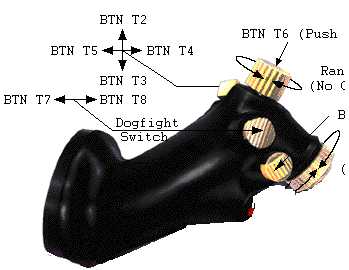
1. UHF VHF Transmit Switch (COMMS SET)
2. MAN RNG/UNCAGE Knob/Switch
3. ANT ELEV Knob
4. DOG FIGHT
5. SPD BRK Switch
6. RDR CURSOR/ENABLE Switch
Dogfight/Missile Override (DOGFIGHT/Missile Override) Switch
[Up/Middle/Down]|
DOGFIGHT/Missile Override is a three-position switch hat overrides The DOGFIGHT (outboard) UP Puts the Systems in to Dogfight this provides cues and solutions on the HUD for both 20mm gun firing and air-to-air missile delivery. |
|
When DOGFIGHT or missile override is selected, request for master mode changes for MRM but any air-to-air radar mode and air-to-air missile can be selected when switched to this positions. |
|
If the switch is in the center position, the last selected master mode is returned. |
Manual Range/Uncage/Gain (MAN RNG/UNCAGE) Control
[LEFT RIGHT PUSH IN]|
When Dogfight Switch is set to Up and Down the RNG/UNCAGE Button will UNCAGE the Seeker if the AIM9 is Called up |
|
When Dogfight is set to Middle [and S3 is Out] Pressing UNCAGE will Change the SOI FOV [S3 IN] Will Change the MAV FOV. |
|
Turning The Knob Left Or Right Will Change The Radar Scan Range In Both Air To Air and Air To Ground Radar Modes |
Antenna Elevation (ANT ELEV) Knob
[Rotating]|
The ANT ELEV knob is used to manually set the radar antenna elevation angle. Rotating the knob counter clockwise (backward) from the detented center causes the antenna scan center to move upward in elevation to a maximum of +60 degrees. Rotating the knob clockwise causes downward scan center movement to a maximum of 60 degrees. The ANT ELEV knob may also be used to position the antenna elevation in air to air search modes |
Cursor/Enable (CURSOR/ENABLE) Control
[Left Right FWD AFT]|
The CURSOR/ENABLE control is a three-axis (X-Y-Z) switch. The CURSOR (X-Y) axis allows you to slew the radar cursors. |
|
In Boresite Mode You Can Use it to Slew the EO weapon video, |
|
The ENABLE (Z) axis is used for similar functions depending on the mode. Depressing the CURSOR/ENABLE switch will Cycle FCC Sub Modes for the Selected A2A and A2G Modes |
|
When Air to Grounds Stores like AGM-65 or GBUs. Are selected Pressing the cursor switch will cycle through the BORE/SLAVE option. |
This Document is property of the 808th Composite Fighter Wings (PSD-AWC) Program ©
