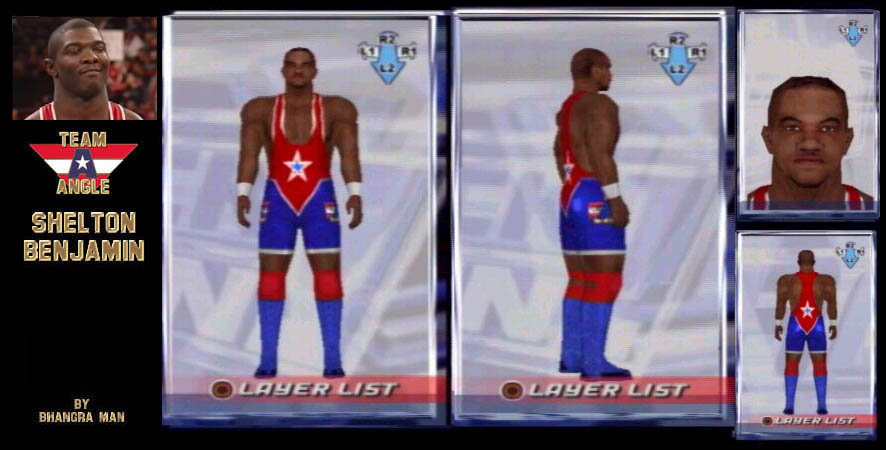
Shelton Benjamin
Credit:BHANGRA MAN
Skin color:6 : C(-90,-72), S(14)
BASE MODEL : Normal
1.)Skin :2
2.)Cheeks Face Edit: 2, Face Model:12
Eyebrows: (-11,-10)
Eyes(36,-4),(-26,-77)
Nose(28,7), (-47,1)
Cheeks: 95
Mouth: 50,27
Jaw(-42,54),-32
3.)Eyes :9, C(41,-41)
4.)Eyebrows: 61, C(-88,-80)
5.)Hair:23, C(-95,-79)
6.)Default Underwear
7.) Face accessories: 64, T(31), C(-92,-72), S(11)
8.)Design>Letters>Face>Sign> 4th coloumn , sixth row, T(-21),C(-83, -64), S(4) place between eyebrows
9.) Design>Letters>Face>Sign> 4th coloumn , sixth row, T(-21),C(-83, -64), S(4) place between eyebrows below previous
10.)Design>Letters>Face>Sign>5th row, first coloumn, T(-35),C(-93,-100)
place below the nose this is the tiny moustache he has
11.) Design>Letters>Face>Sign> 4th coloumn , sixth row,reduce 1*. C(-89,-45),S(-35) place on side of the nose before the nostrils are, iam trying to lightem up the nose outline
12.) Design>Letters>Face>Sign> 4th coloumn , sixth row,reduce 1*. C(-89,-45),S(-35), place on other side of nose
13.)Face accessories: 1, T(-48), C(-96,1), S(74)
*Note: 1: put the custume on first and then put these flag patterns over the straps at the top of custume in front view. Then move the layers around in this order. This will give the straps a white lining
START AT LAYER 20, THEN WORK THROUGH 14 TO 19 THEN MOVE THE LAYERS AROUND IN THE FOLLOWING ORDER. THEN RESUME AT LAYER 21
Note: 2:When I say strap this is the part in pic where there is a white lining at the top of custome
14.)Design>Patterns> Body>Flags: 30, reduce 3*, rotate 1*, C(97,100), S(-100)
put this as high possible where the left strap begins
15.) Design>Patterns> Body>Flags: 30, reduce 3*, rotate 1*, C(97,100), S(-100)
place to connect with previous piece
16.) Design>Patterns> Body>Flags: 30, reduce 3*, rotate 1*, C(97,100), S(-100)
place to connect with previous piece
*Now repeat above for right strap
17.) Repeat as layer 14 but for right strap
18.) Same as layer 15but for right strap
19.) Same as layer 16 but for right strap
20.)Body>Custome>Others: 10, C(-97,30), S(22)
21.)Legs>Tights> Blank:8, L(-74),C(20,100,-100)
22.) Legs>Tights> Blank:8, L(-80), C(29,64),S(64)
23.) Design>Pattern>Body>Simple pattern: 139, C(-98,100), S(-100) place in middle of chest almost as high possible but make sure it stays on top
24.) Design>Pattern>Body>Simple pattern: 139, C(-97,3), S(65) place over the white diamond and place so that there is a white lining at the bottom of this piece
25.) ,
26.) Use the same method of layers 23 and 24 but on back place so that the triangles go over the blue tights as seen in pic
27.)Arms: wristand:Blank:1; L(-75),C(23,-3),S(-100)
28.)Legs kneepads:Blank:2, C(100,45),S(6)
29.)Feet> Shoes: Blank: 13, L(-28) , C(30,-37),S(70)
30.)Design>Body> Simple pattern>161, C(-100,100), S(-83), reduce 1*, Place on chest in middle of the red area as seen in pic
31.) Design>Body> Simple pattern>161, C(-100,100), S(-83), reduce 1*, Place back as seen in pic
32.) Design>Body> Simple pattern>156, C(19,74), S(28) place in middle of white star on front
33.) Design>Body> Simple pattern>156, C(19,74), S(28) place in middle of white star on back
34.) Design>Body> Flags>30, reduce 2*, place on side of right leg in middle of blue area see pic
35.)Design> Body>WWE pattern: 1, C(-84,20) reduce 1* place over the flag
36.) Design> Letters>Alphabet: A. reduce 1* put this in middle of previous patterm; now the team Angle log is done on the right leg
37.)same as layer 34 but on left leg
38.)same as layer 35 but on left leg
39.)same as layer 36 but on left leg
Head(-38) , (33)
Neck(-13,-29),(60)
Chest(33,-12)
Shoulder(-87,-40),(-12)
Abdomen(-3,-23),36
Arms(-4,3) ,-100
Forearms(-9,-23),-94
Hands(-89,-12),-39
Waist(25,-39)
Thighs(0,21), -27
Legs(-8,-18),-6
Ankles(-47,-36)
Height: 6'3"