|
Author: cmort@sun.com

       Date: 11/8/2002
Special thanks to: emily.xu@sun.com, don.bowen@sun.com, bhavna.bhatnagar@sun.com,
and
the 6.0 doc team
Overview
As
described by the core OASIS specification,
"The Security Assertion Markup Language (SAML) is an XML-based framework
for exchanging security information. This security information is expressed
in the form of assertions about subjects, where a subject is an entity (either
human or computer) that has an identity in some security domain. Assertions
can convey information about authentication acts performed by subjects, attributes
of subjects, and authorization decisions about whether subjects are allowed
to access certain resources."
Simply stated, SAML provides a standardized means for identity authorities to issue security related statements about an identity. SAML also defines an XML based protocol for request, and response of SAML assertions, so that there may be standardization of the client/server communication of these statements. SAML does not attempt to address implementation of identity systems/authorities, nor make assumptions about their underlying architecture...it is meant to be a means of message exchange about identity between collaborating heterogeneous systems. SAML is all about message exchange, but generally tries to focus on the composition of the message exchange, rather than the detailed logistics of the exchange itself.
The SAML Browser Profile
The exception to this statement
is the SAML bindings document. Here, the SAML standard dives into the
logistics of SAML message exchange, with the purpose of both providing an
example protocol binding, and solving a discreet business problem....Single
Sign-On (SSO) between two SAML enabled entities. In this document, the
committee choose to provide bindings for SOAP over HTTP, and also use this
binding when defining the necessary steps for web browser based SSO.
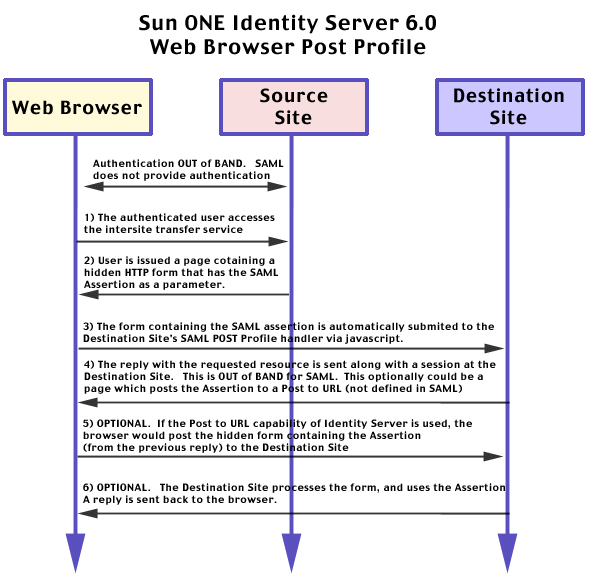
This SSO use case is defined as the "Browser Profile", and has two forms
1) Artifact based, which uses a one time nonce, plus back channel SOAP requests
between the source and destination site, and 2) the POST (as in the HTTP
operation) profile, which directly POSTs an assertion between the source and
destination. In parallel to the illustration of these profiles, the
Bindings document addresses the corresponding security threats and counter
measures.
SAML - Looking beyond
the messages
Through the bindings document, the SAML specification committee developed
a concrete demonstration of how one might transport SAML messages, and use
this to solve a common business need. This should help enable SAML
to become a successful standard, and can be generally credited to A) an experienced
committee, with a number of members having performed successful protocol/standard
work, and B) OASIS's somewhat unique approach of fostering the partnership
of both end-user and vendor participation. This co-operative standards
process helps make sure that the resulting work is applicable across a broad
range of end-user needs and use-cases.
While
the specification did include business and educational end-user input, it
did not attempt to dictate business process or collaboration. This
is an important facet of understanding SAML - just as it does not attempt
to dictate the technical implementation of identity authorities, it does not
attempt to dictate the content or interpretation of SAML assertions.
While the assertions have structure and format, the exact content they contain
is not defined nor standardized...at least beyond the abstract. Hence,
the interpretation of a message is left to the consumer of that message,
and is generally predicated upon some existing agreement/relationship between
the 2 parties. For instance, the definition of a Gold membership group
is certainly not universally understood nor applicable to all organizations.
Co-operating parties would need to agree upon the definition of a
gold membership group, and agree to respect assertions about members of that
group before a SAML assertion containing that information would be effective/useful.
Indeed, SSO with SAML is not possible without a good deal of co-operation
between the parties involved. Both technical configuration, and message
content/interpretation need to be agreed upon and implemented before SSO
can be successfully achieved. This document will attempt to demonstrate
the basics of making this happen.
SAML - a quick
note on what not to expect.
SAML is not a new form of authentication...it merely provides a means of asserting information about other types of previously occurring authentication. While a party may choose to respect an authentication assertion as a valid, that is merely interpretation of a previous authentication event in the context of an agreement between the exchanging parties. SAML asserts authentication, and that assertion may provide functionality based upon trust and liability...but it is not Authentication.
SAML is not an alternative to WS-Security, or a security framework for web services. Simply because it is XML based does not mean it can be used as a security model for web-services. It may prove useful in WS-Security, as it has in Liberty, but it is not competitive or analogous.
SAML
is not limited to web browser applications, legacy applications, or web services
security. SAML defines security message exchange. Systems have
been exchanging messages since long before the architecture-du-jour and SAML
is flexible enough to be used in many types of applicaitons and architectures.
The web browser profiles is merely one application of SAML to a specific
common use case.
Configuring SAML for the Web Browser Profile in the Identity Server
This attribute contains a list of entries. You will generally have one multi-part entry for each server you want to act as a SAML authority. Each entry contains the following:
- instanceID: This is how a server looks up the other values from this table. For instance, when a SiteID is needed for an artifact, the server creating the artifact can discover its SiteID by looking it up in the list.
- siteid: SiteID is a base64 encoded SHA-1 hash of the Instance ID. It is used for identification of the server between sites. For instance, the web artifact will include the SHA-1 hash decoded from the SiteID. This will be used to lookup the Site in a Trusted Partner Sites at the site which receives the artifact. A new siteID can be generated using the following:
java -cp .:./am_services.jar:./am_sdk.jar com.sun.identity.saml.common.SAMLSiteID test
- issuerName: This is an identifying URL for the issuer of the SAML Assertion. This should correspond to the domain name of the server which will issue the assertion, or optionally the virtual name of a loadbalanced set of servers.
The default value of SiteID and Issuer Name will be assigned during Identity Server installation. The format is as follows:Sign Request:
instanceID=<protocol://servername:port>|siteid=<base 64 encoded 20 byte sequence>|issuerName=<default value is servername:port>
When acting as a SAML client, the SAML services can optionally digitally sign requests. This helps prevent man in the middle attacks and attacks which might attempt to divert a response by intercepting and modifying the content of the request.Sign Response:
When acting as a Assertion Authority, the SAML services can optionally digitally sign responses to prevent modification of the response. When using the SAML Post Profile, Assertions are always signed, as the profile would easily allow tampering if message integrity were not insured.Sign Assertion:
When acting as a Assertion Authority, the SAML services can optionally digitally sign assertions to insure that the assertion that is delivered can be verified as the one that was issued.Artifact Name:
The SAML Bindings document specifies this value as SAMLart. It is used in a re-direct URL during the artifact profile as the name of the artifact parameter. You should not need to modify this.Target Specifier:
The SAML Bindings document specifies this value as TARGET. It is used in a re-direct URL during the artifact profile as the name of the desired destination URL. You should not need to modify this.Artifact Timeout (seconds):
This defines how long an Artifact and associated Assertion will be valid for. The default should be fine, as these should have a suggested life span of no more than a few minutes.Assertion skew factor for notBefore time:
This allows for clock skew in the validity period of assertions received by the system as to account for lack of global time synchronizationAssertion Timeout (seconds):
This defines how long an Assertion will be valid for. It applies to Assertions formulated in response to a direct query, and not the Artifact Profile. The default should be fine....Assertions should have a life a suggested life span of no more than a few minutes.
Trusted Partner Sites:
This attribute contains a list of entries that represent trusted sites for . Each entry contains key=value pairs separated by "|". SourceID is required for each entry. The parameters are:
- sourceID: This is the siteID of a trusted partner's site. This is used to lookup the site in the trusted site list. A site would set the sourceID to a partner's siteID.
- target: This is used by the Source Site. Using the target parameter, the issuing site can determine which trusted partner's information to use...destination parameters are looked up via the target parameter. Only sites with valid targets defined can participate in SAML based SSO
- SAMLUrl: The SAMLUrl is the target Artifact Profile handling service at the destination site. When forming a Artifact profile re-direct, this is the URL that the service will use for the target in question.
- POSTUrl: The POST Profile handler at the destination site. This is the URL the service will sue when forming a POST profile for a specified target.
- issuer: The issuer is used for validating the source of a POST profile at the destination site.
- SOAPUrl: The SOAPUrl is used by the destination site during the Artifact profile to determine where to make SAML requests for the associated assertion. This is determined via sourceID
- AuthType: This defines what type of authentication to use with the SOAP service. No authentication [NOAUTH] is the default, and does not need to be declared. Other values include BASICAUTH, SSL, and SSLWITHBASICAUTH
- hostlist: A list of IP addresses, and/or cert aliases, which are used to verify a requester as a valid recipient of a SAML artifact.
- AccountMapper: A pluggable class which defines how the subject of an Assertion is related to an Identity at the destination site. By default, this is done by straight UID mapping...the users is given the session of the UID in the root org. You may commonly implement new logic for this.
- attributemapper: A pluggable class used for mapping attribute information about a subject into assertions. Used for Assertions that are in response to a query.
- actionMapper: A pluggable class used for mapping authorization decisions into assertions.
- siteAttributeMapper: A pluggable class used for mapping attribute information about a subject into assertions. Used for assertions in the Web Browser Profile.
- certAlias: The certificate to use when verifying a signed assertion.
Not all of these parameters are necessary for all use cases. Optional Parameters are in [] Recall that in many SSO use cases, a party could be both a Sender and Receiver. Also remember that these must exist for each partner. Here is the sample/typical configuration table for Trusted partner sites.:
Post to Target URLs
			Sender			Receiver

	artifact	sourceid		sourceid
			target			SOAPUrl
			SAMLURL			[accountMapper]
			hostlist		[AuthType]
			[siteAttributeMapper]	[User]
						[certAlias]

	POST profile	sourceid		sourceid
			target			issuer
			POSTUrl			[accountMapper]
			[SiteAttributeMapper]	[certAlias]

	SOAP Request				sourceid
						hostlist
						[attributeMapper]
						[actionMapper]
						[certAlias]
						[issuer]
After an Artifact Profile has been used to retrieved and validated an Assertion, it creates a user's session, and re-directs the user to the specified TARGET. If the target is in the Post to Target URL list, the Identity server will instead return a page with a hidden form that contains the assertion. This is automatically posted to the target URL via javascript, where the service behind that URL can use the assertion, rather then allowing it to be lost. This is a valuable tool if you don't want that juicy Assertion data to be literally taken out with the garbage.
8) Click that SAVE Button! You don't want to lose all your hard work...http://moleman.sun.com:58080/demo/app_artifact.jsp
SAMLSampleApp.jar10) On the source site, add <install-directory>/SUNWam/lib/SAMLSampleApp.jar to the classpath in <install-directory>/SUNWam/server/<instance-name>/config/jvm12.conf and restart the server.
12. Log into the Source Site as amadmin, and go to Identity Management->users>amadmin. Add an email address of amadmin@sun.com and "Home Address" as "gold" or "silver" or "bronze". ( For sample purposes we are using this attribute postaladdress to represent membership level of user...it was simple... ) This data will be mapped into the assertion using the siteAttributeMapper you configured (and that is supplied in hte JAR you just added)
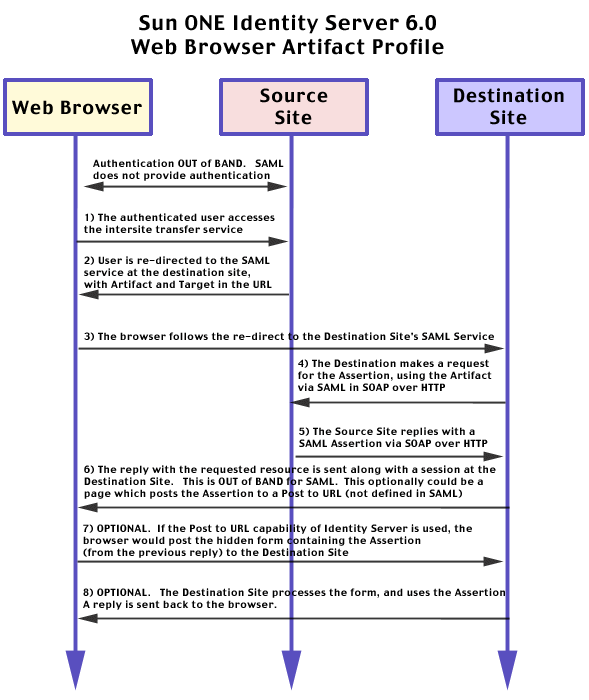
Visualizing the Web Browser Artifact Profile
Examining the Web Browser
Artifact Profile in Detail
To
begin with, let's assume a user is currently logged into the Identity Server
called burns.xmldap.org. This will be referred to as the "Source Site."
While accessing the Source Site they decide to click on a link which
offers access to a service at moleman.sun.com. This server is managed
by a different organization, in a different domain, potentially using different
software. In this case, the two sites have established an agreement
to allow SSO between the two sites, and have appropriately configured their
servers. (For this case, 2 Identity Servers were used, but this need
not be the case.)
Having
previously configured their systems with the necessary SAML information to
allow SSO between the sites, the Source Site presents a URL to the user, which
points them at an Intersite Transfer Service, and includes a target location
at the Destination Site.
The link might appear as follows:
http://burns.xmldap.org:58080/amserver/SAMLAwareServlet?TARGET=http://moleman.sun.com:58080/demo/app_artifact.jsp
Clicking
on this link, the browser accesses the Intersite Transfer Service. Notice
the inclusion of the user's SSO Token. (the iPlanetDirectoryPro cookie)
The transfer service is responsible for establishing the SAML information and transfering the user to the Destination Site.
GET /amserver/SAMLAwareServlet?TARGET=http://moleman.sun.com:58080/demo/app_artifact.jsp
HTTP/1.0

Referer: http://burns.xmldap.org:58080/demo/demo_artifact.jsp

Cookie:
iPlanetDirectoryPro=AQIC5wM2LY4SfcwXs6vXyW8yypHhtBHSBGDxi3He2XDgRQQ=@burns.xmldap.org-9%253A3dcc44ef%253Aae4ea25bca68a853;
Now, having built an assertion and corresponding artifact, It redirects the user to the destinations sites SAML URL with the Target, and Artifact in the url
HTTP/1.1 302 Moved Temporarily

Location:
http://moleman.sun.com:58080/amserver/SAMLAwareServlet?TARGET=http://moleman.sun.com:58080/demo/app_artifact.jsp&SAMLart=AAEez8uyRj8ajRA79%2FUIZoOqJVemxyXMZAqvqVCFrQrbrXcOjDaQsjAx
The
browser in turn follows this redirect, and makes a request to the destination
site's SAML service
Host: moleman.sun.com:58080
GET
/amserver/SAMLAwareServlet?TARGET=http://moleman.sun.com:58080/demo/app_artifact.jsp&SAMLart=AAEez8uyRj8ajRA79%2FUIZoOqJVemxyXMZAqvqVCFrQrbrXcOjDaQsjAx
HTTP/1.0

  Referer: http://burns.xmldap.org:58080/demo/demo_artifact.jsp
The destination site's SAML service looks at the request, and extracts the
Artifact. Using the sourceID from the artifact, the Server looks up
the Source Site in its Trusted Partner Sites. If the source site is
found in the Trusted Partner Sites, it locates the SAML Soap Service for
the source site, and formulates at SAML Assertion Request. It then
becomes as client of the Source Site itself, by opening a back channel request,
and sending the Assertion request over SOAP/HTTP as defined by the SOAP over
HTTP Binding for SAML
POST /amserver/SAMLSOAPReceiver HTTP/1.1

Content-Type: text/xml; charset="utf-8"

Content-Length: 436

SOAPAction: ""

Host: burns.xmldap.org:58080
<soap-env:Envelope xmlns:soap-env="http://schemas.xmlsoap.org/soap/envelope/">

<soap-env:Body>

<samlp:Request xmlns:samlp="urn:oasis:names:tc:SAML:1.0:protocol" RequestID="v9Bd+owz464TzPms1MznVu6sIAQ="
MajorVersion="1" MinorVersion="0" IssueInstant="2002-11-08T23:34:40Z">

<samlp:AssertionArtifact>AAEez8uyRj8ajRA79/UIZoOqJVemxyXMZAqvqVCFrQrbrXcOjDaQsjAx</samlp:AssertionArtifact>

</samlp:Request>

</soap-env:Body>

</soap-env:Envelope>
The
source site gets the Request on its SOAP receiver, and checks to see if the
requester is in the Trusted Partner Sites. This is validated via the
hostlist configuration, and may either be done via a IP address, or a certificate
alias.
Next, it looks up the server which originally created the Artifact and Assertion being created. This is designated by the 2 byte code in the Assertion handle. This 2 byte code needs to correspond to a server defined in the platform list. This is visible in the debug logs as follows:
SAMLUtils.getServerURL: id=01

SAMLUtils.getServerURL: remoteUrl=http://burns.xmldap.org:58080, thisUrl=http://burns.xmldap.org:58080
In this case, the request returned to the originating server, but if the
server identified by the artifact was different from one which has received
the SAML Assertion request, the receiving server will contact that server
and retrieve the Assertion. This allows the servers to exist behind
a loadbalancer without confusing the protocol.
Assuming that the request has arrived at the same server that issued the server, the server uses the artifact to retrieve the corresponding assertion. It then forms the assertion into a SAML Assertion Response as defined by the SAML SOAP over HTTP binding sends the assertion back to the SAML SOAP Client that made the request from the Destination Site
HTTP/1.1 200 OK

Server: Netscape-Enterprise/6.0

Date: Fri, 08 Nov 2002 23:34:22 GMT

Content-type: text/xml; charset="utf-8"

Content-length: 2135

Soapaction: ""
<soap-env:Envelope xmlns:soap-env="http://schemas.xmlsoap.org/soap/envelope/">

<soap-env:Body>

<samlp:Response xmlns:samlp="urn:oasis:names:tc:SAML:1.0:protocol" ResponseID="6tWsLCOwMiHM+Gl77HQ85VLsVdM="
InResponseTo="v9Bd+owz464TzPms1MznVu6sIAQ=" MajorVersion="1" MinorVersion="0"
IssueInstant="2002-11-08T23:34:22Z" Recipient="64.81.243.234">

<samlp:Status>

<samlp:StatusCode Value="samlp:Success">

</samlp:StatusCode>

</samlp:Status>

<saml:Assertion  xmlns:saml="urn:oasis:names:tc:SAML:1.0:assertion"
MajorVersion="1" MinorVersion="0" AssertionID="b4tfDVodc+mBzgQhH0Nj/tQ9t5c=01"
Issuer="burns.xmldap.org:58080" IssueInstant="2002-11-08T23:34:21Z" >

<saml:Conditions  NotBefore="2002-11-08T23:29:21Z" NotOnOrAfter="2002-11-08T23:36:21Z"
>

</saml:Conditions>

<saml:AuthenticationStatement AuthenticationMethod="urn:com:sun:identity:LDAP"
AuthenticationInstant="2002-11-08T23:12:50Z">

<saml:Subject>

<saml:NameIdentifier NameQualifier="dc=xmldap,dc=org">uid=amAdmin,ou=People,dc=xmldap,dc=org</saml:NameIdentifier>

<saml:SubjectConfirmation>

<saml:ConfirmationMethod>urn:oasis:names:tc:SAML:1.0:cm:artifact-01</saml:ConfirmationMethod>

</saml:SubjectConfirmation>

</saml:Subject>

<saml:SubjectLocality  IPAddress="64.81.243.233" /></saml:AuthenticationStatement>

<saml:AttributeStatement >

<saml:Subject>

<saml:NameIdentifier NameQualifier="dc=xmldap,dc=org">uid=amAdmin,ou=People,dc=xmldap,dc=org</saml:NameIdentifier>

<saml:SubjectConfirmation>

<saml:ConfirmationMethod>urn:oasis:names:tc:SAML:1.0:cm:artifact-01</saml:ConfirmationMethod>

</saml:SubjectConfirmation>

</saml:Subject>

<saml:Attribute AttributeName="email" AttributeNamespace="TestSiteAttributeMapper
attributes">

<saml:AttributeValue xmlns:saml="urn:oasis:names:tc:SAML:1.0:assertion">amadmin@sun.com</saml:AttributeValue>

</saml:Attribute>

<saml:Attribute AttributeName="membershipLevel" AttributeNamespace="TestSiteAttributeMapper
attributes">

<saml:AttributeValue xmlns:saml="urn:oasis:names:tc:SAML:1.0:assertion">bronze</saml:AttributeValue>

</saml:Attribute>

</saml:AttributeStatement>

</saml:Assertion>

</samlp:Response>

</soap-env:Body>

</soap-env:Envelope>
As
you can see, this assertion contains a good deal of information about the
user performing the SSO action.
The
SAML specification provides for several types of assertions that are also
defined in the SAML Service:
In
Identity Server, the Authentication Service is the authentication authority;
the Identity Management Service is the attribute authority; and, the Policy
Service is the authorization authority.
HTTP/1.1 200 OK

Server: Netscape-Enterprise/6.0

Date: Fri, 08 Nov 2002 23:34:40 GMT

Set-cookie: iPlanetDirectoryPro=AQIC5wM2LY4SfcyazpPip0qLyK3SfMUGFjcvF5xunCB2trI=;domain=.sun.com;path=/

Content-type: text/html

Content-length: 4596

Connection: keep-alive
<BODY Onload="document.forms[0].submit()">
<FORM METHOD="POST" ACTION="http://moleman.sun.com:58080/demo/app_artifact.jsp">
<INPUT TYPE="HIDDEN"
NAME="ASSERTION"
VALUE="%3Csaml%3AAssertion++xmlns%3Asaml%3D%22urn%3Aoasis%3Anames%3Atc%3ASAML..blah...blah...blah...
</FORM>
</BODY></HTML>
POST /demo/app_artifact.jsp
HTTP/1.0
Referer:
http://moleman.sun.com:58080/amserver/SAMLAwareServlet?TARGET=http://moleman.sun.com:58080/demo/app_artifact.jsp&SAMLart=AAEez8uyRj8ajRA79%2FUIZoOqJVemxyXMZAqvqVCFrQrbrXcOjDaQsjAx
Connection: Keep-Alive
User-Agent: Mozilla/4.78
[en] (X11; U; Linux 2.4.7-10 i686)
Host: moleman.sun.com:58080
Accept: image/gif, image/x-xbitmap,
image/jpeg, image/pjpeg, image/png, */*
Accept-Encoding: gzip
Accept-Language: en
Accept-Charset: iso-8859-1,*,utf-8
Cookie:
SunONEUserId=64.81.243.233:119541035853132;
JSESSIONID=moleman.sun.com-10%253A3dcc49ea%253A28cf99a87ef57cc6;
iPlanetDirectoryPro=AQIC5wM2LY4SfcyazpPip0qLyK3SfMUGFjcvF5xunCB2trI=
Content-type: application/x-www-form-urlencoded
Content-length: 2792
ASSERTION=%253Csaml%253AAssertion%2B%2Bxmlns%253Asaml%253D%2522urn%253Aoa..blah...blah...blah...
You've now seen the basics of the Artifact profile, and its use in SSO.
HTTP/1.1 200 OK
Server: Netscape-Enterprise/6.0
Date: Fri, 08 Nov 2002 23:34:40
GMT
Set-cookie: JSESSIONID=moleman.sun.com-11%253A3dcc4a10%253A68e1beaa525ca9e3;path=/;expires=Sat,
09-Nov-2002 00:04:40 GMT
Content-type: text/html;charset=ISO-8859-1
Connection: close
/amserver/SAMLPOSTProfileServlet
The best source for further information is the SAML working group at Oasis. You can find their web page, the SAML specification, and supporting documents at:
Conclusion