Additional Form's
Properties
The Form has many of the Command Button's
properties
(MousePointer, BackColor, Visible and more).
He also has
additional properties:
Caption - The text that appear in
the Form's title bar,
and in the taskbar.
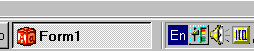
Icon - The
Icon that appear in the form's title bar (Figure 7)
and in the Task bar
(Figure 8).
Figure 7
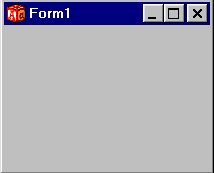
Figure 8
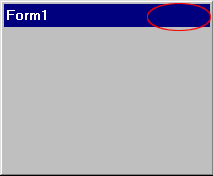
ControlBox - Set this property to "False" to
remove
the title bar's Close, Minimize and Maximize buttons (Figure
9).
Figure 9
MaxButton - Set this
property to "False" to disable
The title bar Maximize
Button.
MinButton - Set this property to "False" to
disable
The title bar Minimize Button.
ShowInTaskbar - Setting this property to
"False" will
cause the form not showing in the task bar.
WindowState - The
initial appearance style of the form:
Minimized, Maximized, or normal.
The Form's KeyPreview Property
To understand this property,
lets look on
the following example:
Start new project, and add 1 Command
Button
(named Command1) to your form.
verify that the Form's KeyPreview
property is set to "False".
Add the following code to your
program:
Private Sub Command1_KeyPress(KeyAscii As
Integer)
Print "Button Pressed"
End Sub
Private Sub Form_KeyPress(KeyAscii As Integer)
Print
"Form Pressed"
End Sub
The code above will
print "Button Pressed" on
the form when the Command Button's KeyPress event
will be executed, and print "Form Pressed" when the
Form's KeyPress event
will be executed.
Run the program and press any key on the
keyboard.
"Button Pressed" is appearing on the form, but
"Form Pressed"
isn't appearing.
The Form's KeyPress event hasn't been
executed.
When the KeyPreview property is "False",
if any control is
found on the form (the command button in this case),
It will get all the Key
events (KeyPress, KeyDown and KeyUp)
instead of the form.
To allow the
Form's Key events be executed,
set the KeyPreview property to
"True".
Lets try it. Set the KeyPreview
property to "True", run the
program again
and press any key.
The Form's KeyPress event has been
executed,
in addition to the Button's KeyPress event that
been executed
too.
Notice That the form's KeyPress event executed
before the
Button's event.
[ Next ]
|

