
This tutorial will guide you through the AutoHack(Memory Breakpoint and EasyWrite) from tsearch.
You need:
Let's start
Launch TSearch and program test.exe.
In Tsearch click on the button "Open Process" and select PROGRAMME TEXT.EXE
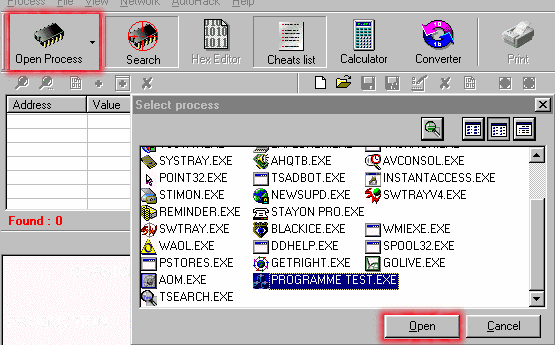
Now you can see on the TSearch caption : "TSearch - PROGRAMME TEST.EXE"
Let's look PROGRAMME TEXT.EXE

Well will try to defeat the first counter(1) who increase when the user press the button.
So here we can see 1 so let's search for this number.

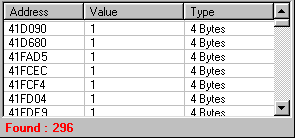
We have found too many addresses so let's continue
Press once the buttton(1) in the PROGRAMME TEXT.EXE for display the value 2

Now we will search for 2 with TSearch
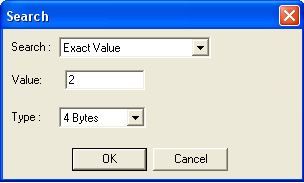

We found one address so double click on it for add it to the cheat table at the right.
We need enable the debugger for use the autohack.
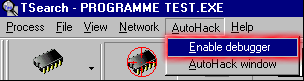
and we make the autohack window visible
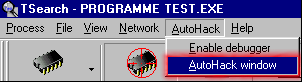
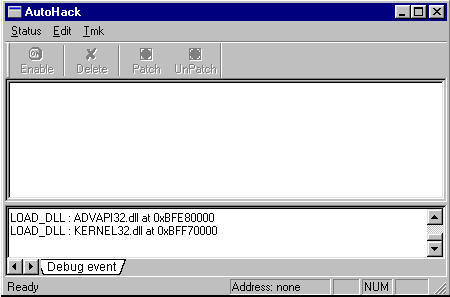
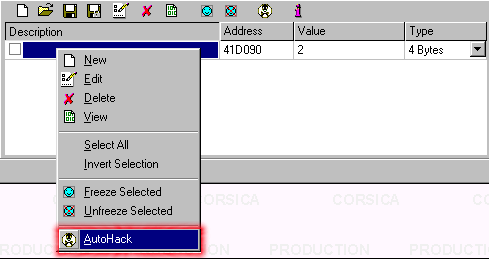
Now we select the address in the cheat table and right click on it.in the menu select autohack
The autohack window display the address selected
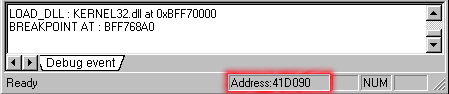
Now press the button(1) in the PROGRAMME TEST.EXE

The asm line who modify the value at the address 41d090 will be logged in the AutoHack window.
Press the disassembler button for see the listing

Now i will try to show you how decrease the value when you press the button(1) instead of increasing using easywrite
Display easywrite pressing the "easywrite" button
Add a new Patch using the new button,and write an short description if u want.

We have the line : mov [41d090],eax who write the value in the EAX register at the address 41d090
so for decrase the value of 1 we can for example add twice the line dec eax,but we can't do so without replace another line
so we will do a far call from 401384 to our own function and return.
we have to write an little function and for example inject it at the address 0x400000 (once the program is loaded in memory,it doesn't use this area for run)
so at 0x400000 we will write:
dec eax //decrease eax by one
dec eax //decrease another time
mov [41d090],eax // and write the eax value decrased by 2 time at the address 41d090
ret //we return to the main program function
and at 0x401384 we write our far call
call 0x400000
WARNING: be sure than the new instruction will have the same length than the instruction you will replace,complete with nop if not!!!
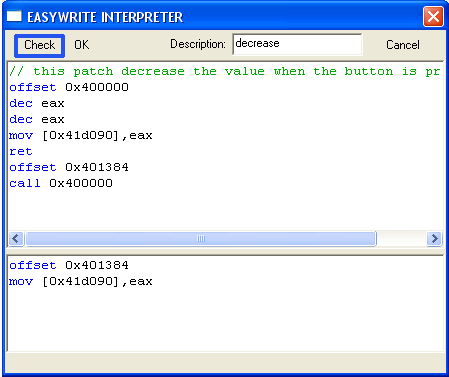
With easywrite script that will become that :
we push check button for check for script errors

You have noticed than the interpreter is separate into 2 tab
the top one is used for write the script into memory when you check the box(for patch)
and the botton one is used for write the script into memory when you uncheck the box(for unpatch by example)
so in the bottom tab i write the original instruction so our routine will not be called anymore and the button will increase the value like before.
once again press check button for be sure to have no errors.if not press OK
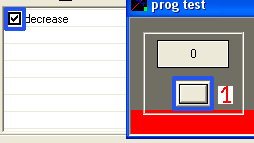
Check the box and press the button (1) few times you will see the value decrease(script at top).
uncheck it for come back to normal(script at bottom )
With the "hex" command you can write hexa chain directly into the memory
By selecting an line and right mouse click on it you display a menu where you have the getoffset command
which display the offset of the selected line
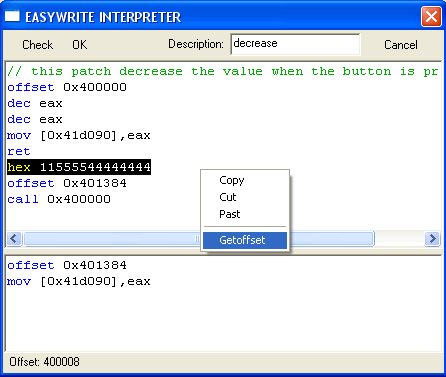
"hex" write hexa chain into the memory ex: hex 9050c3
"asc" write an ascii chain into the memory ex: asc "my text"
it's not teminated with null char so if u need to u have to do it like that:
asc "my text"
hex 00
"offset" set offset where the code must be write into memory
"rem" "//" comment line
If the check box doesn't appear ,you have an error in your script
