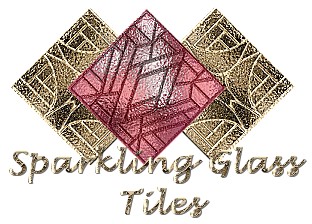
Sparkling Glass Tiles
Materials
- This zip contains the font required, download and unzip it.Zip File
- ulead art texture ~ a free filter
- Eye Candy (optional)
- Paint Shop Pro Program level 7, you may be able to create this at other levels
Lets Begin:
Note* this is a quick tutorial which creates a nice glassy effect. It can be done 2 different ways, with eye candy or without. I show both.
- Open a new canvas or image, 200 x 200 pixels. If your creating this to match a frame or piece of art, select a colour from the art or frame. Write down the hue and saturation of this color. You will need it later.
- Flood fill
- Now select a colour that is lighter but of the same shade.
- Select your paint tool, round, a good size 50, hardness 15, opacity and density 100, step 25. Paint dabs of this color which ever way suits you. Try to leave equal amounts of the lighter and the darker color.
- Now pick a dark, dark color of the same shade. Add a few drops of this color.
- This is not necessary but you can use the filter simple filters quick tile and apply.
- Method 1: Using only your paint program.
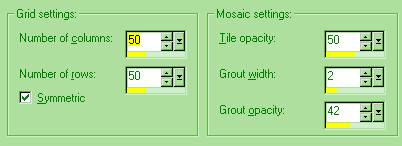
- Go to effects, texture effects, mosaic antique. Use the following settings:
Method 2: Using eye candy apply the following jiggle. Make sure seamless tile is selected.
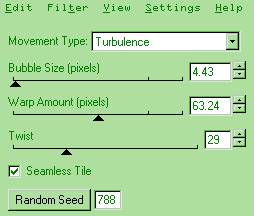
Now Both Methods continue to follow:
- Change your foreground to null and your background to white.
- Add a new layer.
- Select glass as your font. size 150, floating. I have forgotten the creator of this font otherwise I would tell you where its from. Apply.
- Now position your font equally spaced on your glass tile.
- Select modify, expand by 1 pixel.
- Effects, plugins, ulead effect, art texture.
- Click on the edit button on the left. Click # 5.
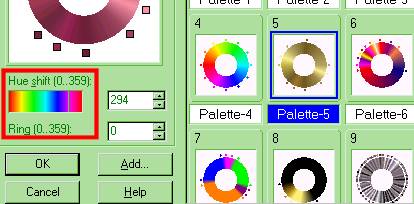
- Now click on the area outlined below called Hue Shift. This change the color of the edging. Select a color that is close to the color you chose for your glass. Click ok.do not close your plugin but..
- Back to the main screen,under Pattern Template, chose #3 pattern.Your pattern sample is highlighted at 3-3. Use this one. Click ok, do not deselect.
- Change your foreground to white.
- Go to effects, artistic effects, hot wax coating, apply.
- Go to effects, texture effects, emboss, apply.
- Go to color, colorize, remember the numbers you wrote down use the hue and saturation now.
- Add a drop shadow of v and h 1, opacity 46, blur 2.4.
- Click on your layer palette. To the right you will see the word normal, click on this. A table will drop down, scroll down and select luminance.
- Your done!
Below are two tiles I created. The first uses psp the second uses eyecandy, resized.
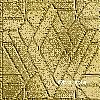
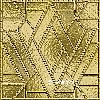
Thank you for visiting my tutorial, Sparkling Etched Glass Tiles.
Please come back and visit again!
This tutorial was created by EveningStar
© '02
All rights reserved.
Main Tutorials
|