Chisel Frame Tutorial
The art is from The Art of Beverley LuI have used it here, with her permission. Thanks so much Beverley. The painting is under people.
Materials
- Paint Shop Pro 7
- Filter: Greg's Factory Output, pool shadow
- Filter: Kiwi's Filter Oelfilter Guck Mal This is a foreign filter but the effects are interesting!
- *This is a quick tutorial. The level I think is Intermediate.
Lets Begin:
Open an image. You have permission to use the graphic below. Right click on the image below and save to your hard drive. It is from a Royalty Free CD which I purchased. Whom the artist is, I have no idea. It is called swanchiselframe.jpg
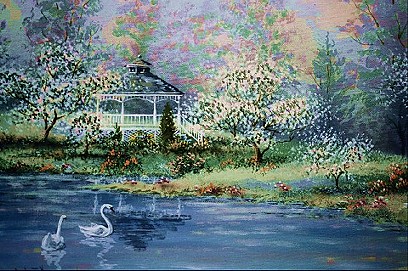
Change your background color to #b99eae.
Image add border 2 pixels, symmetric.
Select it with your magic wand.Tolerance 0, feather 0, antialias checked.
Change your settings as follows:
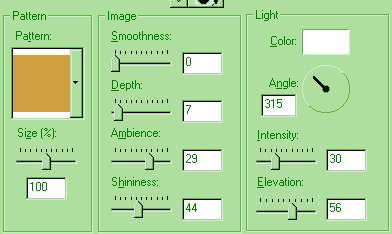
Apply a gold fill. You may use ulead, Blade Pro, but I show this using the sculpture shiny gold.
If your using the shiny gold apply pool shadow, same settings. It makes a pretty shiny gold effect.
Selection invert. Effects, 3d effects, cutout. Set your Vertical at 8, horizontal at 4. Opacity 43, blur 11.9, color black, fill interior unchecked. Apply, then apply a second changing both vertical and horizontal to negative values, the other values the same. Select none.
Select a color from the painting and make it your background color. I chose #7CA097.
Add a border 20pixels, symmetric.
Select the new border you added. Go to effects, plugins, Gregs factory output, pool shadow. Apply. Then go to effects, plugins, Kiwi's Oelfilter, guck mal and apply.
Then add the cutout using vert and horizontal of 2, apply. Then apply a second cutout using negative 2. Invert and apply effects, 3d effects, chisel amount 2, transparent. Deselect.
Add another border of 2 pixels symmetric. Select the border and add another gold fill as you did previously. Sculpture, pool shadow select none.
Image, add a border of 20, select. Add pool shadow changing the intensity to 86 and the lightness to 165. Apply. Invert selection, apply the same chisel. Deselect.
Add a border of 2, apply the same gold fill, then without inverting apply the chisel. Deselect.
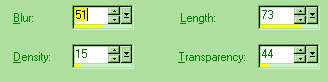
Add another border, using the color you selected from the painting. Select the border and go to effect, texture effects, fur. Use the following settings
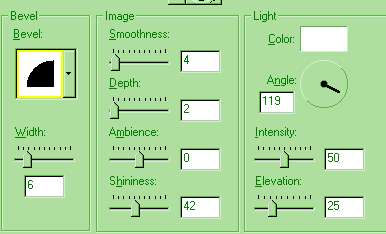
Apply an inner bevel of the following settings:
You can add one more border of 2 and apply the same gold setting.
Your done!
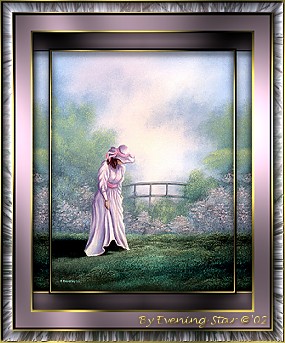
Thank you for visiting my tutorial, Chisel Frame. Please come back and visit again!
Graphics and tutorial © '02 to
Evening Star
All rights reserved.

