|
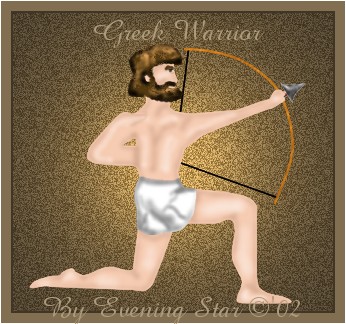
This tutorial creates the above Warrior in selection files. This is a quick tutorial.
Materials: The following file which contains the selections required. File
LetsBegin:
Create a new canvas 408x385, transparent background, 16.7mil. Col.
Add a new raster layer.
Selections load from disk 1string.sel. Flood fill with black. Select none.
Add a new rastor layer, load 2bow.sel. Flood fill with black. Selection, modify contract by 1. Change your foreground to pattern. Select Stained Wood, angle 117, scale 100. Flood fill. Select none.
Add a new raster layer, load from disk 3arrow.sel. Flood fill with black, deselect.
Add a new raster layer. Selections load from disk 4arrowhead.sel. Flood fill with white.
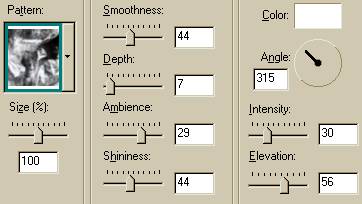
Effects, sculpture. Use the following settings: pattern 28.
Select none.
Add a new raster layer. Selections, load from disk, 5body.sel. Flood fill with #F0B984. Deselect. Add a new raster layer load from disk .sel.
4) Add a new raster layer. Selections load from disk, 5a_bodyshadow.sel. Change your foreground color to D29A84. Flood fill twice. Deselect.
5) Add a new raster layer, load from disk, 5b_bodyhighlight.sel. Change your foreground to F8E0D6. Flood fill. Deselect.
Add a new raster layer. Selections load from disk 6eye.sel. Change your foreground color to black. Flood fill. Deselect.
You must now figure out what color you would like the hair to be. I wanted it dark this time so I chose black.
Layer, new raster layer. Selections, load from disk, 7eyebrow.sel. Flood fill with the darker color, such as black or dark brown, or medium gold or a dark rust. Deselect.
Add a new raster layer, selections, load from disk, 8hair.sel. Flood fill and do not deselect. Get your airspray tool. Settings are round size 35, hardness 16, opacity 63, step 25, density 38. Spray lightly, if creating black hair #5D7181, if not choose a medium value of your color. Select none.
Add a new raster layer, Selections, load from disk, 8a_hairshadow.sel. Flood fill with the lightest value of your color, in the case of black use #C0C0C0. Deselect.
Layer, new raster layer. Selections load from disk, 9wrap. Sel. Flood fill with white. Select none. Add a new raster layer. Selections, load from disk, 9a_wrapshadow1.sel. Flood fill with #808080.
Select none. Then on the same layer, load from disk the next two wrap shadows and flood fill with the same color.
Merge your layers visable. Save as a tube or create a painting! Your done!
Thank you for visiting my tutorial, Greek Warrior. Please come back and visit again!
Graphics and tutorial © '02 to
Evening Star
All rights reserved.
|

