
Understanding and Applying the Main Features of Browser Software
Vocabulary and Explorer Features

Vocabulary and Explorer Features
Back and Forward Buttons: Allow you to move back or forward to pages you have already seen.
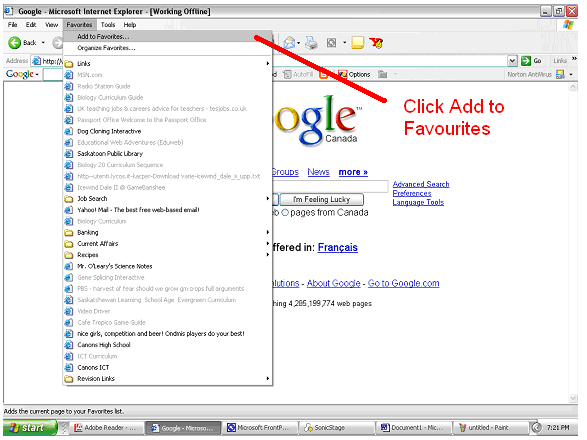
Favourites Menu: Stores and organizes web pages you have book marked.
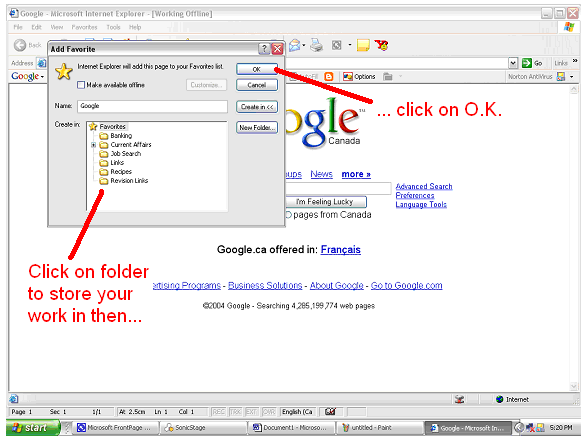
Bookmarks: This is the term used for saving the URL of a web page in your favourites menu.
Stop Button: This lets you stop a web page from loading.
Home Button: When you open Microsoft Explorer you start off on your homepage. If you press this button you can return instantly to your homepage.
Address Bar: If you know the URL of a particular website you can type it in here.
URL: This is a Uniform Resource Locator. The URL tells Microsoft Explorer where a particular file is on the internet.

It is impossible to remember all of the URL's you are going to want to use. Microsoft Explorer has a tool for doing this for you it is the Favourites Menu and it allows you to bookmark a web page. Follow these instructions:


If you want to have more than one browser window open at a time do this:

