Turning Popup Stopper On-Off
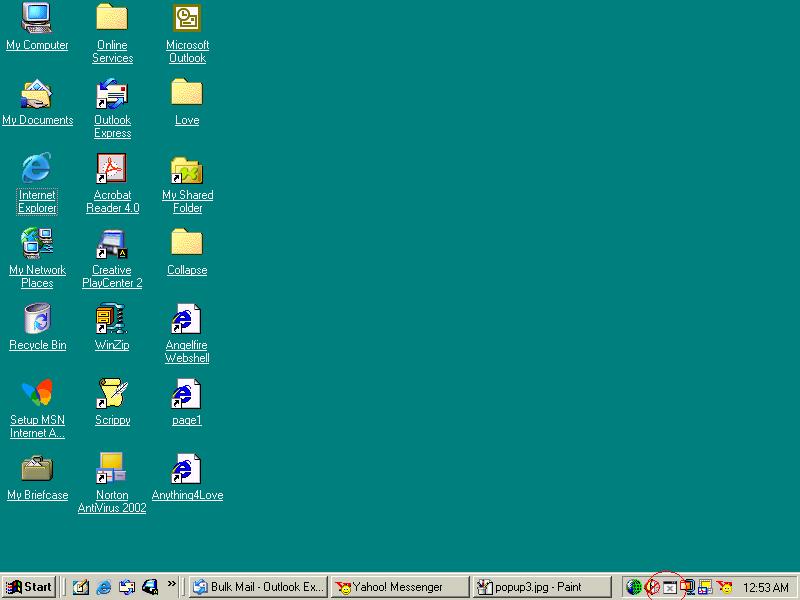
You will see popup stopper down in the bottom right hand corner of the
task bar.
See picture below.
 To turn it off take your mouse pointer down so it is over the icon and
right click on it.
To turn it off take your mouse pointer down so it is over the icon and
right click on it.
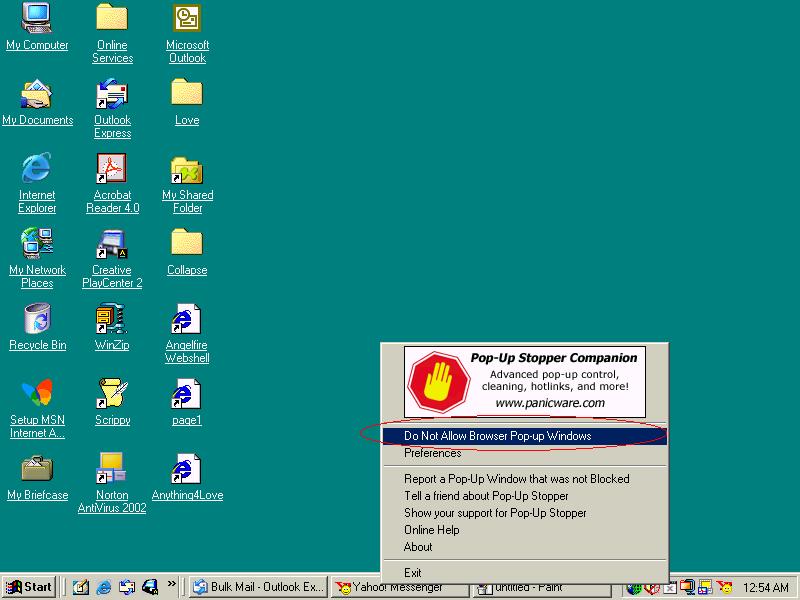
You will then see it has a tick beside Do not allow pop-up browser windows.
See picture below.
 Take your mouse pointer up to Do not allow browser pop-up windows and
left click on it.
Take your mouse pointer up to Do not allow browser pop-up windows and
left click on it.
This window will now go away.
But if you look back down in the right had bottom corner you will see its
no longer has a red x in the middle of the icon it will now be grey.
See picture below.
 This means the pop-up stopper is disabled.
You will not have to hold down the ctrl key to open a browser now. So remember
you may get other browses opening to.
Ok lets turn it back on now that you have the browser window open.
Take your mouse pointer back down to the lower right to the pop-up
stopper icon.
See picture below.
Place mouse pointer over the top of the icon and right click on it.
See picture below.
 Take your mouse pointer back up to Do not allow browser pop-up windows
and left click on it.
Take your mouse pointer back up to Do not allow browser pop-up windows
and left click on it.
See picture below
 This window will disappear now. If you look back down bottom right at
the pop-up stopper icon it will now have the red x back in the box. This
is showing you it now back to stopping browser windows from opening.
This window will disappear now. If you look back down bottom right at
the pop-up stopper icon it will now have the red x back in the box. This
is showing you it now back to stopping browser windows from opening.
See picture below.
 Thats all there is too it....Hope this works for you....
Return to main page
Thats all there is too it....Hope this works for you....
Return to main page

