File Attachments
This is what you will first see when you open your Outlook Express.
Make sure you click on the in box and then click on the name of the person
you have email from.
In this case Sweet Aussie.
As you can see in the picture below there is a paper clip beside this persons
name( sweet aussie ). This means there is a file attached.
At the bottom right hand corner of the window below you will see a paper
clip.
Put your mouse pointer over the paper clip and left click once.
Look at picture below.

Once you have left clicked once you will see cleanup.exe or what ever the
attachment may be called.
Put mouse pointer on cleanup.exe and left click once.
See picture below.

Once you have left clicked on cleanup.exe you will get another window that
opens.
Make sure you have a black dot in the save it to disk, then click on ok.
See picture below.

Now you will get a different window that opens.
This is were you are going to save the file but in this case we are going
to save it into My Documents so we need to change the directory.
See picture below.

You will need to left click on the upside down triangle that will drop
down a menu.
Bring mouse pointer down to My Documents and left click.
See Below

Now you will be in a folder called My Documents.
Here is were we need to make a new folder to put the file into.
You need to put mouse pointer over the new folder icon and left click on
it once.
See picture below.
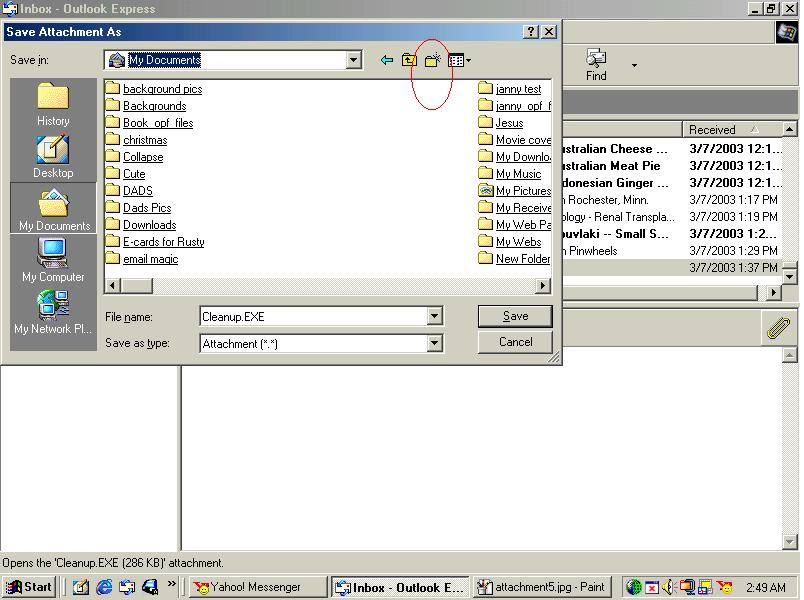
Once you have clicked on new folder you will need to rename it.
You will see it is already highlighted for you.
See picture below.

Now type in cleanup and then hit the enter key on your keyboard.
The folder is now called cleanup.
See picture below.

Now left click on the folder you named to cleanup and it will open up a
new window.
Now its time to save the file.
Put mouse over the save button at the bottom right hand corner and left
click on the word save
See picture below.

Now the file has been saved and it will return you to Outlook Express.
You need to minimize this window so you can go back and open up the file.
in the top right hand corner you will see the little stroke that minimizes
the window . Click on the little stroke.
See picture below.

Once you have minimized the Outlook Express window you will be back to
the desktop.
Find the folder called My Documents and left click on it to open the folder.
see picture below.

Now your in My Documents folder.
Locate the fold you made and named cleanup.
Put mouse pointer over the folder and left click once to open it.
See picture below.
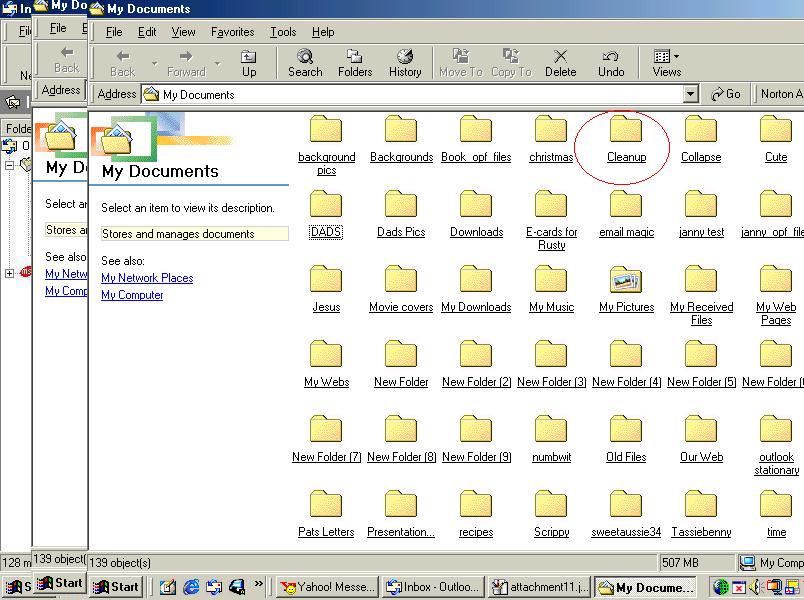
Once you have opened this folder you will see an icon named cleanup.exe.
Put mouse pointer over the icon and left click once to open it.
See picture below.

Some files need to be set up but in this case it does not have to be.
It already is.
You will see another window open this is the program click on the word
clean up and it will start deleting unwanted internet files that are no
longer required to keep.
See picture below.

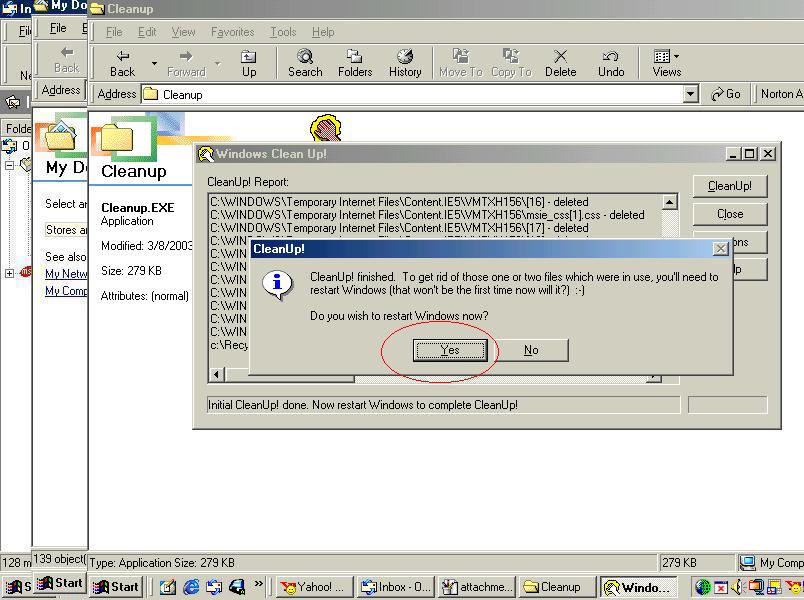
Once you click on the cleanup button it will start going through the process.
When it is done it will come up and ask you if you want to reboot now.
Click on the yes button and your machine will reboot and be cleaned out
of all the temp files.
See picture below
That's it.... Easy wasn't it lol
Return to main page

