Using Voice In Yahoo
We already have the basics of yahoo.
To communicate with voice you will require microphone and speakers or
head set to use.
If you are typing to a person but prefer to use voice instead of typing
this is what you will need to do.
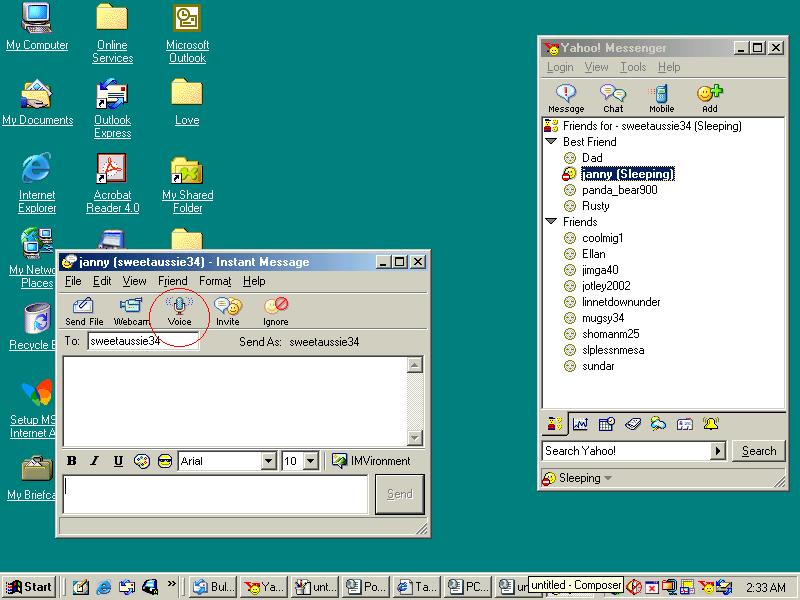
Look to the top of the message box were you are typing and you will
see the icon saying voice off.
See picture below.
To start talking take your mouse pointer up to the
voice icon and left click on it.
The person will get a message inviting then to enable voice once they
click yes you will get a message in the screen saying they have enabled
voice.
See picture below
 The easiest way is to place a tick into the hands free box.You can
then talk freely.
The easiest way is to place a tick into the hands free box.You can
then talk freely.
See picture below.
 If you no longer wish to communicate using voice just go back up
and click on voice off.
If you no longer wish to communicate using voice just go back up
and click on voice off.
this will take the voice away and you can go back to typing instead.
IF you get disconnected while on voice you will need to close the
message window you was talking in and open a new window.
Then just go back to the top of this page and follow the same instructions.
Return to main page