|
| |
These is a simple introduction to the use of cvs, described as my usual style
mainly by example
The first step is to create a simple user ( I named it cvs ) that allow the
connection ftom other pc
[root@linux5 root]# adduser cvs
The as user cvs I build a cvs repository ( in these case the cvs's home
directory itself )
[cvs@linux5 cvs]$ cvs -d /home/cvs init
At this point I can import some files or directories inside the repository.
[cvs@linux5 projects]$ cvs -d /home/cvs/ import -m "progetti enzo" enzo_proj enzo init
...............
N enzo_proj/CVSROOT/rcsinfo
N enzo_proj/CVSROOT/taginfo
N enzo_proj/CVSROOT/verifymsg
L enzo_proj/CVSROOT/dummy_link
No conflicts created by this import
This operatione will create a directory called 'enzo_proj' under the cvs
repository.
In all subsequent operation , ie. during a checkout, I will get on my work
directory a subdir called enzo_proj with all the files I will request from the
cvs repository.
[cvs@linux5 cvs]$ ls /home/cvs
CVSROOT/ enzo_proj/ tmp/
[cvs@linux5 cvs]$ ls /home/cvs/enzo_proj/
Autostrade/ CVSROOT/ images/ p1/ p1.db,v p1.pro,v proj3/ project2/
*******************************************
[enzo@linux5 enzo]$ export CVSROOT=:pserver:cvs@linux5:/home/cvs
[enzo@linux5 enzo]$ cvs login
Logging in to :pserver:cvs@linux5:2401/home/cvs
CVS password:
cvs [login aborted]: unrecognized auth response from linux5: no repository configured in
/etc/cvs/cvs.conf
---> [root@linux5 enzo]# more /etc/cvs/cvs.conf
# -*- shell-script -*-
#
# Configuration file for the Mandrake CVS-related scripts
#
# Locations of CVS repositories you want to export via pserver
CVS_REPOS="/home/cvs"
# cvs.conf ends here |
[enzo@linux5 enzo]$ cvs login
Logging in to :pserver:cvs@linux5:2401/home/cvs
CVS password:
[enzo@linux5 enzo]$
[enzo@linux5 enzo]$ cvs checkout .
cvs server: Updating .
cvs server: Updating CVSROOT
U CVSROOT/checkoutlist
U CVSROOT/commitinfo
U CVSROOT/config
.........
U enzo_proj/project2/src/interface.h
U enzo_proj/project2/src/main.c
U enzo_proj/project2/src/support.c
U enzo_proj/project2/src/support.h
cvs server: Updating tmp
[enzo@linux5 enzo]$
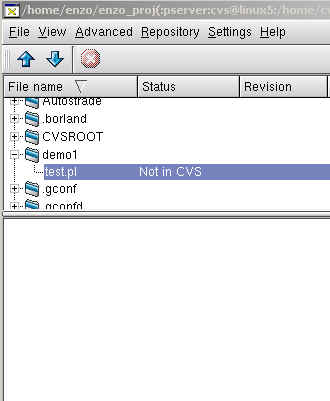
| Add a new file or directory to CVS
The first step is of course the creation of the file and then add
it to repository
[enzo@linux5 enzo]$ cvs add demo1
[enzo@linux5 enzo]$ cvs add demo1/test1.pl
[enzo@linux5 enzo]$ cvs add demo1/test2.pl
[enzo@linux5 enzo_proj]$ cvs commit demo1/test2.pl
Checking in demo1/test2.pl;
/home/cvs/enzo_proj/demo1/test2.pl,v <-- test2.pl
initial revision: 1.1
done
|
 |
|
| |
- $ cd /home/enzo/ && cvs -f -d :pserver:cvs@linux5:/home/cvs
checkout -P enzo_proj
cvs server: Updating enzo_proj
? enzo_proj/demo1- ...............
- cvs server: Updating enzo_proj/project2
cvs server: Updating enzo_proj/project2/m4
cvs server: Updating enzo_proj/project2/macros
cvs server: Updating enzo_proj/project2/po
cvs server: Updating enzo_proj/project2/src
[Finished]
|
|
cvs -f add 'demo1' 2>&1
? demo1/test.pl
Directory /home/cvs/enzo_proj/demo1 added to the repository
[Finished]
|
|
cvs -f commit -R -m 'Directory with sample perl program' 'demo1' 2>&1
cvs commit: Examining demo1
[Finished]
|
|
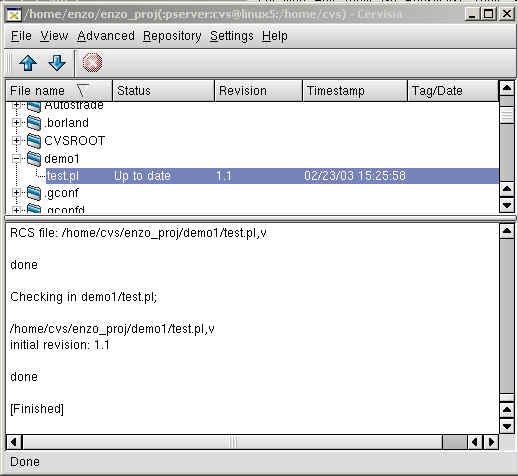
cvs -f add 'demo1/test.pl' 2>&1
cvs server: scheduling file `demo1/test.pl' for addition
cvs server: use 'cvs commit' to add this file permanently
[Finished]
|
|
cvs -f commit -R -m '' 'demo1/test.pl' 2>&1
RCS file: /home/cvs/enzo_proj/demo1/test.pl,v
done
Checking in demo1/test.pl;
/home/cvs/enzo_proj/demo1/test.pl,v
initial revision: 1.1
done
[Finished]
|
 |
| |
[enzo@linux2 enzo]$ export CVSROOT=:pserver:cvs@linux5:/home/cvs
[enzo@linux2 enzo]$ cvs login
Logging in to :pserver:cvs@linux5:2401/home/cvs
CVS password:
[enzo@linux2 enzo]$ cervisia &
|
- [enzo@linux2 enzo]$ cvs checkout
.....
- U enzo_proj/project2/src/main.c
U enzo_proj/project2/src/support.c
U enzo_proj/project2/src/support.h
cvs server: Updating tmp
[enzo@linux2 enzo]$ ls
CVS CVSROOT Desktop enzo_proj tmp x
|
|
[enzo@linux2 enzo]$ cvs -f update -l -d -P 'demo1/test.pl' 2>&1

|
| |
|
[enzo@linux2 enzo]$ cvs -f commit -l -m '1 mdofyed by enzo@linux2' 'demo1/test.pl' 2>&1
Checking in demo1/test.pl;
/home/cvs/enzo_proj/demo1/test.pl,v
new revision: 1.3; previous revision: 1.2
done
[Finished]

|
|
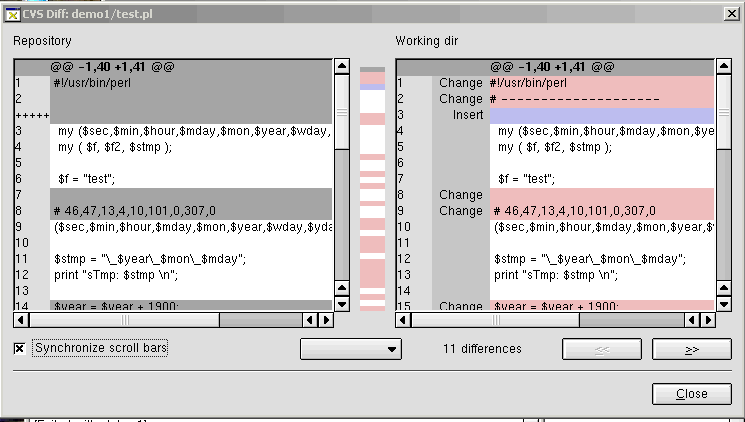
[enzo@linux5 enzo]$ cvs -f commit -R -m '2 modifyed by enzo@linux5' 'demo1/test.pl' 2>&1
cvs server: Up-to-date check failed for `demo1/test.pl'
cvs [server aborted]: correct above errors first!
[Exited with status 1]
|
|
|
|
[enzo@linux5 enzo]$ cvs -f update -R -d -P 'demo1/test.pl' 2>&1
RCS file: /home/cvs/enzo_proj/demo1/test.pl,v
retrieving revision 1.2
retrieving revision 1.3
Merging differences between 1.2 and 1.3 into test.pl
rcsmerge: warning: conflicts during merge
cvs server: conflicts found in demo1/test.pl
C demo1/test.pl
[Finished]
|
|
The merged file has some info about the change required, you should
made the appropriate fix and submit again the file for the commit.
<<<<<<< test.pl
#!/usr/bin/perl
# --------------------
# modified by enzo@linux5
=======
#!/usr/bin/perl
# ---------------
# modifed by enzo@linux2
>>>>>>> 1.3
my ($sec,$min,$hour,$mday,$mon,$year,$wday,$yday,$isdst);
my ( $f, $f2, $stmp );
|
|
|
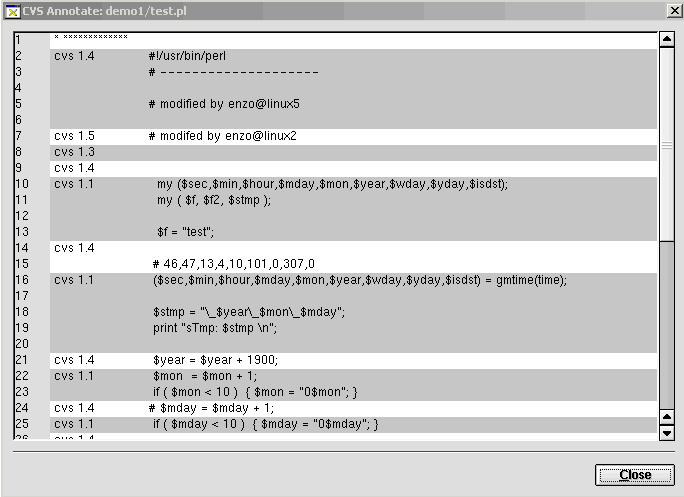
[enzo@linux5 enzo]$ cvs -f commit -R -m '4 merge/modified by enzo@linux5' 'demo1/test.pl' 2>&1
cvs server: warning: file `demo1/test.pl' seems to still contain conflict indicators
Checking in demo1/test.pl;
/home/cvs/enzo_proj/demo1/test.pl,v
new revision: 1.4; previous revision: 1.3
done
[Finished]

|
| |
| |
| |
|
 |
|
 |
|
|
[enzo@linux5 enzo]$ cd enzo_proj
[enzo@linux5 enzo_proj]$ pwd
/home/enzo/enzo_proj
[enzo@linux5 enzo_proj]$ cvs status demo1/test.pl
===================================================================
File: test.pl Status: Up-to-date
Working revision: 1.5
Repository revision: 1.5 /home/cvs/enzo_proj/demo1/test.pl,v
Sticky Tag: (none)
Sticky Date: (none)
Sticky Options: (none)
| The file should be in one of the following
status |
| Up-to-date |
the local file is updated to the one in the
repository |
| Locally Modified |
the local copy of the are been modified , (
you still have to notify/update the repository ) |
| Locally Added |
a new file is added locally , ( you still
have to notify/update the repository ) |
| Locally Removed |
an old file is removed locally , ( you still
have to notify/update the repository ) |
| Needs Checkout |
the local copy is older than the one in the
repository ( an update is required ) |
| Needing Patch |
the local copy is older than the one in the
repository |
| Needs Merge |
both the local and repository copy of the
file are modified ( a merge is required ) |
| File had conflicts on merge |
a merge of files had filed , so a manual
intervention is required |
| Unknown |
the status is unknown to cvs |
|
|
|
[enzo@linux5 enzo_proj]$ cvs status demo1/test2.pl
===================================================================
File: test2.pl Status: Up-to-date
Working revision: 1.1
Repository revision: 1.1 /home/cvs/enzo_proj/demo1/test2.pl,v
Sticky Tag: (none)
Sticky Date: (none)
Sticky Options: (none)
[enzo@linux5 enzo_proj]$ cvs remove demo1/test2.pl
cvs server: file `demo1/test2.pl' still in working directory
cvs server: 1 file exists; remove it first
[enzo@linux5 enzo_proj]$ rm demo1/test2.pl
rm: remove regular empty file `demo1/test2.pl'? y
[enzo@linux5 enzo_proj]$ cvs remove demo1/test2.pl
cvs server: scheduling `demo1/test2.pl' for removal
cvs server: use 'cvs commit' to remove this file permanently
[enzo@linux5 enzo_proj]$ cvs status demo1/test2.pl
===================================================================
File: no file test2.pl Status: Locally Removed
Working revision: -1.1
Repository revision: 1.1 /home/cvs/enzo_proj/demo1/test2.pl,v
Sticky Tag: (none)
Sticky Date: (none)
Sticky Options: (none)
[enzo@linux5 enzo_proj]$ cvs commit -m "demo file removed" demo1/test2.pl
Removing demo1/test2.pl;
/home/cvs/enzo_proj/demo1/test2.pl,v <-- test2.pl
new revision: delete; previous revision: 1.1
done
[enzo@linux5 enzo_proj]$ cvs status demo1/test2.pl
===================================================================
File: no file test2.pl Status: Up-to-date
Working revision: No entry for test2.pl
Repository revision: 1.2 /home/cvs/enzo_proj/demo1/Attic/test2.pl,v
|
|
[enzo@linux5 enzo_proj]$ cvs log demo1/test2.pl
RCS file: /home/cvs/enzo_proj/demo1/Attic/test2.pl,v
Working file: demo1/test2.pl
head: 1.2
branch:
locks: strict
access list:
symbolic names:
keyword substitution: kv
total revisions: 2; selected revisions: 2
description:
----------------------------
revision 1.2
date: 2003/02/24 23:23:40; author: cvs; state: dead; lines: +0 -0
demo file removed
----------------------------
revision 1.1
date: 2003/02/23 17:27:54; author: cvs; state: Exp;
#!/usr/bin/perl
print " test2 \n";
=============================================================================
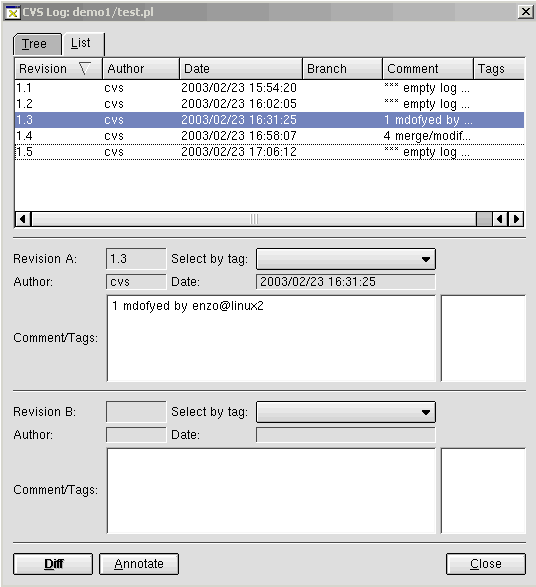
[enzo@linux5 enzo_proj]$ cvs log demo1/test.pl
RCS file: /home/cvs/enzo_proj/demo1/test.pl,v
Working file: demo1/test.pl
head: 1.5
branch:
locks: strict
access list:
symbolic names:
keyword substitution: kv
total revisions: 5; selected revisions: 5
description:
----------------------------
revision 1.5
date: 2003/02/23 17:06:12; author: cvs; state: Exp; lines: +1 -5
*** empty log message ***
----------------------------
revision 1.4
date: 2003/02/23 16:58:07; author: cvs; state: Exp; lines: +26 -19
4 merge/modified by enzo@linux5
----------------------------
revision 1.3
date: 2003/02/23 16:31:25; author: cvs; state: Exp; lines: +3 -0
1 mdofyed by enzo@linux2
----------------------------
revision 1.2
date: 2003/02/23 16:02:05; author: cvs; state: Exp; lines: +2 -0
*** empty log message ***
----------------------------
revision 1.1
date: 2003/02/23 15:54:20; author: cvs; state: Exp;
*** empty log message ***
=============================================================================
|
cvs diff ???? |
cvs tag ???? |
|
[enzo@linux5 enzo_proj]$ cvs logout
Logging out of :pserver:cvs@linux5:2401/home/cvs
|
|
|





