
 |
 |
E-mail Disclosures
Effective 09/21/99 and depending on your status, you are required to use one of the following disclosures on ALL outgoing e-mails. Use these instructions to create the proper email disclosure. Please consult your local Workstation Representative (WSR) if you have any questions on how to modify your signature file.
Thank you.
Disclosure "A" for Registered Representatives and FAs ONLY:
The registered representative sending this communication offers securities through AXA Advisors, LLC (212-314-4600), member NASD, and is an agent of The Equitable Life Assurance Society of the United States (NY, NY 10104) and is licensed to do business in the following states: [list states where licensed]. Registered representatives also offer variable and traditional life insurance and annuity products of the Equitable, and offer over 100 other companies, through an insurance-brokerage affiliate.
Disclosure "B" for IAAs and FPs ONLY:
The individual sending this communication is a registered representative and investment advisor representative of AXA Advisors, LLC (212-314-4600), member NASD, a broker-dealer and investment advisor, and is an agent of The Equitable Life Assurance Society of the United States (NY, NY 10104) and is licensed to do business in the following states: [list states where licensed].Registered representatives also offer variable and traditional life insurance and annuity products of Equitable, and offer over 100 other companies through an insurance-brokerage affiliate.
See the following for instructions on inserting this into your e-mails.
This is a two step process. In the first step you will create a text document called disclosure.txt. In the second step you will tell netscape to attach it to your e-mails.
Step one:
Click on "START"- "Programs" – "Accessories" – "notepad". A program called notepad will open. Type in the blank area the appropriate disclosure (see above). After typing, check that the disclosure is correct, click on "File" – "Save". This will appear
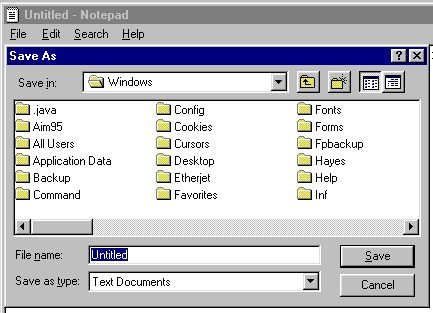
In the file name section type disclosure.txt and click on "save". You may now close note pad and proceed to step two.
Step two:
To Create a disclosure for your e-mail.
Open your Netscape e-mail and click on "Edit" and then "preferences".
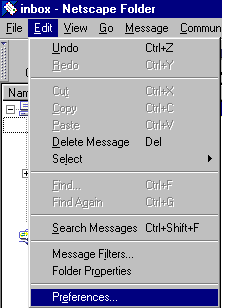
This will open a window that looks like this.
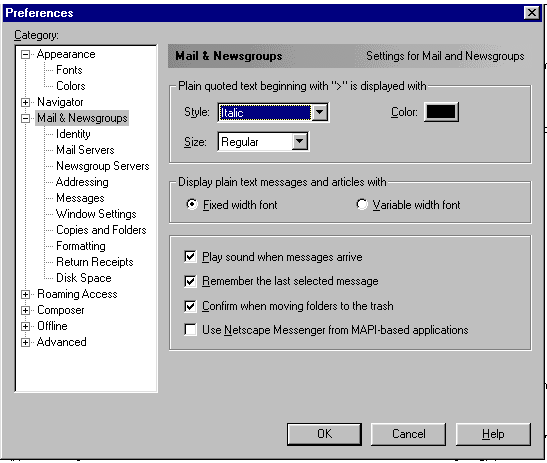
Click on "Identity.
This will open a window that looks like this.
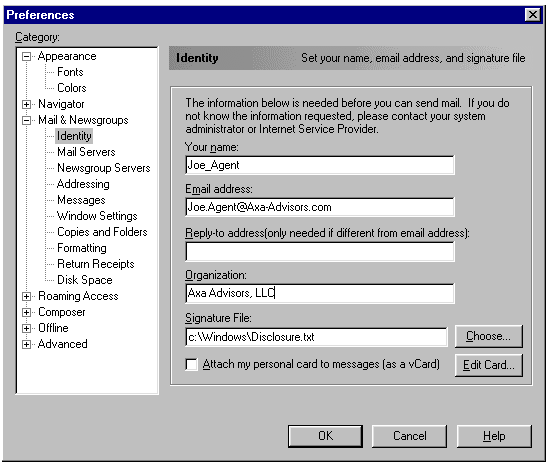
In the "Signature file:" section type c:\windows\disclosure.txt. Then click on "Ok". Close this window and send yourself an e-mail to verify that the disclosure is present. If you have any questions please contact you WSR.
