
I have been asked hundreds of questions (by one or two people) about my various
exploits in the world of HTML. I am no expert! However, I may
be able to offer some information on how I put this site together along with
some details about some other sites which I am involved with.
If this helps you to get a presence on the web then that is great!
We have all seen web sites with only textual content. These can be
very interesting if we have gone looking for them and if they contain the
information that we seek. But if you want to grab the interest of a
casual visitor then color and image are a must.
Graphics are good - photographs are better. Best of all are a combination
of these.
I have no intention of going into the thinking behind the presentation of
this site but here are a few details of the methods that I use to get the
pics and graphics onto the screen.
Scanner. I use a Mustec scanner. It is the 600 III
EP Plus model. It is not the most technically advanced unit in the
world but it does all that the manufacturer claims for it and does it very
well indeed. It is capable of much more than is required for web page
work.
When I first got this machine I had a few problems due to lack of interfacing
on my computer. I have too many things hanging off the back of it.
I e-mailed the manufacturer and received amazing support from them.
I was actually given the e-mail address of one on their technical staff
and he worked with me until the problem was cleared up. This was an
excellent experience and I highly recomend the company for this in addition
to the basic excellence of the machine.
Camera. I have a Casio digital camera. The QV-11.
Again, this is a very basic unit but perfectly adequate for web use.
The camera came with a reasonable piece of software for downloading
to the computer and a photo re-touch package. I have since visited
the Casio web site and downloaded a Twain add-on to the basic supplied package.
This lets me import images directly to the various software that I
use for graphics/photographic
work.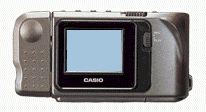
The photograph at the top of the home page on this site was taken with this
camera. I held it at arms length and pointed it back at myself and
pushed the button! Like with all digital cameras at the cheaper end
of the market better results are possible with more light and with the camera
mounted on a rigid mount or a standard tripod. Under ideal conditions
this device has produced some excellent results. As with the scanner
above, the makers of this unit deserve a great deal of credit for an excellent
product.
Graphics Tablet. This is a wonderful way to work with
images.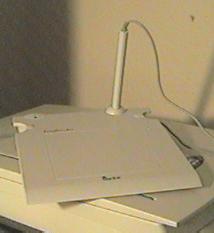 I do not find for graphics work that a mouse is particularly intuitive
so when I discovered an affordable tablet I grabbed it. My unit is quite
small but fine for what I do with it. It is the Genius EasyPainter.
In common with the scanner and camera above this came with a significant
bundle of software. The usable area on this tablet is only 5"x5".
This is small but generally enough. I am not very experienced
in the field of graphics tablets so I suspect that I will replace this one
when I discover more about the capabilities of the things. This one
was bought purely on the basis of its low cost and has been a good introduction
into the field for me.
I do not find for graphics work that a mouse is particularly intuitive
so when I discovered an affordable tablet I grabbed it. My unit is quite
small but fine for what I do with it. It is the Genius EasyPainter.
In common with the scanner and camera above this came with a significant
bundle of software. The usable area on this tablet is only 5"x5".
This is small but generally enough. I am not very experienced
in the field of graphics tablets so I suspect that I will replace this one
when I discover more about the capabilities of the things. This one
was bought purely on the basis of its low cost and has been a good introduction
into the field for me.
Software. This is a highly evocative subject and I have
no wish to add to the debate so I will simply list the various packages that
I use with possibly a short note on each.
| Paint Shop Pro | This is a wonderful program. Possibly the best there is. I use version 4 although later versions are available. |
| PC Paint Brush | This is the full blown package - not the one that comes with Win95. It has a huge number of features but is not capable of working directly with my scanner or camera. Images require to be saved in another application and imported. This is not a big problem - just an annoyance. |
| iPhoto Plus | This came with the scanner purchase. Basic. No more need be said. |
| Micrographx Picture Publisher | Also came with the scanner and is aimed more at paper publishing than web publishing. Some very nice features. |
| MGI PhotoSuite | This came with the Casio camera and has some interesting features aimed directly at web page production. |
The above packages are generally used to modify images from external sources so in addition I will use, as required, Kai's Goo, Corel Draw, Auto Sketch and anything else that comes to hand. Why not? Don't allow your self to be restricted. Use anything, everything. Even an old fashioned sheet of paper and a pencil or a paintbox. You can always get it scanned later.
Other Equipment. This is just a listing of the other bit and pieces attached to the back of my main computer and is just for completeness. Not everything is web related.
| Modem | US Robotics Sportster |
| Microphone | For web telephone and .wav files |
| Printer | Epson Stylus Color |
| Printer | Canon BJ10-ex |
| Midi Interface | Connected to a synth bank - just for fun |
| Speakers/Mouse/Etc. | All the normal stuff |

