|
Jerry's RM2K Land |
|
Day and Night system Day and Night
This tutorial requires the ability to create events (duh) switches and forks. You will make switches called day, night, time start. The first question to be answered is.. do you really even need a day/night effect? While the effect is easy to make and shows passage of time; is this going to add to the game or irritate the player. Day and night is just using timer commands and screen tone. If you decide you want the day/night effect then you have to decide how long a day lasts. To short and he frequent shift of tone may be irritating to players, to long and it will hardly be noticed. Then do you want the effect to occur inside buildings and caves? Considering a game usually takes just a few hours to play, the day/night transition would have to be done frequently to add any passage of time. Lets use 10 real hours as a basis of how long it will take to play your game (most of the games I have seen take between 5 and 7 hours). If the game were to cover 6 months that’s 182 days. That means for every real hour that passes 18 game days pass which works out to a game day lasting just over 3 real minutes, and since a day is split between day and night you would need to change tone every 1 ½ minutes. I prefer to have the tone inside a building be different than the tone outside so we will need to decide how to control that. There are 2 basic methods, one would be to put the event that controls day/night on the maps that are outside so that when you teleport into a building the event is not running, the other is to use a common event with forks to see if you went inside a building. Putting the commands on each outdoor map is easy with copy and paste commands. Using a common event with the fork is just a matter of putting a switch into every teleport event that tells the game when you go from outside to inside, or inside to outside. I put the event on each map, this allows me to tweak each tone setting for where I am, a forest is darker than a meadow but not as dark as inside a house in the forest which is not as dark as a cave in the forest. Any tone setting I use in the tutorial you should play with to get the effect you want. First we have to get time rolling. While you could have this run during the opening screens, if the screen lasted more than 1 ½ minutes the tone would change during the opening scene, so I start this from the first map I give the PC control of the character, it is a 2 page event. On this first map create an event that is auto-start and a blank graphic.(All the events are a blank graphic and all events are out of reach, such as in a wall.) First page of commands: Create timer operations – set – 1 min 30 sec Timer operations – start (both lower choices should be left unchecked) Change switch - one - #### Day – On (or night if you want to start at night) Change Switch – one - #### Time Start – On Second page of this event : Event conditions – switch – time start – on Event start condition – push key Leave event commands blank Okay, now that time is running lets make our day and night commands. My game starts in a cave so there are no day/night events until I go outside so step out the door onto the world map. First for the night event. Event conditions – switch - #### Day – On Event start condition – parallel process Event commands: Fork conditions – timer – 0 min 0 sec – below – add else case Set Screen Tone – 20,20,20,50 – time 40 – Options check wait until done Timer operation – set – 1 min 30 sec Change switch - #### Night – on Timer operation – Start Change Switch - #### Day – off Leave the else case blank. Now for day event: Second page of the event Event conditions – switch - #### Night – On Event start condition – parallel process Event commands: Fork conditions – timer – 0 min 0 sec – below – add else case Set Screen Tone – 100,100,100,100 – time 40 – Options check wait until done Timer operation – set – 1 min 30 sec Change switch - #### Day – on Timer operation – Start Change Switch - #### Night – off
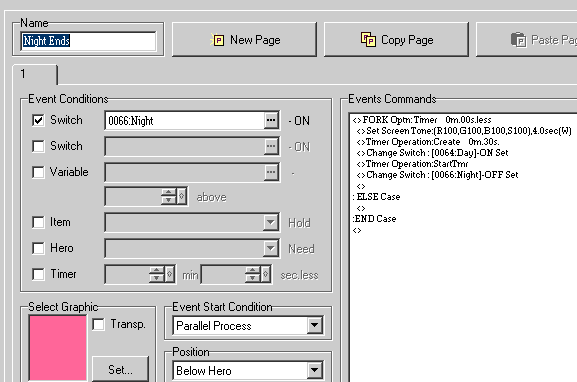
This screen shot shows the commands to set the day time screen tones And that’s it. Put this event on whatever maps are outside, play with the numbers to get the exact tone you want and you have a day/night system that does not effect inside buildings since you just don’t include the event on inside maps. For those you can just set whatever tone you want inside the building as part of the teleport event, you could event include a fork to have different screen tones based on the day/night switches. Since the events are on each outdoor map, if you have a gloomy area that always rains, you can add a call weather effect to the commands for that map and adjust the screen tones accordingly. Problems? Send email to gbennett61 |