bgcolor="black" link="white" alink="white" vlink="white" text="white">

RoK's newest fad since the release of the Beta Client!
Explanation: Customizing the skins on your RoK program is a LOT easier than you would think. Heres how it works:
In the folder "C:\Kaos\Skins" are multiple folders with assorted names. Classic, Dark Castle, Underground, and Lava are some of the ones that come with the beta client when you download it.
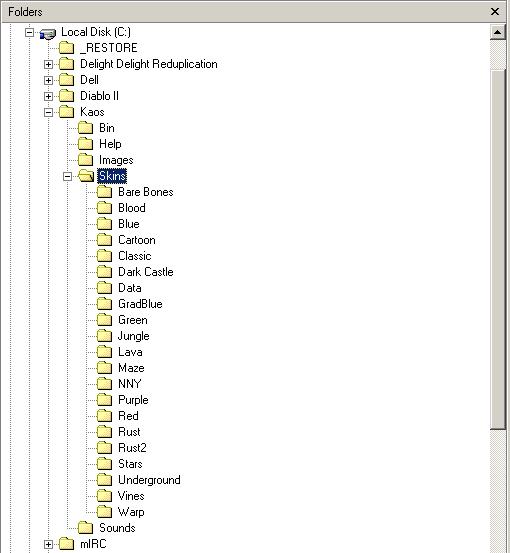
Inside each folder there are 13 .jpg pictures. Each picture is used for a different section of the background on your RoK window.
Each picture is numbered specifically to coordinate it with which area it is used for.
Therefor, you can just make 13 of your own pictures, alter them to be the correct sizes, make a new folder, and bam! You've got your brand new customized skin!
Now it may SOUND easy....but if you don't really know what you are doing, I wouldnt try doing it yourself as it may only cause you to have a messed up computer rather than a neat background.
I have a few custom skins already made by some players that are all set up and ready for you to download and try out.
Instructions: All you have to do is click the skin name on the left side of the screen and a window like this will pop up:
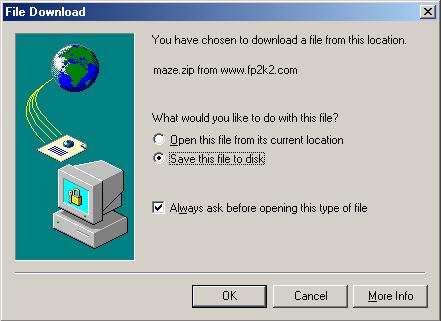
Click "Save this file to disk" and choose a location to save it to.
After you download the zip file containing the 13 images, you need to go into the directory named "C:\Kaos\Skins" and create a new folder within it. Whatever you name this folder is what the skin will be named when you try to select it for your background.
Then you need to unzip the file with the 13 images using a program like UltimateZip.
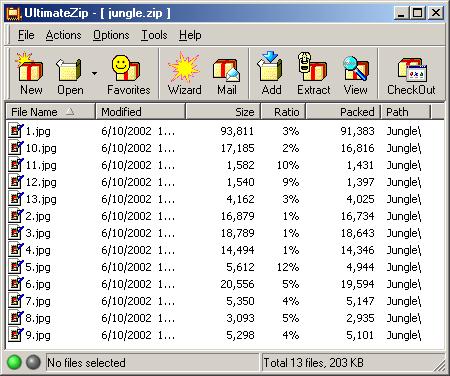
Either extract or copy the images into the folder you just created to use for your new skin. Restart your RoK client and then when you click "Skins" the new skin you just made will be available as one of the choices.
Easy enough, right? If you need me to explain it more you can email me at Aramoug@hotmail.com or contact me on AIM, my screen name is Aramoug.
To see and/or download custom skins submitted by other players Click Here!