
Site hosted by Angelfire.com: Build your free website today!

To create a new dialer in Windows XP


                                                                                                                                         Home
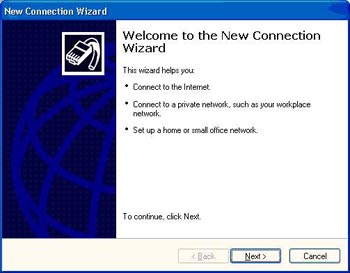
1. Start -> Connect to -> Show all connections -> Double click on New connection Wizard -> Click Next
                                                                                                                                Top  Home
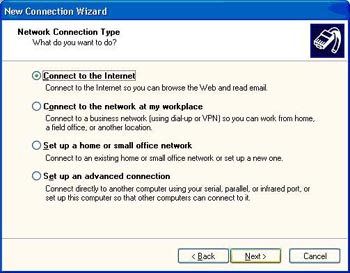


2. Select " Connect to the internet " and click Next
                                                                                                                                Top  Home
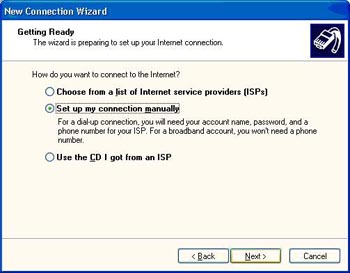


3. Select " Set up my connection manually "and Click Next
                                                                                                                               Top  Home
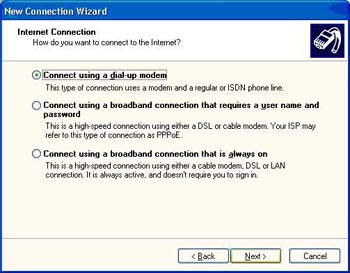


4. Select " Connect using a dialup modem " and click Next
                                                                                                                                Top  Home
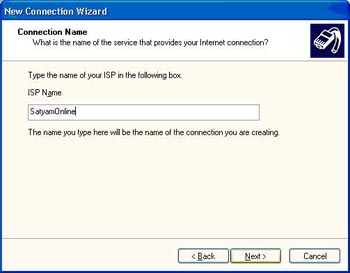


5.
Type the name of the ISP " SatyamOnline "and click Next
                                                                                                                                Top  Home
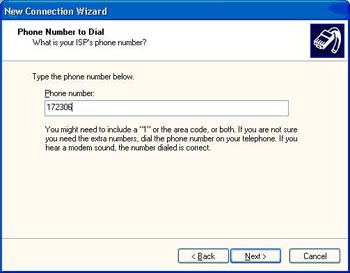


6. Specify the Phone number -> click Next
                                                                                                                                Top  Home
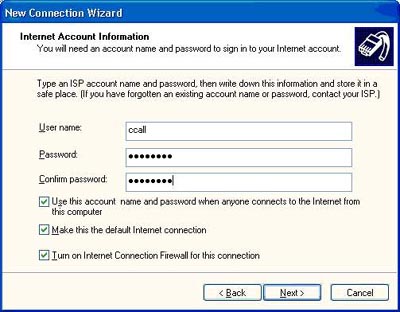


7. Type the Username and password - > Click Next
                                                                                                                                Top  Home
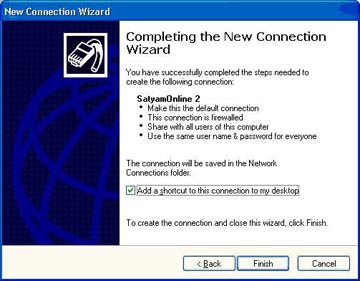


8. Click Finish - > Select Add a shortcut to this connection to my desktop
                                                                                                                                Top  Home
