
Site hosted by Angelfire.com: Build your free website today!

To create a new dialer in Windows 2000


                                                                                                                                         Home

1. Double click on the " My Computer " --> " Control Panel " --> " Network and Dialup..."
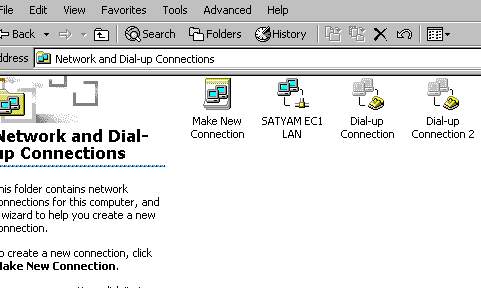


2. Double click on  " Make New Connection "

                                                                                                                               
Top  Home

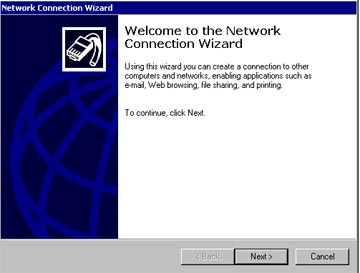
3. Click on Next button

                                                                                                                               
Top  Home

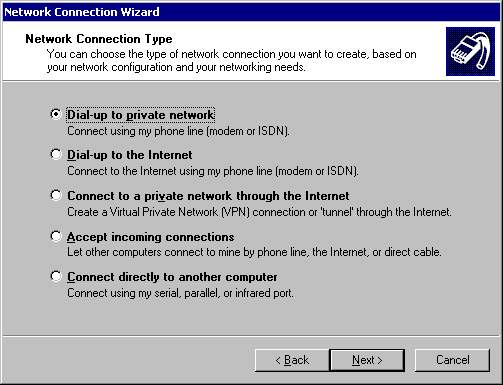
4. Select " Dialup to private network " and click on Next

                                                                                                                               
Top  Home

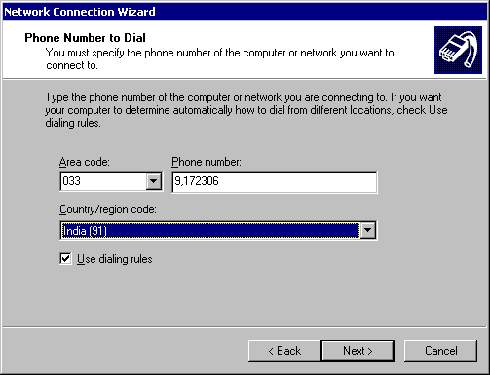
5. In this screen it will ask the phone number to dial and by default the use dialing rules option is disabled . If the user will check the option it will ask the Area code and Country code .Click on Next 

                                                                                                                               
Top  Home

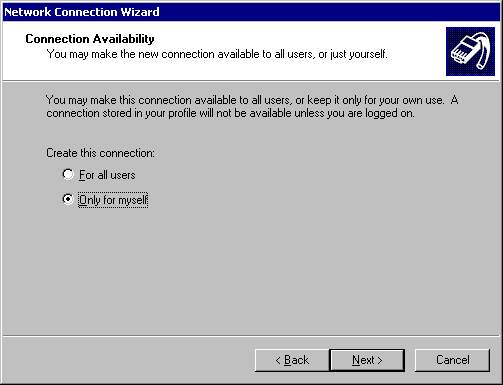
6. The mode of connection is of two types 1. For all users and 2 . Only for myself select the appropriate and click on next .
                                                                                                                               
Top  Home

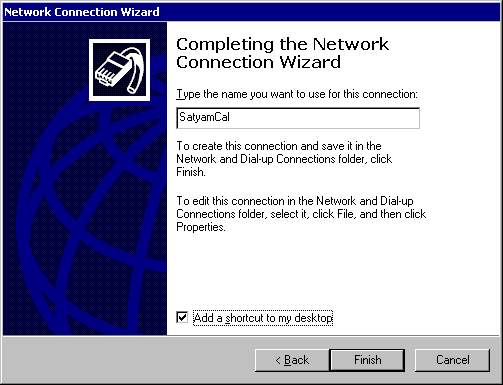
7. Type a name in the " Type a name you want to use for this connection" . If you want to create a shortcut for the connection on the desktop , check the option" Add a shortcut to my desktop " , click on Finish .
