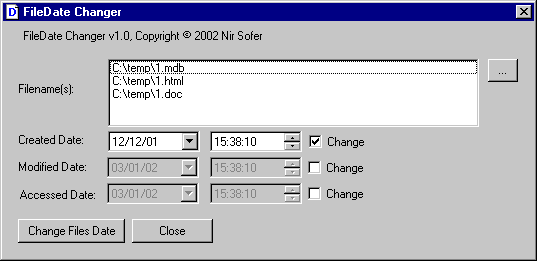
The FileDate Changer utility allows you to easily change the Created/Modified/Accessed dates of multiple files in a folder.
You can use this utility in all 32-bit Operating systems (Windows 95,98,ME,NT,2000,XP) with one exception: It requires the comctl32.dll with version 4.70 or above.
If Internet Explorer Version 3.0 or later is installed on your computer, the newer comctl32.dll is already installed on your computer.
Known Limitations
On FAT file system, the exact time of the "Accessed Date" is not saved as the other dates. Only the date (dd/mm/yyyy) is saved.
The "Accessed Date" has a little tricky problem:
With the FileDate Changer utility, you can modify the "Accessed Date". However, if you try to watch the "Accessed Date" of a file after you change it, You'll see the current date instead of the date you have just changed earlier !
The reason for this behavior: When you watch the properties of a file (in Explorer environment), The "Accessed Date" is always changed to the current date by the operating system...
License
This utility is released as freeware. You can freely use and distribute it.
If you distribute this utility, you must include all files in the distribution package including the readme.txt, without any modification !
Disclaimer
The software is provided "AS IS" without any warranty, either expressed or implied,
including, but not limited to, the implied warranties of merchantability and fitness
for a particular purpose. The author will not be liable for any special, incidental,
consequential or indirect damages due to loss of data or any other reason.
Using FileDate Changer
The FileDate Changer utility doesn't require any installation process as long as you have the newer version of comctl32.dll: version 4.70 or later. You don't have to worry about that, because this file is usually installed by Internet Explorer version 3.0 or later and by other applications. You probably already have the right version of comctl32.dll in your system.
In order to start using this utility, copy the executable (filedate.exe) to any folder that you want and run it.
After you run the utility, follow the instructions below in order to change the dates of one or more files:
Click the "..." button and Select one or more files. You can select multiple files in one folder by holding down the Ctrl or Shift keys.
Select which date type (Created Date, Modified Date and Accessed Date) that should be changed, by clearing or selecting the 3 check-boxes. By default, The "Accessed Date" is disabled.
Select the dates and times for changing the files you selected and click "Change Files Date".
Feedback
If you have any problem, suggestion, comment, or you found a bug in my utility, you can send a message to nirsofer@yahoo.com