|
This page is to help you get familiar with MS Paint. It is a simple program, so it shouldn't really be that hard to deal with. I've numbered each of the tools, and below is a more detailed explanation. Just
*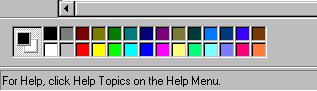
The color pallete lets you select both the background colors and the colors you'll be working with. If you double click on one color, you can also do a custom color! 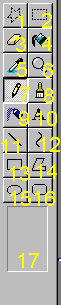 1. Free Form Select 1. Free Form Select
2. Select
3. Eraser
4. Flood Fill
5. Color Dropper
6. Zoom in/out
7. Pencil
8. Brush
9. Airbrush/Spray Can
10. Text
11. Line
12. Curve
13. Rectangle
14. Polygon
15. Ellipse
16. Rounded Rectangle
17. Misc. Options for each tool
- Free Form Select- this lets you select areas to move, copy, or delete by drawing around the object you need. It does not force you to use a square.
- Select- This tool allows you to draw a box around the part of the image you would like to select for moving, copying, or deleting.
- Eraser- This tool lets you- you guessed it, erase those ugly mistakes!
- Flood Fill- this tool lets you fill in any area with a single color of "paint." Its very handy.
- Color Dropper- this lets you pick up colors from other sources- a photo, a pallette, or another part of your doll.
- Zoom- This lets you zoom in and out so you can get close to your doll and draw on it, and zoom out to see what it'll look like when its finished.
- Pencil- this lets you draw single pixel lines when you're shading, outlining, etc.
- Brush- lets you "paint" things with a variety of shaped paintbrushes. This is good when you need to fill in a large area but you don't want to use flood fill.
- Airbrush/Paint can- this gives a sort of "spray paint" effect. Good if you want random dotting.
- Text- Lets you add all sorts of great text to your doll/image.
- Line- lets you draw a ray from any point to another point. You can do a straight line in several thicknesses, and this is handy at times.
- Curve- similar to the line tool, but you draw curves instead. Much less exact.
- Rectangle- lets you draw a rectangle, and if you want a square, hold down shift while you make it.
- Polygon- Lets you draw any shape you want, automatically connects the lines at the end.
- Ellipse- So you can make circles and ovals! Hold down shift for a circle!
- Rounded Rectangle- Lets you make a rectangle with rounded edges. Nice for buttons and things like that.
- Misc Options- when you click on another tool, sometimes there will be more options here. You can change them.
Thats about it for the tool explanations. Just mess around with them and see what you can come up with!!!!!!
|

