Alien Reverence: WindowsXP Enhancement

Tired of the boring, plain look of WindowsXP? Seen screenshots of Linux and wish your desktop looked as nice? Or maybe you run both Windows and Linux on your computer and want them both to look cool. Here are some ways to do it.

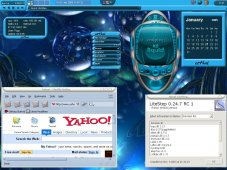
Here's a screenshot of my WindowsXP desktop under heavy enhancement. The bulk of the changes are created through Litestep under the Ethal theme. Other things were changed through various other software. Want to learn how it's done? read on,
Or you can go back to Main
The Software:
 This is the first piece of software I recommend. It was started a long time ago as a AfterStep(A Linux window manager like KDE or Gnome) clone replacement shell for Windows. Normally when you boot windows it loads the Explorer shell which gives you the usual start button and program management bar. After a litestep install, when you boot Windows it dosn't boot the Explorer shell at all, but the LiteStep shell instead. This leads to a more creative, powerful and stable shell to use while still being able to run all your usual Windows software(because you are in fact, still running Windows) Note: It is very easy to switch back and forth from Litestep to Explorer, and just as easy to remove Litestep if you dont like it. This one is freeware so it wont cost anything. It provides most of the graphical and user interface changes you see in the above screenshot. There are hundreds of themes availible that are all unique and diffrent in their own ways, find what looks best to you. The code that makes up the theme is all open so you are free to edit and customize all you want.
Go Here to visit Litestep's webpage and download the software, you will need a valid email account and sign up for the free membership to do this. (they wont send you constant annoying emails) To start I recommend you download the LiteStep Installer (omar) It offers a great easy to use setup program and is by far the simpilist way to get LiteStep on your PC. You can also find all the themes and a help forum on the site.
 Mozilla FireFox Web Browser:
Scrap Microsoft Explorer Web browser, time to get Mozilla's Firefox web browser. First on Linux and now ported over for Window's users to use. Completly free to use. You'll find this browser to crash a lot less and notice how useful its multi-tabbed web browsing, built in pop-up blocker, and themeable interface make browsing the web a much better experience. Note The browser in my screenshot above shows firefox open.
Get it Here
BootXP:

BootXP is a great program that changes the WindowsXP splash screen that comes on right before you enter Windows. You can download a theme for it or make your own. It's not freeware but you can use the functional demo. Excellent when you change your shell from Explorer to something else(like LiteStep) and don't want a 'Loading Windows' screen to display before you are in the Operating System.
Get BootXP Here
FrontMotion Logon:

Front Motion Logon is a great program that is used to change the way user's log on and off on your computer. It actually uses Macromedia Flash to create logon prompt's that are animated with a futuristic look and as a result become incredably attractive.
Get it Here, you can also find animated screenshots of what it will look like as well as a bunch of themes to use with it. This program is free for personal use.
CursorXP:

CursorXP is the program to use to change your boring old white arrow cursor to something much more interesting. It's a StarDock program, so you know it's going to be good. This one is actually completly free to use to! There are tons of excellently drawn animated cursor sets up for download and it's very easy to use. The cursor you see in my desktop screen shot above display's one of CursorXP's pointers.
You can grab your copy of CursorXP Here
Window Blinds:

Window Blind's is one of the must have programs. Unfortunatly it's not free but it does have a limited time fully functional demo for download. This program works on the bar thats on the top of any program you open (you know the one with the minimize, expand, and close buttons on the right side.) and change's it to a fresh new one that add's a really nice look to any desktop, especially when using a new shell like LiteStep. If you look in the screenshot of my desktop at the top you can see an example of this being used (can see it clearly on top of the Mozilla Firefox Browser) There is a huge selection of bar's to select from, it also allows the ability to roll a window up into the bar like in Linux and unroll it when you need the program again.
Download Window Blinds Here
Y'z Dock:

Y'z dock is a really cool program that seems to be a clone of a program for Linux called Ksmoothdock. It will put a program launcher like the one in the picture, full of all your favorite programs..then it will zoom in on the icon you scroll over and launch on click. Free to use.
Get Y'z Dock Here
Winstep Full Pak:

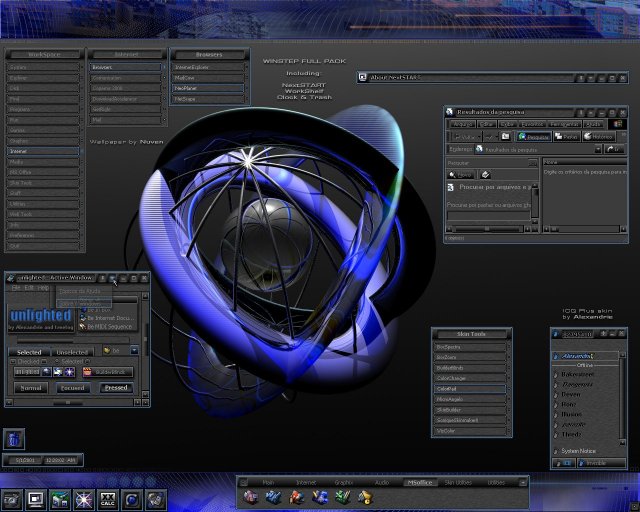
Winstep Full Pak as seen in the screen shot is another replacement shell similar to Litestep. It comes with a whole mess of themes so the look in the screen shot is only one among a very cool collection. It installs very easily and is pretty customizable. However if you really want full control over your desktop, I'd really recommend using LiteStep. I just put this on the page as an alternative. This one also isn't free but has a time period fully functional demo. I always go with free whenever possible, but as I said I really do find LiteStep to be much better, see for yourself.
You can get Winstep Full Pak Here
Dremples:

Now this is a cool little app. See the animated picture above? This program will make something like that(only way more intricate then the pic above)your wallpaper. Imagine that, a moving animated wallpaper for your desktop! Worth checking out, free to use.
Get Dremples Here
gAIM:

gAIM is Linux's version of AOL Instant Messenger, uses the same networks, and has all the same features and then some. gAIM is now ported to Windows, I recommend this because it eliminates the advertisements within AOL Instant Messenger and even has a feature to add new smiley themes.
Get gAIM Here
Like to Chat? IRC Programs:


IRC (Internet Relay Chat) can be a great way to chat with people all over the world or find file servers that dispense all kinds of files you might be in need of. These are the best chat programs you can get for Windows in my opinion.
mIRC is the classic popular Windows IRC program and is truly great. Takes a bit of getting used to at first but you'll soon find out it has tons of features. Highly Recommended. You can get mIRC Here
X-Chat, orginally for Linux has now been ported over to Windows. A great chat program with a great GUI and a lot of the same features as mIRC, Definatly worth a try. Get X-chat Here
Bitchx, a powerful command prompt IRC program originally for Linux and based off of irc-II, uses a quite attractive color ANSII graphics and has tons of cool options. Try it and see! Bitchx can be downloaded Here
Gotta Have the Music/Video, Try These:
 Winamp is by far the best media player in my opinion. It's been around a long time and has improved drastically over the years. It now plays all major sound formats as well as video. Also supports a variety of visualazation plugins, sound plugins, equalizer, and cool skins which can even be transparent as seen in the screenshot. All skins and plugins are availible on their website. This one comes highly recommended and is free to download.

Get Winamp Here
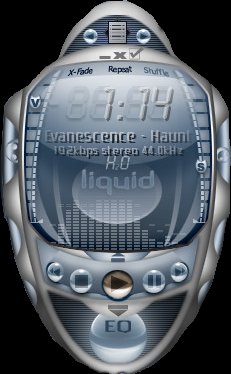
 Sonique is another music player which is free to download and seems to now be sponsored by Lycos. It also supports a number of sound, visualization, and skins(also transparent) all of which are availible on their website. Worth checking out. See screenshots below for examples of some of the different looks of Sonqiue.

Get Sonique Here
Know about some cool software not listed here that I don't know about? Or are you looking for software that does something specific that you don't see here? Email me at pogo730@yahoo.com and tell me about it, please include a link of where the software is located, or provide a decent description of what it is your looking for.
Go back to Main