
By Nathan Sturcke
In VBScript scripts often data needs to be collected and displayed quickly and easily. But to do this wuold involve making new objetcs to display or gather that data which of course invlolves time. There is a lot easier solution though, simple, effective and oddly fascinatin: message and input boxes. Below are a picture of each and if you click on the images you can get a feel for what the message and input boxes actually do.
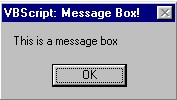

But how do we add message boxes to our scripts, and the answer is with a tiny bit of code.
Message Box code:(bold is needed, italisized is changable)
MsgBox "The text inside the message box",The button type,"The title of the message box"
Input Box code:(bold is needed, italisized is changable)
InputBox "The text inside the message box"
MessageBoxes - This number is insert betweent the message and the title. |
|
| Number | Demo |
| 1 - Ok, Cancel | |
| 2 - Abort, Retry, Ignore | |
| 3 - Yes, No, Cancel | |
| 4 - Yes, No | |
| 5 - Retry Cancel | |
| vbCritical | |
| vbinformation | |
| vbOkOnly | |
As you can see there are many type of message boxes and all can be used in various situations. Message boxes are usually used in If Statements to verify something with the user while inpitboxes are used to gather information as a substitute for text boxes. Through out your programming life message and input boxes are extremely important and without them most language would be a lot harder, in fact most languages actually use message and input boxes so you really do need to know them for a lot of things. That concludes this tutorials but at one point or another I am going to have to update and put more about input bixes, until then.
Below are some lessons you will also need to learn more about VBScript:
Objects: the building blocks of scripts. If Statements: Decisions, decisions, decisions. Strings? Rope? Whats the difference?
