

HOW TO UPLOAD A SPECIFIC FORM TO PROCESSCLAIMS:
@NOTE@ The following is assuming the form is already in ICImage.
1.) Open ICImage and select the file we are working on.
2.) Highlight the form located on the right by left clicking it (it will have a red box around it when highlighted).
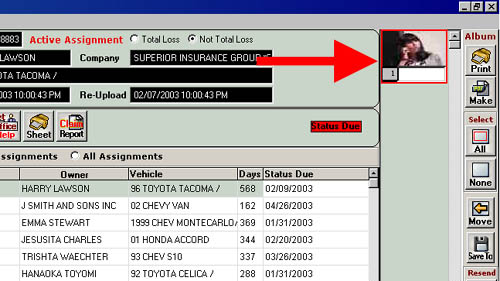
4.) Now glance at the lower left corner of your screen, it will display a file name. Make note of that file name.
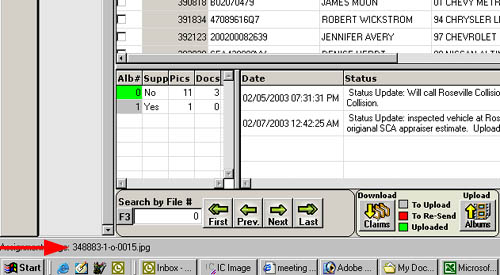
5.) Open processclaims. Log in and go to the upload screen (claims > estimate > upload estimate).
6.) Near the bottom right hand portion of this page left click the plus sign next to "C". (if it's a minus sign don't click it, we want there to be a '-' next to 'C')
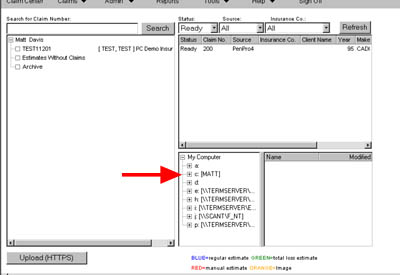
7.) Scroll down to "program files" and left click the plus sign next to that.
8.) Scroll down to "kelly-weston" and left click the plus sign next to that.
9.) Left click the plus sign next to "Icimage Remote".
10.) Left click the plus sign next to "Assignments".
11.) Locate the SCA number of the file were working and left click it (NOT THE PLUS SIGN, LEFT CLICK THE NUMBER ITSELF).
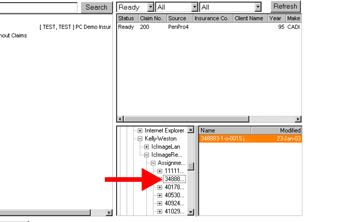
12.) This will display the contents of the folder on the right. Left click the file name that you made note of earlier and drag it on over to the left and attach it to the file your working on. The end!
