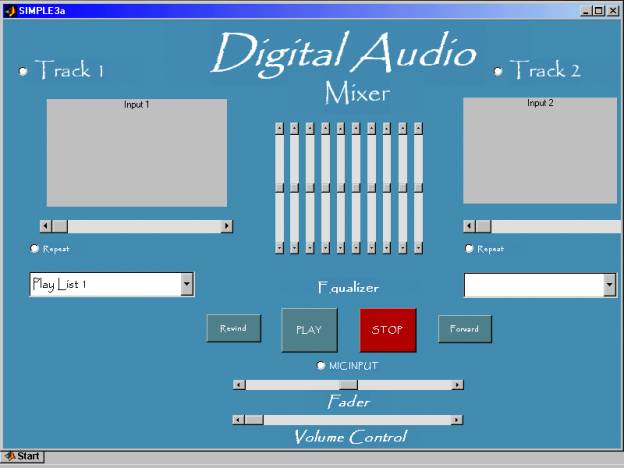
This project was designed using a professional DJ mixer as a reference. It contains all of the major elements: cross-fader, volume controls, 10-band equilizer, microphone input, etc. Three preloaded tracks can be chosen per channel using a drop-down menu box. The cross-fader (if you are unfamiliar) will fade out one channel while fading in the other. Both channels will play simultaneously if desired.
This project was created entirely using Matlab. It consists of two major parts: the GUI (Graphical User Interface) and the Simulink Block Diagram. The GUI is a separate window which allows the user to adjust scrollbars, buttons, etc. while the program is running. The GUI updates the simulink model, changing the variables in real-time.
The GUI can be seen below, as well as a labeled Simulink Model and its subsystems with explainations.
- Click here to read the Project Report (Microsoft Word Document)
- The GUI that controls the mixer (Simulink Model):
- The Simulink Block Diagram that receives the inputs from the user (subsystems and specific blocks) and produces an output ("To Wave Device"):

- Two subsystems: "Enabled Subsystem 1," the audio file inputs for each channel, and "Subsystem 2," the crossfader itself.

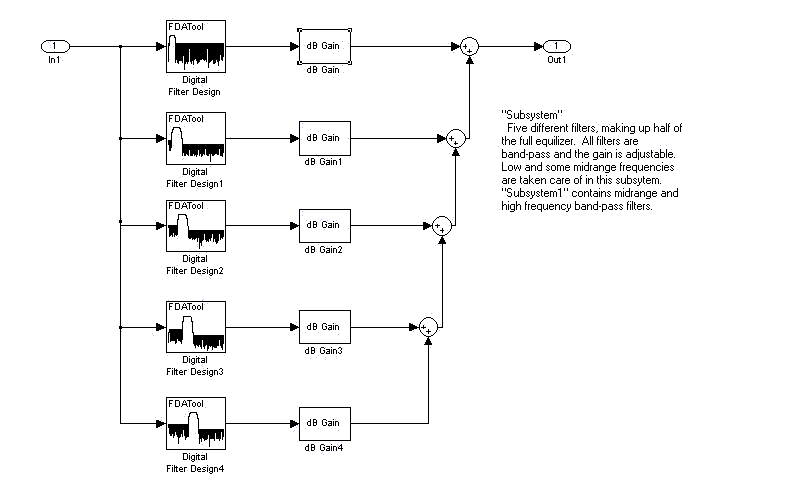
- Equilizer subsystem. Five band-pass filters per subsytem. The "dB Gain" changes when the user adjusts the EQ.
Top

