|
How To Import Data In Metastock
Start Metastock
Go to Tools – Downloader
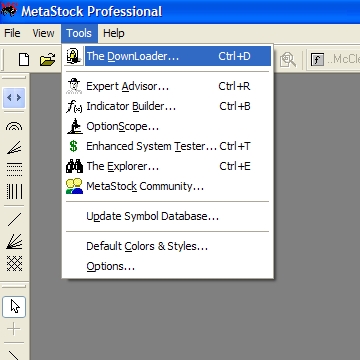
Now you will get downloader
Click the Tools menu and choose Convert... as follows:
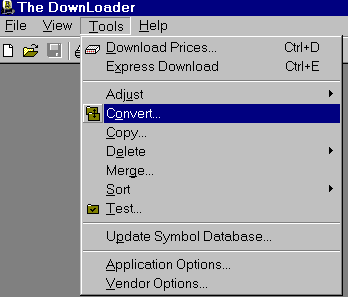
You will see a Window similar to the following:
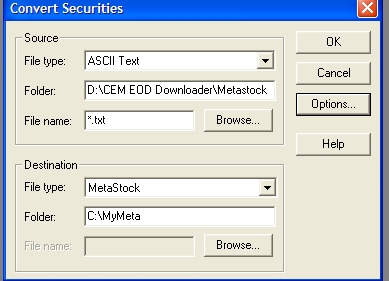
Source
File type: Select ASCII Text
Folder: Select the folder ‘Metastock’, this will be
in folder where you have installed CEM EOD data downloader.
File Name – Write *.txt
Destination
File Type: Select MetaStock
Folder: Click Browse: Select the folder where your
historical data is contained.
File Name: This is not needed
The Options Button.
Click the Options button to open the conversion options dialogue box. This
is very important, otherwise your data will not import correctly.
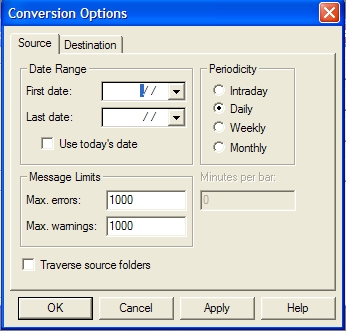
Periodicity. Choose the Periodicity of the source file as Daily.
Now
Choose Destination from the Conversion Options dialog and ensure that the
settings are as follows
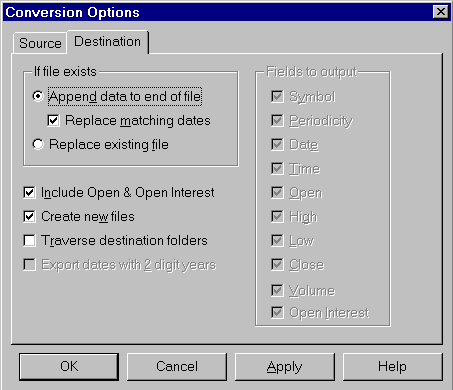
Click OK or Apply to confirm these settings.
Click OK of "Convert Securities"
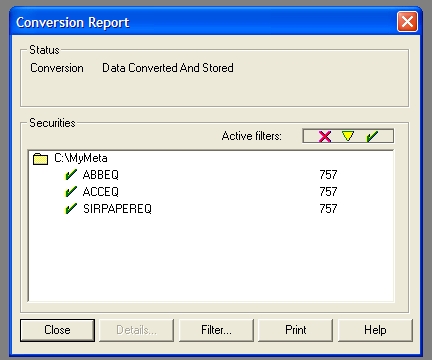
Conversion Report
After a conversion is complete the Conversion Report appears showing the results
of the conversion process. A green check mark next to the file means that data
was successfully converted and stored. A yellow triangle means that
warnings exist. A red X means that errors exist.
Go To Top
|


