
How I Added Profiles to Microsoft Movie Maker
Creating a New Profile in WindowsXP
Adding the New Profile to Windows Movie Maker
The information presented on this page is for research purposes only. It is not meant in any way to condone copyright violation. Windows ME, WindowsXP, Windows Movie Maker, Windows Media Encoder are all registered trademarks of Microsoft Inc.
Windows Media Format for Video (WMV) is perhaps one of the most compelling video formats currently available. It provides tremendous quality for files that end up being very small (An interesting comparison of codecs is given at http://www.linkline.com/personal/rwreed/codecmp.html also see another comparison, though less favorable, at http://www.digital-digest.com/nickyguides/WM8-test.htm ) I agree with the contention that WMV is a superior format and is fantastic for archive purposes.
Despite the benefits of Windows Media Format it has yet to be picked up as a video format by either of the two NLE software packages (Ulead or Premiere). Thus to modify a WM video you are really reduced to using Movie Maker. Movie Maker is only available as part of Windows ME or WindowsXP. Microsoft has not chosen to release it as an independent product. There is a rudimentary editor provided with the Windows Media Encoder Resource Kit called ASFChop but I have found it unwieldy. If you're interested in using Movie Maker and don't have either of these products I know of no other alternatives. However, Movie Maker has some great features and is not a bad non-linear editor. However there are two problems with it. First, it has no capability of saving to a format other than WMV. So you cannot save your video projects to MPEG-1 to view on a VCD or MPEG-2 to view on a DVD. WMV is a one way format, once you've saved it to WMV there is no going back unless you preserve your original source (which sort defeats the whole point). Second, even using WMV format you are limited in the bit rate and screen size you can save your projects in Movie Maker to the options that are listed in the Profiles provided with Movie Maker. That list is very pathetic in Windows ME, limiting one to no more than 400kbs. It is better in WindowsXP (at least as far as RC1 is concerned, we will see when it is actually released), but it still does not appear to intrinsically support Microsoft's latest Windows Media codec called "Windows Media 8" which really pares down the compressed file size.
The following information then chronicles an experiment I did in an attempt to add a profile to Movie Make in both XP and ME. This is presented only as a report of what worked for me. It should not be construed as an encouragement to do the same necessarily. I also take no responsibility for any damage or problems that results from this. Which leads to our next section
The following information is a report of what I did. Please note one of the precautions I used was to BACKUP ALL FILES AFFECTED BY THIS PROCESS. THAT INCLUDES THE MOST IMPORTANT FILE WMSysPrx.prx AS WELL AS ANY PROFILES CREATED. The author of this page take no responsibility for use of this procedure. All users are encouraged to behave in a morally and legally responsible manner.
Creating a New Profile in WindowsXP
As intimated in the warnings, the profiles for Windows Movie Maker are stored in a singled file called /Windows/WMSysPrx.prx The .prx file is essentially a text file. A new profile can be added simply by adding it to this file. Windows Media Encoder 7 can create new profiles. I used Windows Media Encoder 7.1 to create a new profile which I called "Test of Theory."

Profiles are added and modified through this screen which is about the 4th screen in the New Session Wizard the Windows Media Encoder starts up with. I clicked the "Create and Manage Profiles..." button to begin the process.

I then chose a profile to modify in the Manage Profiles window and clicked Copy... Gave it a new name "Test Of Theory" and then clicked "Edit..." to modify my new profile.

This is the first screen change the description to match what your profile will now do, it will be less confusing in the long run.

Click the Target Audience. In this case I have selected the highest Mps because that would give me the greatest quality.

I modified this so that it had the right audio and video specs. General consensus seems to be that you lose little in terms of quality by creating video at half size and the file generated is much smaller.
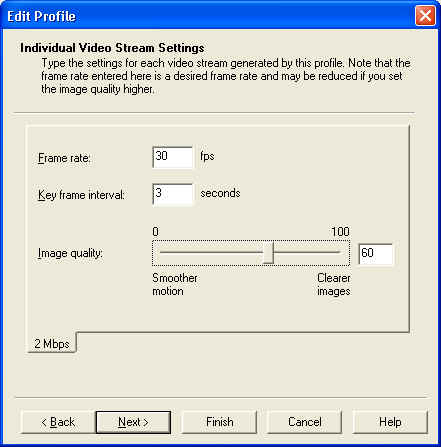
This screen is a place to tinker. A lower number means worse quality. However higher numbers will tend to increase file size and may generate a file that is difficult to play on many machines since they don't have the processor muscle to keep up. I went with a medium number at 60.
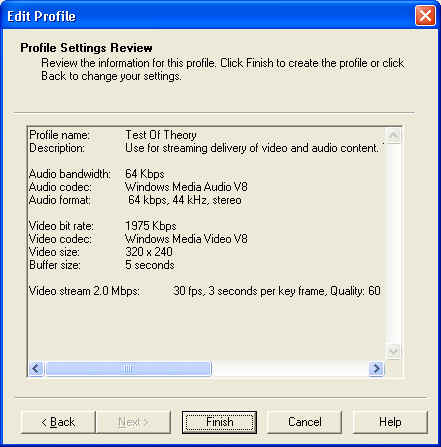
This window displays the results of my modified profile. When I click Finish it will add it to the list of profiles available. It is possible to use the profile to convert a file to windows media format from MPEG-1, MPEG-2 (if you have a DirectShow Filter installed) or AVI using Windows Media Encoder.
But I was interested in using this profile in Microsoft Movie Maker so on to the next part.
Adding the New Profile to Windows Movie Maker
Windows Media Encoder will create a .prx file for each newly created profile. The .prx file is a simple ASCII file in XP and can be loaded into notepad using the Open With... option on the shortcut menu.

It was a fairly simple task for me to select all and then copy this to the clipboard. Next I opened the Windows Movie Maker file WMSysPrx.prx in notepad as well and copied in my new profile just below the <PRX> tag. Of course I backed up WMSysPrx.prx before I made any changes by copying it into a temp directory.

The new profile is now ready to be used in Windows Movie Maker.
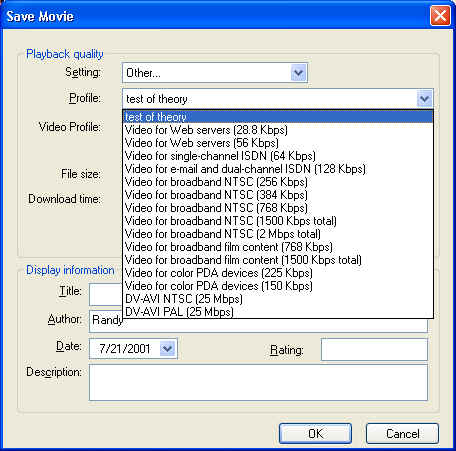
This is the Save Movie window which I selected after I had constructed a new video project. As you can see by selecting "Other..." my new profile shows up as an option in the profile drop-down box.
Creating a profile is essentially the same in both programs (WinMe & WinXP) so go back up to Making a New Profile in WindowsXP if you are interested in my data on that.
Where this became tricky was when I tried to add it to Windows Movie Maker. The file that Windows Movie Maker stores is profiles in is the same in both versions of windows WMSysPrx.prx. This file is a simple ASCII file that can be opened in Notepad or WordPad.
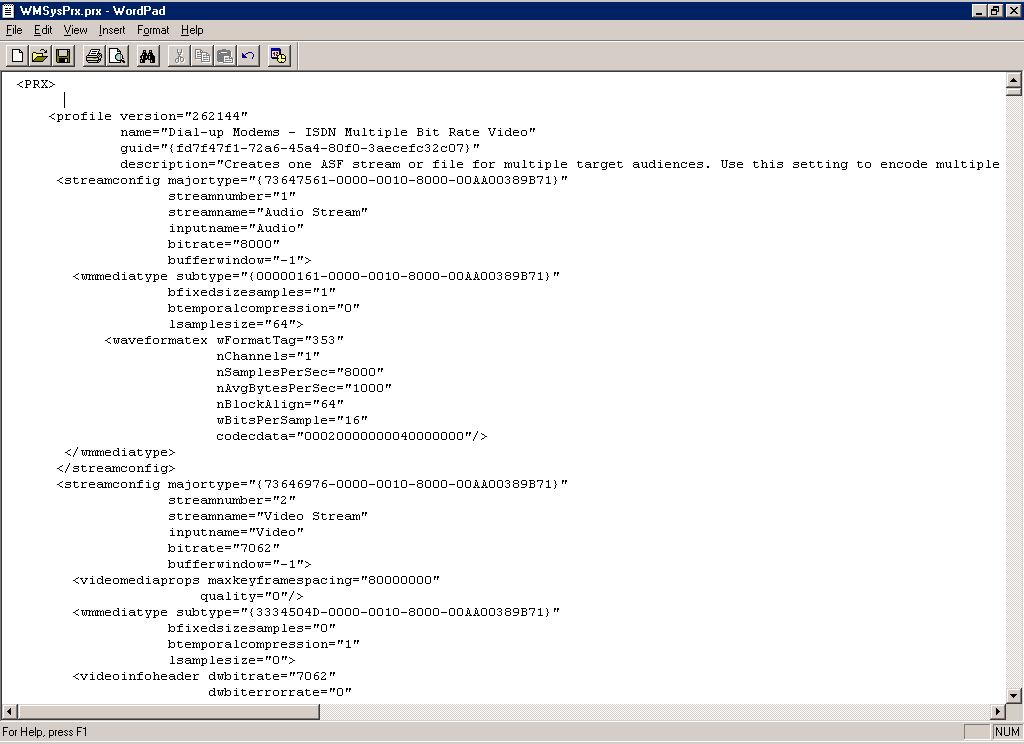
Where it became tricky was dealing with the .prx file generated by Windows Media Encoder. Take a look at the test profile I created in WinME which I called 320x240 test.prx
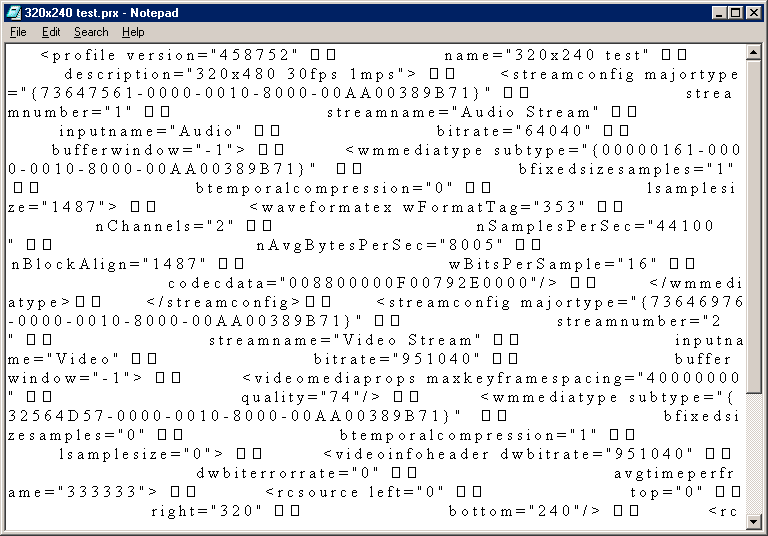
As is apparent I had a file filled with unprintable characters. I solved this problem in the following way. First I did "Save As..." to save it as text file. This converts the unprintable characters to spaces. But I've got two problems here. First I have a space between each letter which means windows Movie Maker's parser is going to have a problem and the formatting is all messed up so I can't see what I'm looking at. What I did was load it into WordPad (this will work with Word as well, but WordPad comes standard with Windows) and I converted all my double spaces into periods. Of course, I could have used any number of delimiters like |. It looked like this when I was done.

Now I can replace all my single spaces with nothing which will effectively delete the spaces and not mess up the format of the document. Now my document looks like this.
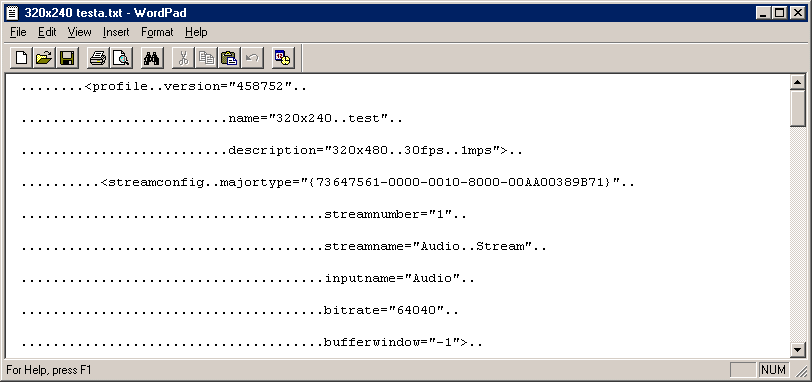
Much better, but I'm not home yet. I could just now convert all the . to spaces and paste it into WMSysPrx.prx and it would work without a problem. But I'd like to make it a little cleaner. So First I convert all the triple periods into spaces. This gives me a file that looks like this:
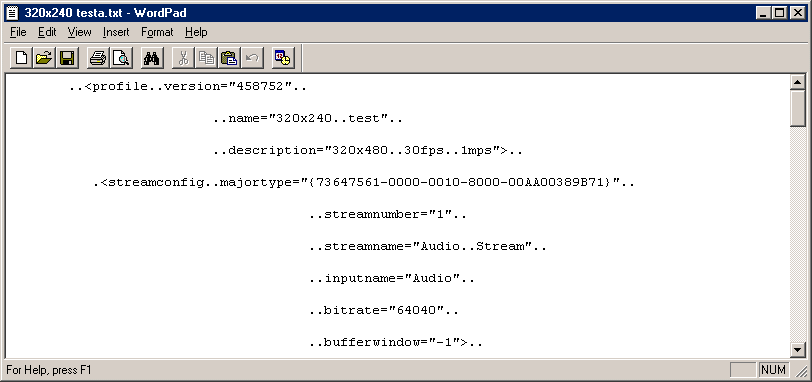
Then I converted all the double periods in to single spaces. I found I had to be careful to delete everything in the replace field of the find/replace command because sometimes stray spaces would still be there.
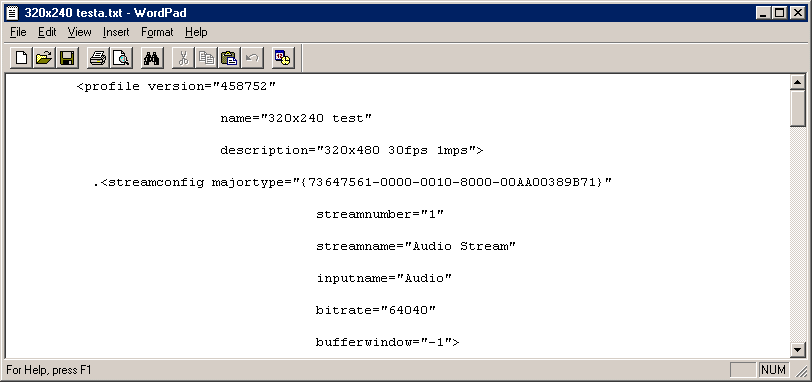
You might notice I still have a couple of stray periods that didn't get taken out by either the three period replace or the double period replace. So I run one more find/replace changing all periods to spaces.

Now that looks quite cleaned up. The only problem is that its double spaced and WMSysPrx.prx is single spaced. I'm not sure whether that would make a difference I didn't try it. Unfortunately I've reached the limits of WordPad. WordPad has no way of converting double spacing into single spacing. To fix this I either have to go through and delete the extra line manually or use another program. I can save this file as a text file import it into Word as plain text and then search on the paragraph code ^p^p and replace them all with ^p and I have a file that looks like this.

Now that's the ticket! I can now select all and copy it into WMSysPrx.prx in WordPad just below the <PRX> tag, resave it as a text file and I have a new profile in Movie Maker in Windows ME.

And that's all I had to do. Clearly its easier in XP than in ME because XP notepad strains out the unprintable characters for me. But besides that the process was generally the same. I encourage individuals who are doing work in this field to publish their findings as I did. Academic research is perpetuated only by engagement and publication. Currently the Movie Maker newsgroup at news://msnews.public.moviemaker has seen very little informative traffic and is more and more filled by spam. This is a sad state of affairs. Part of the publication of my findings is related to the lack of substantive responses on that list. I hope that others who have tricks, experiences or information to share will do the same.
