
Chat Control Troubleshooting
If you use MSN browser go to the
 icon on the start menu and right click to find
:
icon on the start menu and right click to find
:
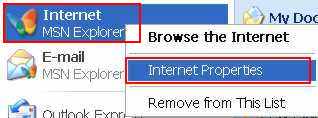
OR
If you use the Internet Explorer browser Go to "Tools" and then "Internet Options":
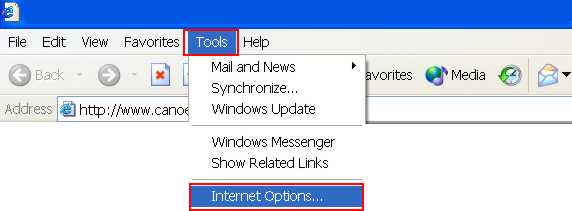
"Internet Options" is the same thing as "Internet Properties"
The Internet Properties dialog box pops up:
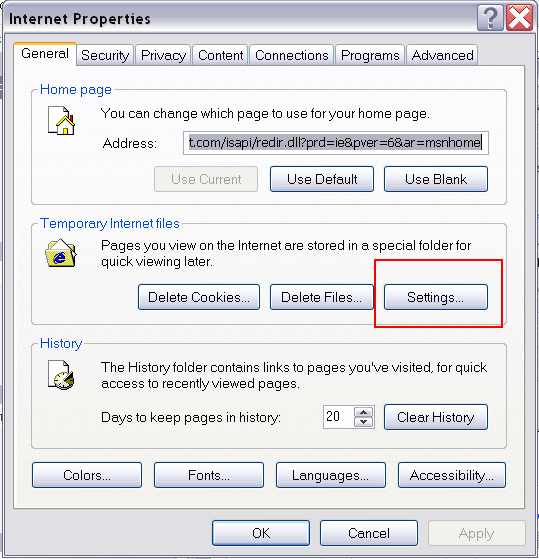
go to and select the Settings button and then View Objects :
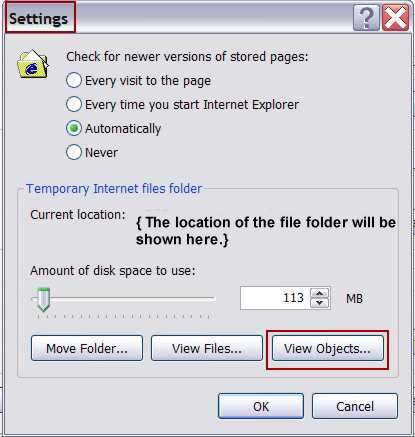
While you're there, may as well Delete Cookies and Delete Files (for Windows XP) or Delete Files (for Windows 98); as well as Clear History.
{Regardless of what operating system you're using: Windows 98, ME, 2000, or XP, the pathway to the Internet Properties and the "Settings" should be basically similar.}
A window opens, and you select the MSN Chat Control
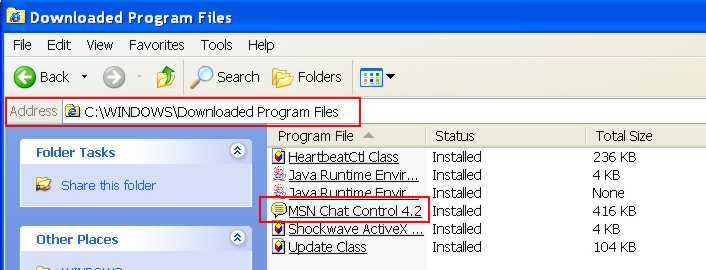
Another way to get to these files, is to type the pathway to the folder in the "Address" field. If you only have one hard drive, and its designation is C:\ , then the pathway would be C:\WINDOWS\Downloaded Program Files .
Highlight the MSN Chat Control and delete it, close window, click OK on the Settings box, click OK on the Internet Properties.
