
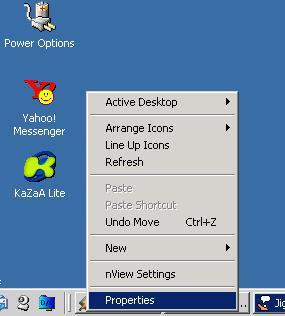
Step 1: Right-click a blank space on your desktop and click 'Properties'.
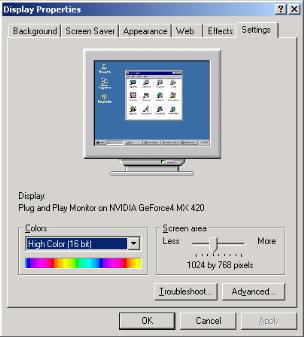
Step 2: Click the 'Settings' tab on the upper right.
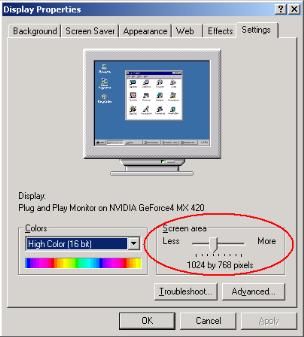
Step 3: Move the slider in the 'Screen Area' to the right until it changes to 1024 x 768.
(NOTE: If your video card does not support 1024 x 768, it will not allow you to change to that resolution)
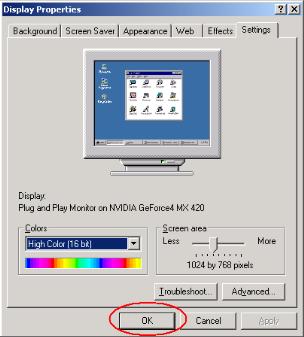
Step 4: Press the 'OK' button to set the changes.
(NOTE: You may need to restart your computer after this change. If you are given a choice, apply the changes without restarting)
If you need additional assistance, IM me on HrnyRabidRaccoon
Email: Rorybjb@hotmail.com
Step 1: Right-click a blank space on your desktop and click 'Properties'.
Step 2: Click the 'Settings' tab on the upper right.
Step 3: Move the slider in the 'Screen Area' to the right until it changes to 1024 x 768.
(NOTE: If your video card does not support 1024 x 768, it will not allow you to change to that resolution)
Step 4: Press the 'OK' button to set the changes.
(NOTE: You may need to restart your computer after this change. If you are given a choice, apply the changes without restarting)
If you need additional assistance, IM me on HrnyRabidRaccoon