
how to remove Vloading parasite parasites
open a browser window
go to File click to open and copy paste the green sentence %WinDir%\Downloaded Program Files
Once the files are displayed delete the 'Download class'
right click and select remove .
Below is step by step guide to remove most Parasites
Start Removing TopText
| 1. | From your Taskbar select:
Control Panel > Add/Remove Programs |
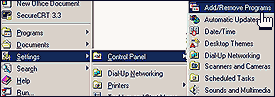 |
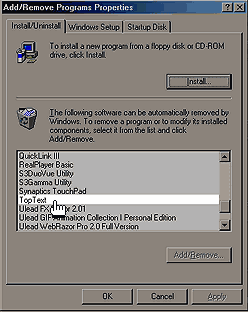
| 2. | In the Add/Remove Programs Properties
pop-up window:
Locate one of the following program names: TopText HotText ContextPro Select the program name you find by clicking on the name in the white window. Click OK to begin the uUninstall process. These are all different names for the same ScumWare program. If you locate more than one of these program names, repeat this step
for each of the program names. |
 |
| 3. | Restart your computer
This is a critical step. Do not skip it. |
