|
Seashell Angel Part 3
by LovlyGypsy

Click on your background layer and click the create layer button and name the new layer wings. Click the freehand tool
 , feather 0, Antialias checked and make one wing, here's mine... , feather 0, Antialias checked and make one wing, here's mine...

Click the floodfill tool, select white as your foreground color and floodfill the wing. Deselect. Turn the visibility off on all your layers except the background & wing layers, that way we can see what we're doing. Click the freehand tool again and draw around like this...

Click inside your selection, go to EFFECTS>3D EFFECTS>DROP SHADOW and I used these settings...
Vertical: 0
Horizontal: 0
Opacity: 85
Blur: 7.4
Deselect. With your freehand tool start at the right side, follow your line and draw to the left, then all the way down, then to the left, then all the way up, draw to the left, then all the way down, then to the left, then follow your line all the back up and connect where you started. It should look something like this...
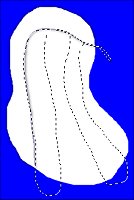
Click inside your selection, go to SELECTIONS>INVERT and apply the same drop shadow, deselect and mine looks like this...

Go to EFFECTS>BLUR>GAUSSIAN BLUR and blur her wings by 5. Now mine looks like this...

Turn the visibility on for all layers.
Copy your wing, paste as a new selection, mirror and place on the other side like this...

Click on your shell layer and add a drop shadow with these settings...
Vertical: 0
Horizontal: 0
Opacity: 63
Blur: 7.4
Click on your head layer and add the same drop shadow.
Click on the blue layer and delete it. Go to LAYERS>MERGE>MERGE VISIBLE.
There ya go, and here's mine...

If you have any questions please feel free to email me...
LovlyGypsy@AOL.com
back
to page 1 back
to page 2
Copyright © 2000-2001 by LovlyGypsy,
all rights reserved
| I, LovlyGypsy,
Give my permission to Ldy
Archrr aka Artists for PSP to place any and all tutorials
that I have made on her site.. this 22nd day of February 2001.
These tutorials were made solely by me and permission is mine to
give. |
|

