|
How to make a 3 Layered Drop
Shadow Tag
The DOWNLOAD file contains
these files...
dgirl.tub
sparkleb.tub
.
Download, unzip.
Open PSP open the tube files and export each as a
picture tube.
Go to FILE>NEW with the following settings...
Width: 300
Height: 300
Background color: White
Click ok.
Click the tube tool  and
select...dgirl: 49% on the control palette. and
select...dgirl: 49% on the control palette.
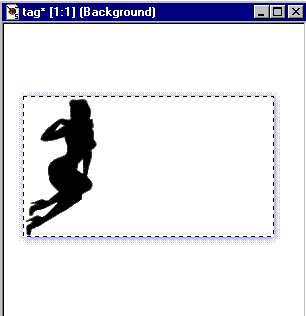
Place the girl to the left side. Like this...

Click the background color box and pick a color.
I picked dark blue.
Click the selection tool  and
make a rectangle around the girl like this... and
make a rectangle around the girl like this...

Go to IMAGE>EFFECTS>DROP SHADOW use the
following settings...
Color: Blue
Opacity: 255
Blur: 10.6
Vertical: 1
Horizontal: 1
Click ok. Now it looks like this...
Click the selection tool again.
Click anywhere outside the dotted lines to
deselect.
Now make a rectangle inside the one you just made
like this...

Go to IMAGE>EFFECTS>DROP SHADOW use the
following settings...
Color: Blue
Opacity: 255
Blur: 10.6
Vertical: 1
Horizontal: 1
Click ok. Now it looks like this...

Click the selection tool again.
Click anywhere outside the dotted lines to
deselect.
Now make a rectangle inside the one you just made
like this...

Go to IMAGE>EFFECTS>DROP SHADOW use the
following settings...
Color: Blue
Opacity: 255
Blur: 10.6
Vertical: 1
Horizontal: 1
Click ok.
Go to SELECTIONS>SELECT NONE.
Now it looks like this...

Now click the crop tool  make
a rectangle make
a rectangle
around the outside drop shadow like this...

Now double click in the rectangle to crop it.
Click the tube tool and select...sparkleB: 28% on
the control palette.
And place a few sparkles anywhere you want them.
Here's what mine looks like now...

Now your ready to add text to the center rectangle.
Here's what it looks like if you buttonize before
you do the drop shadows.

If you have any questions please just ask...
Copyright © 2000-2001 by LovlyGypsy,
all rights reserved
| I, LovlyGypsy,
Give my permission to Ldy
Archrr aka Artists for PSP to place any and all tutorials
that I have made on her site.. this 22nd day of February 2001.
These tutorials were made solely by me and permission is mine
to give. |
|


