|
How To Make A
Mirrored Shadow Effect
The attached file contains the following files... Download
Here
fairy1.tub
aristo.ttf
Download and unzip, open Explorer and go to the file you unzipped to and
cut the font aristo.ttf and paste it into your Windows>Fonts
folder.
Open PSP, open the tube fairy1 and export it by going to
FILE>EXPORT>PICTURE TUBE, when the box comes up just type in a
name and click Ok. Now go to FILE>NEW and use these settings...
Width: 400
Height: 400
Transparent background
If your Layer Palette isn't up bring it up by clicking the Toggle Layer
Palette button  now click the Add New Layer button
  when the box comes up just click ok. Your Layer Palette should read
from top to bottom Layer2, Layer1. Now make sure Layer2 is selected and
click the tube tool
when the box comes up just click ok. Your Layer Palette should read
from top to bottom Layer2, Layer1. Now make sure Layer2 is selected and
click the tube tool  and select the fairy on your control palette now place the fairy at
100% in the center to the left like this...
and select the fairy on your control palette now place the fairy at
100% in the center to the left like this...

Click the foreground color (top
box) and select any color you want your text to be. Now click the Text
tool  and click on
the pic to the right of the fairy and select your font, I'm using
Aristocrat, Bold, size 40, make sure Floating is checked and click ok.
Now move your text beside the fairy's foot like this... and click on
the pic to the right of the fairy and select your font, I'm using
Aristocrat, Bold, size 40, make sure Floating is checked and click ok.
Now move your text beside the fairy's foot like this...

Select none by holding down the
Ctrl button on your keyboard and pressing D. Go to EDIT>COPY now
click on Layer1 to select it and go to EDIT>PASTE>AS NEW SELECTION
place it below the first fairy and go to IMAGE>FLIP now line the
fairy up with the first one like this...
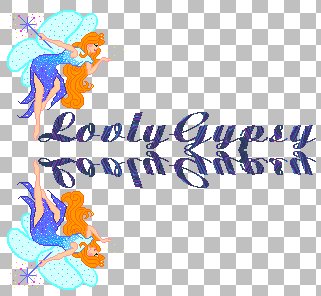
Ok select none again. Now we
need to mute the bottom fairy a little. On the control palette make sure
Layer1 is selected and slide Layer1's slider to the left to mute, I set
mine to 46 like this...
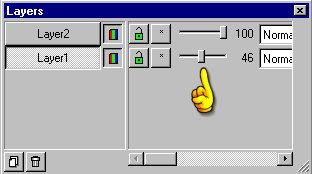
Now go to
LAYERS>MERGE>MERGE VISIBLE and go to EDIT>CUT,
EDIT>PASTE>AS NEW IMAGE and save and mine looks like this...

That's it. If you have any
questions please just ask...
Copyright © 2000-2001 by LovlyGypsy,
all rights reserved
| I, LovlyGypsy,
Give my permission to Ldy
Archrr aka Artists for PSP to place any and all tutorials
that I have made on her site.. this 22nd day of February 2001.
These tutorials were made solely by me and permission is mine
to give. |
|


