|

Text On A Curve Using the Deformations
Tool
.
Open a new file
Width: 400
Height: 300
Transparent background
Select black as your foreground color.
Click on the Shapes tool  and
use these settings control palette... and
use these settings control palette...
Shape: Circle
Style: Outlined
Outline Width: 1
Draw a circle in the center like this...

Now click on the Toggle Layer Palette button  .
When the Layer Palette comes up click the new layer button .
When the Layer Palette comes up click the new layer button  ,
after doing that Layer2 should be the one that is selected if not select
it. Click the text tool, click on the pic and pick a font. I picked
Arial Black, Bold, size 28, check Floating. ,
after doing that Layer2 should be the one that is selected if not select
it. Click the text tool, click on the pic and pick a font. I picked
Arial Black, Bold, size 28, check Floating.
Now you want your text centered at the top of the
circle like this...

Now select none. Now I am going to click the
selection tool and draw a rectangle around the Lovly and single click
inside of the rectangle to select it. Now I will click the Deformations
tool  and
that will put a box around my text like this... and
that will put a box around my text like this...

Notice there is two boxes in the center move your
mouse to the box on the right and click and hold down the button and
move your mouse up. Now that moved the text at a slant like this...

Now click on the box on the left and move your text
until your last letter, mine is the l, is touching the circle like
this...

Now select none and do all that again with the next
letter until you have all the letters on the left done like this...

Now you need to do the other side but instead of
moving your mouse up, move it down.
Do all the letters and it will look like this...
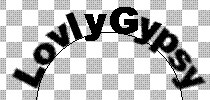
On the Layers Palette click on Layer1 and click the
delete layer button  and
when it asks click , Yes. Then click the selection toon and draw a
rectangle around your text and click inside the rectangel to select it
and go to EDIT>CUT, EDIT>PASTE>AS NEW IMAGE. I saved mine as a
.jpg and it looks like this... and
when it asks click , Yes. Then click the selection toon and draw a
rectangle around your text and click inside the rectangel to select it
and go to EDIT>CUT, EDIT>PASTE>AS NEW IMAGE. I saved mine as a
.jpg and it looks like this...

If you have any questions please feel free to
ask...
Copyright © 2000-2001 by LovlyGypsy,
all rights reserved
| I, LovlyGypsy,
Give my permission to Ldy
Archrr aka Artists for PSP to place any and all tutorials
that I have made on her site.. this 22nd day of February 2001.
These tutorials were made solely by me and permission is mine
to give. |
|


