|
How to make a Nameplate using an Alphabet
Set
.
The DOWNLOAD file contains
the flaming alphabet set I made.
Download and unzip to any file.
Open PSP
Go to FILE>NEW
Height: 500
Width: 500
Transparent background
I know this is big but it will give us plenty of room
to work. Shrink it and open the letters you need. So, I'll open LOVYGPS.
Since I have more than one L & Y in my name I need to copy them and
paste as new image.
In PSP I'm going to line my letters up as I need
them like this...

Now I will bring up my file with the transparent
background and go to VIEW>NORMAL VIEWING. Now I will click on my
first letter and go to EDIT>COPY then I'll click on my file and go to
EDIT>PASTE>AS NEW SELECTION. I will use the grid that's there to
help me keep my letters straight. Then I'll do that to all the letters.
Mine looks like this...
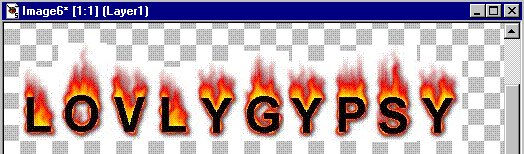
Now this is really big. I need to click the selection
tool  and draw a rectangle
around my name and single click inside the rectangle then go to
EDIT>CUT, EDIT>PASTE AS NEW IMAGE. Now I can close out the
transparent file. Now I want to resize it so I'll go to IMAGE>RESIZE
now here you have to do the size that looks right to you. If you don't
like it after you have resized it just go to EDIT>UNDO. Now after I
have resized I could leave it the way it is and save it and it would
look like this... and draw a rectangle
around my name and single click inside the rectangle then go to
EDIT>CUT, EDIT>PASTE AS NEW IMAGE. Now I can close out the
transparent file. Now I want to resize it so I'll go to IMAGE>RESIZE
now here you have to do the size that looks right to you. If you don't
like it after you have resized it just go to EDIT>UNDO. Now after I
have resized I could leave it the way it is and save it and it would
look like this...

Ok, but what If I want a nameplate. I want to add a
border and since my background color on the alphabet set is white I need
to make sure white is in my background box or the bottom box. Then I
will go to EDIT>ADD BORDERS here's the settings I used...
I checked Symmetric and put 10 in the first box and
PSP put it in all the other boxes for me then I just click ok. Then I
want to buttonize so I go to IMAGE>EFFECTS>BUTTONIZE and I used
these settings...
Height: 15
Width: 15
Opacity: 80
and I checked Transparent edge.
I saved it and this is what it looks like...

That's it. If you have any questions please just
ask...
Copyright © 2000-2001 by LovlyGypsy,
all rights reserved
| I, LovlyGypsy,
Give my permission to Ldy
Archrr aka Artists for PSP to place any and all tutorials
that I have made on her site.. this 22nd day of February 2001.
These tutorials were made solely by me and permission is mine
to give. |
|


