|
Text Effects - Stained
Glass or Confetti Text
The DOWNLOAD file contains
the following files...
Font1.ttf
Download and unzip. Then open Explorer and find the
file you unzipped to. Copy the font file or the .ttf file and go to your
Windows font file and paste it there.
Open PSP.
Create a new file using these settings...
Width: 356
Height: 126
Background color: white
Click ok. Set your foreground color to black and your
background color to white. Click the text tool  and
pick the font called Backgroundfont2, Bold, size 36, make sure the boxes
beside Antialias & Floating is checked and click ok. Go to
IMAGE>NOISE>ADD NOISE and use these settings... and
pick the font called Backgroundfont2, Bold, size 36, make sure the boxes
beside Antialias & Floating is checked and click ok. Go to
IMAGE>NOISE>ADD NOISE and use these settings...
20 % Noise
Random
Go to COLORS>ADJUST>HUE/SATURATION/LIGHTNESS
and use these settings...
Hue: 60
Saturation: 60
Lightness: 20
Go to IMAGE>OTHER>DILATE. Then go to
IMAGE>BLUR>SOFTEN.
Now it looks like this...

See the confetti. It's kinda dark so let's go to
COLORS>ADJUST>HUE/SATURATION/LIGHTNESS and use the same setting as
before. Now it looks like this...

Now go to IMAGE>OTHER>DILATE then go to
IMAGE>BLUR>SOFTEN. Go to
COLORS>ADJUST>HUE/SATURATION/LIGHTNESS and use the same setting as
before. Then go to IMAGE>OTHER>DILATE. Now go to
IMAGE>SHARPEN>SHARPEN. Now go to IMAGE>EFFECTS>CUTOUT and
use these settings...
Do not check Fill interior with color
Shadow color: Black
Opacity: 50
Blur: 10
Vertical: 5
Horizontal: 5
click ok
Now go to IMAGE>EFFECTS>CUTOUT and use these
settings...
Do not check Fill interior with color
Shadow color: Black
Opacity: 20
Blur: 10
Vertical: -5
Horizontal: -5
click ok
Now it looks like this...

Now go to IMAGE>EFFECTS>DROP SHADOW and use
these settings...
Color: Black
Opacity: 25
Blur: 2
Vertical: 5
Horizontal: 5
Click ok
Now go to SELECTIONS>SELECT NONE. Go to
IMAGE>SHARPEN>SHARPEN MORE. Ok, click the crop tool  and
crop the text like this... and
crop the text like this...
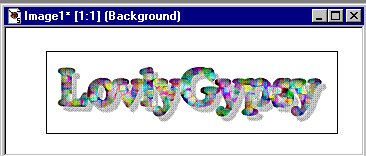
Now you can buttonize it and here's what it looks
like...

Copyright © 2000-2001 by LovlyGypsy,
all rights reserved
| I, LovlyGypsy,
Give my permission to Ldy
Archrr aka Artists for PSP to place any and all tutorials
that I have made on her site.. this 22nd day of February 2001.
These tutorials were made solely by me and permission is mine
to give. |
|


