|

How to Create a Seamless Background
.
Open PSP
Open a new file 400x400, white.
Ok, pick a foregound color that you want the background to be. I
picked a light purple.
Click the flood fill tool  .
Set your control palette like this... .
Set your control palette like this...
Fill style...Sunburst Gradient
Match mode...Hue
Tolerance...5
Opacity...100
But you can play around with those settings. Now I flood filled
the pic.
Now click the selection tool  and
make a small rectangle in the middle like this... and
make a small rectangle in the middle like this...
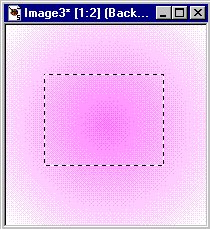
Now go to SELECTIONS>CONVERT TO SEAMLESS PATTERN and a new box
will come up with your new pattern in it. But you might get a message
that says your too close to the edge to convert, if that happens just
click on the pic outside the rectangle and make a new rectangle.
I saved mine as .jpg and it looks like this...

Or you can flood fill with a pattern and do the same thing. That's
it.
If you have any questions, please just ask...
Copyright © 2000-2001 by LovlyGypsy,
all rights reserved
| I, LovlyGypsy,
Give my permission to Ldy
Archrr aka Artists for PSP to place any and all tutorials
that I have made on her site.. this 22nd day of February 2001.
These tutorials were made solely by me and permission is mine
to give. |
|


