|

Antiquing Images
.
Right click on this image to save to your hard
drive =)

Open PSP. Open the pic named beach.jpg
Select white for your background color.
Click the Selection tool  .
Set the control palette like this... .
Set the control palette like this...
Tool Controls...
Selection type: Ellipse
Feather: 0
Do not check Antialias
Now draw an ellipse, then hold down the shift key
on the keyboard and draw some more.
Kinda like this...
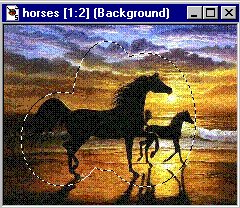
Now go to SELECTIONS>MODIFY>FEATHER by 25
pixels.
Go to IMAGE>CROP TO SELECTION.
Now it looks like this...
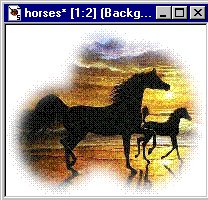
Go to COLORS>COLORIZE and use these settings...
Hue: 15
Saturation: 80
Now it looks like this...

Pretty cool huh?
If you have any questions please just ask...
Copyright © 2000-2001 by LovlyGypsy,
all rights reserved
| I, LovlyGypsy,
Give my permission to Ldy
Archrr aka Artists for PSP to place any and all tutorials
that I have made on her site.. this 22nd day of February 2001.
These tutorials were made solely by me and permission is mine
to give. |
|


