
How to remove SPLOCK
on Sony Cmd-CD5 v8.5 - v8.7
1. Make your Sony Cable
2. Connect Sony Cable to the
Phone and "ON" the PHONE
3. Run "C5Z5R.EXE" program to make "Sony.log" file
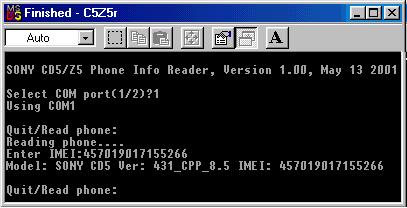
4. Now you have "Sony.log" file
5. Run program to get Code "Sony CMD-J5 Unlocker"
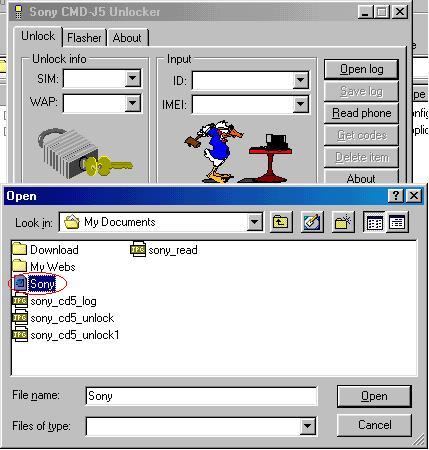
Open Log file you got before "Sony.log"
Then you will see screen screen BELOW
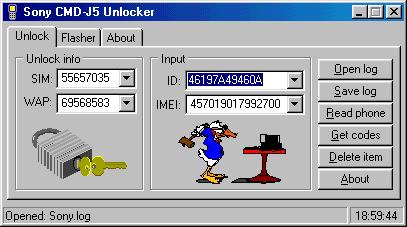
THIS IS NOT THE CORRECT CODE.
6. NOW OPEN LOG FILE THAT YOU GOT BEFORE
FIND LINE STARTING "[3. ]" AND GET LAST 12
CHARACTER OF "ID" CODE.
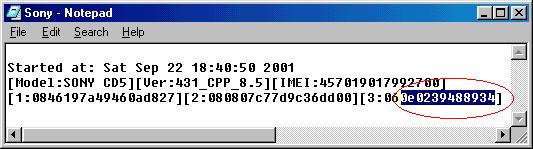
PUT THIS "ID" CODE ON THE PROGRAM "Sony CMD-J5
Unlocker". PRESS "Get Codes" Button On the program.
Program Calculates new Code to remove SP Lock.

7. YOU WILL SEE "NOT AVAILABLE" ON THE IMEI SECTION
ON THE PROGRAM AND THE CODE THAT YOU SEE IS
THE RIGHT ONE.
To remove SPLOCK on the phone
FOR THIS EXAPLE
*#7465625*12*41987066#
AFTER ENTERING THIS CODE YOU WILL SEE "OK" ON
THE PHONE SCREEN
THAT'S ALL
Thanks iceman
