Day 1:
Basic Functions
Ok, you're finally going to learn to make maps on furcadia.
First, I would like to show you a lot of things to look out for:
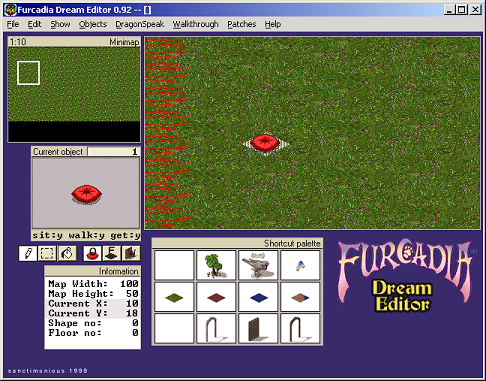
See the Current X and the Current Y? Those are things you need to
look out for. On top of that, look at the current object.
When you select a floor on the shortcut palette, it will show you
the floor number. Don't worry about that right now.
Now, click on patches and "Dream Settings" and call this map
"Tutoiral". It will be shown on furcadia below your name in blue
text.
Alright, now let's make a practice map.
TIP: With the walls, press enter to turn them
around.
Ok, let's start with a basic room. Make this:
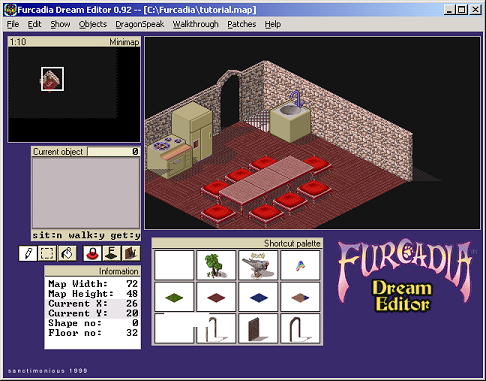
Now, when you do walkthrough, you'll end up at 10,10. We need to
fix that, so open DS. (Press "D" in map editor for shortcut.)
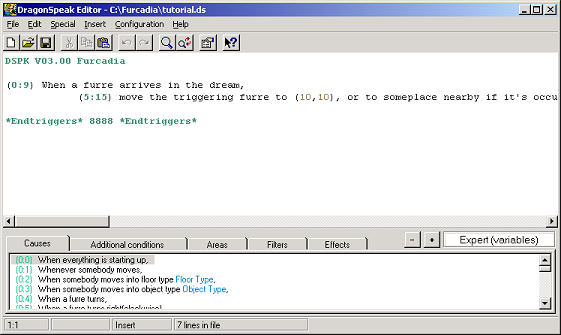
I have it on Expert(variables). You should put it there,
too. I'm not going to remind you to change it from beginner's to
the next. So, I need to go over a few things with DS.
Whenever you see a hash-mark, (#) you need to replace it with a number,
like:
(0:2) When somebody moves into floor type #,
You replace it with, say, 10.
(0:2) When somebody moves into floor type 10,
Now, DS is different from most compilers. In this one, the events
must have a cause. Additional conditions are other
conditions. If the player fails to meet the needs of the
conditions, it won't work at all. Areas and filters will have a
specific area for something to happen. It will only work with
"any furre present" or things like this:
(5:1) set the floor to type #.
(5:5) change object type # to type #.
(5:4) place object type #.
The effects, of course, will be the result of what happens. Now,
find the position of the doorway, change the 10,10 in (5:15[Effect 15])
to that position, and then open the walkthrough (or press ctrl-W) and
see if it worked.
Ok, if successful, this wraps up day 1.

