Back to:
REX MPC Tutorial
REX Lossless Tutorial
rev 1.01
WavePack
* this configuration method here does NOT work with WavePack Hybrid, see special WavePack Hybrid chapter of REX Guide here.
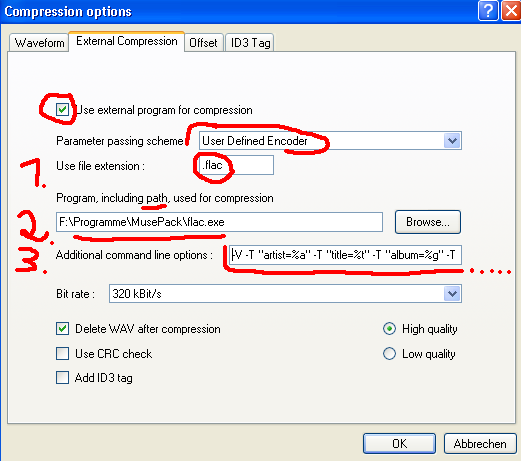
1. Use file extension: Enter .wv (instead of .flac like in picture of example)
2. Browse in your program directory for wapet.exe. (Get wapet here.) This step 2. tells EAC, where EAC can find the wapet utility (not flac.exe as in picture above).
Take care to have copied wavpack.exe to your search/windows path (e.g. C:\WINDOWS\system32 ) (alternative for experts: or specify full path for wavpack.exe in following commandline:).
3. Simply copy & paste following command line into 'Additional command line options' in that EAC window, then edit your (name) there:
%d -t "Artist=%a" -t "Title=%t" -t "Album=%g" -t "Year=%y" -t "Track=%n" -t "Genre=%m" -t "comment=REX Lossless WavePack by (your_name)" wavpack.exe -h %s
4. Click OK.
5. Save this profile as 'REX-WavePack' profile in EAC: Press 'New' and type in REX-WavePack (instead of REX FLAC as shown in picture):
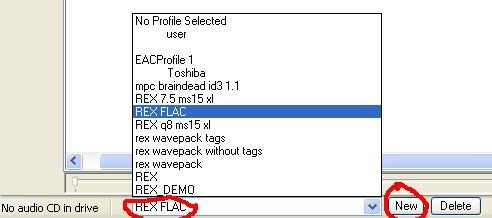
Setting up of EAC is finished. Continue with EAC - extracting an album !
Back to:
REX MPC Tutorial
REX Lossless Tutorial

