Back to:
REX MPC Tutorial
REX Lossless Tutorial
rev 1.0
FLAC
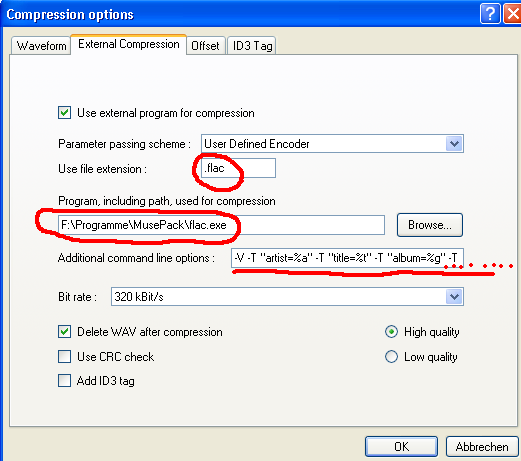
1. Use file extension: Enter .flac
2. Browse in your program directory for flac.exe. This step 2. tells EAC, where EAC can find the external flac encoder.
3. Simply copy & paste following command line into 'Additional command line options' in that EAC window, then edit your (name) there:
-V -T "artist=%a" -T "title=%t" -T "album=%g" -T "date=%y" -T "tracknumber=%n" -T "genre=%m" -T "comment=REX Lossless flac by (your_name)" %s
(Take care, to write -V as it is above in capital, as switch -V and -v in flac would do something very different. -V verifies the encoding result on the fly, and if something would have gone wrong during encoding, you would be warned.)
4. Click OK.
5. Save this profile as 'REX-FLAC' profile in EAC: Press 'New' and type in REX-FLAC:
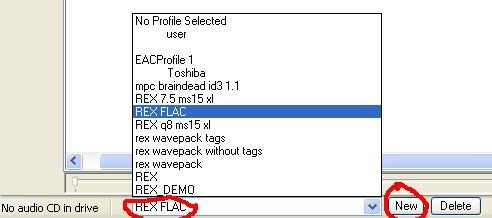
Setting up of EAC is finished. Continue with EAC - extracting an album !
Back to:
REX MPC Tutorial
REX Lossless Tutorial

