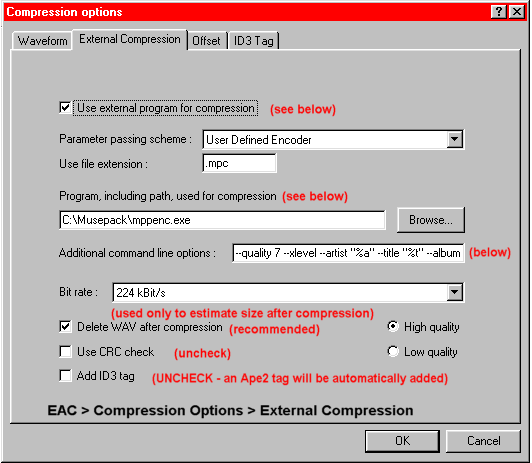
Use external program for compression: Checking this box will tell EAC to start the mpc compressor in the background after each song is extracted. It is by far the easiest way to go. If you wish to just extract to .wav and do your encoding later, then uncheck the box.
Parameter passing scheme: Leave at "User Defined Encoder"
Program, including path, used for compression: This is where EAC will look for mppenc.exe, the mpc compression program. If you have followed this guide, you have installed the program in this directory. If you wish to have your own organization, browse to the location of mppenc.exe
Additional command line options: These are the instructions that EAC will pass along to the encoder and define the encoding quality and the content of the various fields in the Ape2 tag.
Of course, feel free to edit the comment section of the tag to perhaps include your nick or any other information you want to save. To edit, replace the content between the " ".
The complete command line is:
--quality 7 --xlevel --artist "%a" --title "%t" --album "%g" --year "%y" --track "%n" --genre "%m" --comment "REX quality rip by (nickname)" %s
A complete discussion of the mpc options is beyond the scope of this guide, but to be REX means that --quality is AT LEAST 7 and --xlevel is included. --quality 7 will give you transparent encodes, which is the goal of REX.
Read here more about possible REX quality settings.

